AngularJS 四大常用指令详解:ng-app、ng-init、ng-model、ng-repeat
編輯:JavaScript綜合知識
AngularJS 用來擴充 HTML 的方式是指令(directive)——它們都是帶有 ng- 前綴的特殊屬性。本文整理四個最常打交道的指令,並用一個完整範例把它們串起來。
ng-app:啟動應用
這個指令用來啟動 AngularJS 應用並定義根元素。當頁面載入時,框架會自動初始化帶有 ng-app 的那棵子樹,也可以用來載入各種 AngularJS 模組。
<div ng-app="">
  ...
</div>
ng-init:初始化資料
把應用需要用到的初始值放進變數裡。下面用 JSON 語法建立一個國家陣列:
<div ng-app="" ng-init="countries=[{locale:'en-US',name:'United States'}, {locale:'en-GB',name:'United Kingdom'}, {locale:'en-FR',name:'France'}]">
  ...
</div>
ng-model:定義模型變數
<div ng-app="">
  ...
  <p>Enter your Name: <input type="text" ng-model="name"></p>
</div>
ng-repeat:遍歷集合
把集合中的每一項各渲染成一份 HTML,是處理清單資料最方便的工具。
<p>List of Countries with locale:</p>
<ol>
  <li ng-repeat="country in countries">
    {{ 'Country: ' + country.name + ', Locale: ' + country.locale }}
  </li>
</ol>
完整範例
建立 testAngularJS.html,一次用到上述全部指令:
<html>
<title>AngularJS Directives</title>
<body>
<h1>Sample Application</h1>
<div ng-app="" ng-init="countries=[{locale:'en-US',name:'United States'}, {locale:'en-GB',name:'United Kingdom'}, {locale:'en-FR',name:'France'}]">
  <p>Enter your Name: <input type="text" ng-model="name"></p>
  <p>Hello <span ng-bind="name"</span>!</p>
  <p>List of Countries with locale:</p>
  <ol>
    <li ng-repeat="country in countries">
      {{ 'Country: ' + country.name + ', Locale: ' + country.locale }}
    </li>
  </ol>
</div>
<script src="https://ajax.googleapis.com/ajax/libs/angularjs/1.2.15/angular.min.js"</script>
</body>
</html>
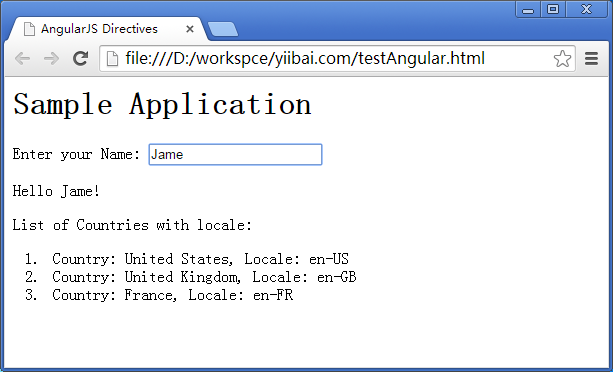
執行結果
用瀏覽器打開頁面,在輸入框打字,問候語即時更新,下方也列出三個國家與其 locale。