AngularJS 表達式詳解:數字、字串、物件與陣列該怎麼寫
編輯:JavaScript綜合知識
表達式是 AngularJS 把應用程式資料綁定到 HTML 上的主要手段。它們寫在雙大括號裡,例如 {{表達式}},行為與 ng-bind 指令一致;本質上就是純 JavaScript 表達式,會把運算結果輸出到所在的位置。
用數字做運算
<p>Expense on Books : {{cost * quantity}} Rs</p>拼接字串
<p>Hello {{student.firstname + " " + student.lastname}}!</p>讀取物件屬性
<p>Roll No: {{student.rollno}}</p>取出陣列元素
<p>Marks(Math): {{marks[3]}}</p>完整範例
建立 testAngularJS.html,把上述四種用法一次展示:
<html>
<title>AngularJS Expressions</title>
<body>
<h1>Sample Application</h1>
<div ng-app="" ng-init="quantity=1;cost=30; student={firstname:'Mahesh',lastname:'Parashar',rollno:101};marks=[80,90,75,73,60]">
  <p>Hello {{student.firstname + " " + student.lastname}}!</p>
  <p>Expense on Books : {{cost * quantity}} Rs</p>
  <p>Roll No: {{student.rollno}}</p>
  <p>Marks(Math): {{marks[3]}}</p>
</div>
<script src="https://ajax.googleapis.com/ajax/libs/angularjs/1.2.15/angular.min.js"</script>
</body>
</html>
這裡的初始值全部塞在 ng-init 裡,用分號隔開多個宣告,物件與陣列都用 JavaScript 字面語法直接寫出。
執行結果
用瀏覽器打開頁面,你會看到姓名被拼接輸出、書本花費完成乘法運算、學號與數學成績分別被取出顯示。
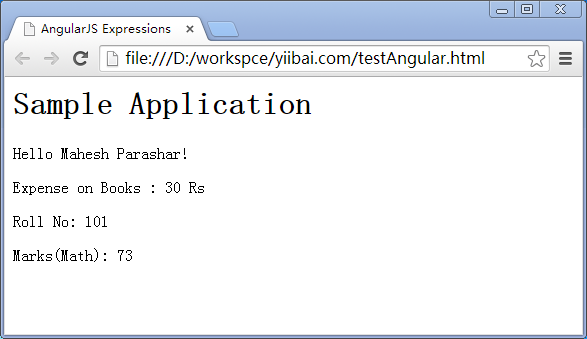
一個實務提醒
表達式雖然方便,但不適合承載複雜邏輯。若運算式開始變長、需要條件判斷或多層巢狀,更合適的做法是把結果先在控制器中算好,畫面只負責顯示。另外要留意 {{ }} 會在 AngularJS 完成編譯前短暫露出原始語法,正式環境可搭配 ng-bind 或 ng-cloak 避免閃屏。
- 上一篇文章: AngularJS 四大常用指令详解:ng-app、ng-init、ng-model、ng-repeat
- 下一篇文章: AngularJS 控制器入門:用 ng-controller 管理資料流向