AngularJS 控制器入門:用 ng-controller 管理資料流向
編輯:JavaScript綜合知識
AngularJS 應用主要依賴控制器來控制資料在應用程式中的流動。控制器透過 ng-controller 指令宣告,本質上是一個帶有屬性與方法的 JavaScript 函式;每個控制器都接受 $scope 參數,用來指定它所管理的應用範圍。
在 HTML 中掛上控制器
<div ng-app="" ng-controller="studentController">
  ...
</div>
接著定義 studentController
<script>
function studentController($scope) {
  $scope.student = {
    firstName: "yiibai",
    lastName: "com",
    fullName: function () {
      var studentObject;
      studentObject = $scope.student;
      return studentObject.firstName + " " + studentObject.lastName;
    }
  };
}
</script>
逐行拆解這個結構:
$scope是函式的參數,代表這段控制器所掌管的應用範圍。$scope.student是掛在 scope 上的屬性,也就是一個學生物件。firstName與lastName是該物件的兩個屬性,這裡給了預設值。fullName是該物件上的方法,任務是把名字與姓氏組合成完整姓名並回傳。
實務上,控制器也可以寫在獨立的 JS 檔案裡,再用 script 標籤引入頁面,讓 HTML 保持乾淨。
在畫面上使用控制器
可以用 ng-model 或表達式來讀寫這些屬性:
Enter first name: <input type="text" ng-model="student.firstName"><br>
Enter last name: <input type="text" ng-model="student.lastName"><br>
<br>
You are entering: {{student.fullName()}}
兩個輸入框分別對應 student.firstName 與 student.lastName,並用 student.fullName() 呼叫方法。只要在其中任一欄位打字,組合出的完整姓名就會自動跟著更新,完全不需要手動監聽輸入事件。
完整範例
建立 testAngularJS.html:
<html>
<head>
<title>Angular JS Controller</title>
</head>
<body>
<h2>AngularJS Sample Application</h2>
<div ng-app="" ng-controller="studentController">
  Enter first name: <input type="text" ng-model="student.firstName"><br><br>
  Enter last name: <input type="text" ng-model="student.lastName"><br><br>
  You are entering: {{student.fullName()}}
</div>
<script>
function studentController($scope) {
  $scope.student = {
    firstName: "Mahesh",
    lastName: "Parashar",
    fullName: function () {
      var studentObject;
      studentObject = $scope.student;
      return studentObject.firstName + " " + studentObject.lastName;
    }
  };
}
</script>
<script src="https://ajax.googleapis.com/ajax/libs/angularjs/1.2.15/angular.min.js"</script>
</body>
</html>
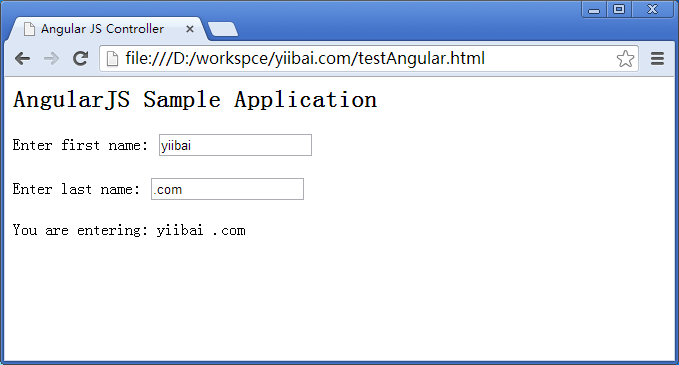
執行結果
用瀏覽器打開頁面,在兩個輸入框中切換內容,下方文字即時反映最新的組合結果。
- 上一篇文章: AngularJS 表達式詳解:數字、字串、物件與陣列該怎麼寫
- 下一篇文章: AngularJS 過濾器詳解:大小寫、貨幣、搜尋與排序