AngularJS 過濾器詳解:大小寫、貨幣、搜尋與排序
編輯:JavaScript綜合知識
過濾器(filter)是 AngularJS 中用來加工資料的功能,寫法是在表達式或指令後面加上管道符號。以下是幾個最常用的內建過濾器。
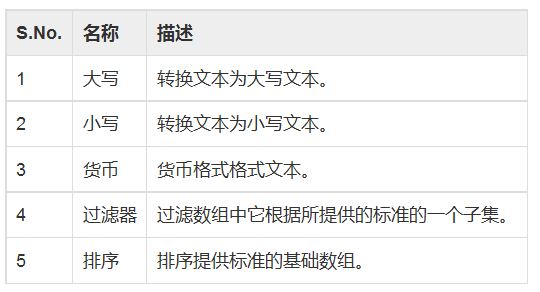
lowercase:轉小寫
在表達式後接上管道符與過濾器名稱,就能把結果轉成小寫:
Enter first name: <input type="text" ng-model="student.firstName">
Enter last name: <input type="text" ng-model="student.lastName">
Name in Upper Case: {{student.fullName() | lowercase}}相對地,uppercase 會轉成全大寫。
currency:貨幣格式化
Enter fees: <input type="text" ng-model="student.fees">
fees: {{student.fees | currency}}
它會依照區域設定加上貨幣符號與小數位數,讓金額更易讀。
filter:依關鍵字篩選
只要把輸入框的模型當作過濾器的參數,清單就會即時縮減到符合條件的項目:
Enter subject: <input type="text" ng-model="subjectName">
Subject:
<ul>
  <li ng-repeat="subject in student.subjects | filter: subjectName">
    {{ subject.name + ', marks:' + subject.marks }}
  </li>
</ul>
orderBy:排序
Subject:
<ul>
  <li ng-repeat="subject in student.subjects | orderBy:'marks'">
    {{ subject.name + ', marks:' + subject.marks }}
  </li>
</ul>
在屬性名前加上 -(例如 orderBy:'-marks')即可改成遞減排序。過濾器也可以串接,先篩選再排序:filter: subjectName | orderBy: 'marks'。
完整範例
建立 testAngularJS.html:
<html>
<head>
<title>Angular JS Filters</title>
</head>
<body>
<h2>AngularJS Sample Application</h2>
<div ng-app="" ng-controller="studentController">
<table border="0">
  <tr><td>Enter first name:</td><td><input type="text" ng-model="student.firstName"></td></tr>
  <tr><td>Enter last name: </td><td><input type="text" ng-model="student.lastName"></td></tr>
  <tr><td>Enter fees: </td><td><input type="text" ng-model="student.fees"></td></tr>
  <tr><td>Enter subject: </td><td><input type="text" ng-model="subjectName"></td></tr>
</table>
<br/>
<table border="0">
  <tr><td>Name in Upper Case: </td><td>{{student.fullName() | uppercase}}</td></tr>
  <tr><td>Name in Lower Case: </td><td>{{student.fullName() | lowercase}}</td></tr>
  <tr><td>fees: </td><td>{{student.fees | currency}}</td></tr>
  <tr><td>Subject:</td><td>
    <ul>
      <li ng-repeat="subject in student.subjects | filter: subjectName | orderBy:'marks'">
        {{ subject.name + ', marks:' + subject.marks }}
      </li>
    </ul>
  </td></tr>
</table>
</div>
<script>
function studentController($scope) {
  $scope.student = {
    firstName: "Mahesh",
    lastName: "Parashar",
    fees: 500,
    subjects: [
      {name:'Physics', marks:70},
      {name:'Chemistry', marks:80},
      {name:'Math', marks:65}
    ],
    fullName: function () {
      var studentObject;
      studentObject = $scope.student;
      return studentObject.firstName + " " + studentObject.lastName;
    }
  };
}
</script>
<script src="https://ajax.googleapis.com/ajax/libs/angularjs/1.2.15/angular.min.js"</script>
</body>
</html>
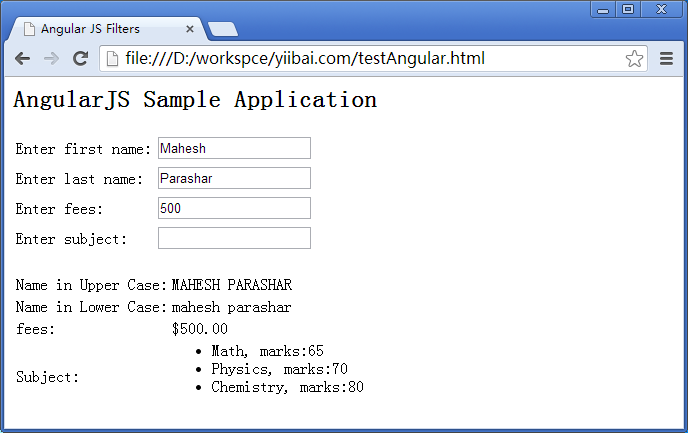
執行結果
打開頁面後,切換大小寫過濾器可看到姓名風格變化;輸入科目關鍵字會即時篩選清單;清單本身則依分數排序呈現。