準備工作
要用 Java 操作 MySQL,第一步是把 JDBC 驅動 (mysql-connector-java.jar) 放進專案的 classpath。在 Eclipse 中若少了這個 jar,程式一執行就會丟 ClassNotFoundException——這是新手最常撞到的第一面牆。
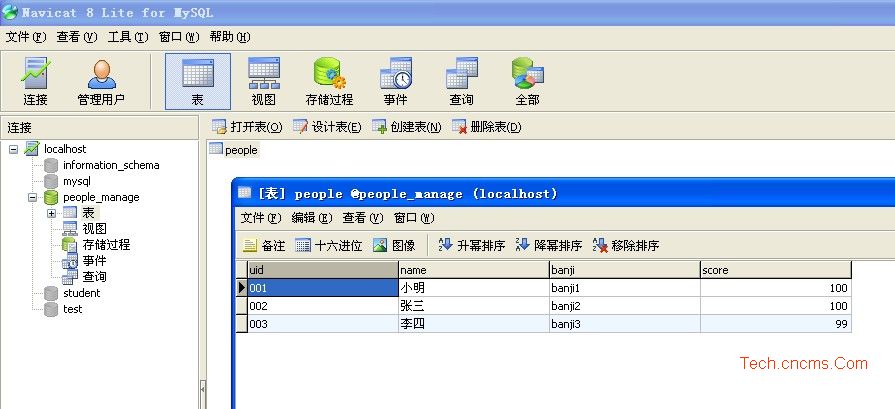
本文的資料表內容如下,示範目標是「查詢成績為 100 分的人員資料」,其他增刪改的功能都在程式碼裡以註解標明。
第一步:資料庫存取類別
把連線、查詢、更新、關閉都封裝進一個類別,之後要換資料庫時只需改這裡的設定。
import java.sql.*;
import java.io.*;

class database_manage {
    public Connection conn = null;
    public ResultSet rs = null;
    private String DatabaseDriver = "com.mysql.jdbc.Driver";

    // DataSource 資料來源名稱 DSN
    private String DatabaseConnStr =
        "jdbc:mysql://localhost:3306/people_manage?useUnicode=true&characterEncoding=utf8";

    public void setDatabaseDriver(String Driver) { this.DatabaseDriver = Driver; }
    public String getDatabaseDriver() { return this.DatabaseDriver; }
    public void setDatabaseConnStr(String ConnStr) { this.DatabaseConnStr = ConnStr; }
    public String getDatabaseConnStr() { return this.DatabaseConnStr; }

    public database_manage() {          // 建構子:載入驅動
        try {
            Class.forName(DatabaseDriver);
        } catch (java.lang.ClassNotFoundException e) {
            System.err.println("載入驅動器有錯誤: " + e.getMessage());
            System.out.print("載入驅動有錯誤: " + e.getMessage());
        }
    }

    public ResultSet query(String sql) {        // 查詢資料庫
        rs = null;
        try {
            conn = DriverManager.getConnection(
                "jdbc:mysql://localhost:3306/people_manage?useUnicode=true&characterEncoding=utf8",
                "root", "root");
            Statement stmt = conn.createStatement();
            rs = stmt.executeQuery(sql);
        } catch (SQLException ex) {
            System.err.println("執行查詢有錯誤: " + ex.getMessage());
        }
        return rs;
    }

    public int update_database(String sql) {    // 更新或插入資料庫
        int num = 0;
        try {
            conn = DriverManager.getConnection(
                "jdbc:mysql://localhost:3306/people_manage?useUnicode=true&characterEncoding=utf8",
                "root", "root");
            Statement stmt = conn.createStatement();
            num = stmt.executeUpdate(sql);
        } catch (SQLException ex) {
            System.err.println("執行更新有錯誤: " + ex.getMessage());
        }
        CloseDataBase();
        return num;
    }

    public void CloseDataBase() {               // 關閉資料庫
        try {
            conn.close();
        } catch (Exception end) {
            System.err.println("關閉 Connection 物件有錯誤: " + end.getMessage());
        }
    }
}
連線字串上的 useUnicode=true&characterEncoding=utf8 是必要參數,少了它中文會變成亂碼。
第二步:資料傳輸物件
用一個 POJO 代表一筆學生紀錄,並提供多個建構子方便使用:
class people {
    private String uid;
    private String name;
    private String banji;
    private int score;

    public people() { }

    public people(String uid, String name, String banji) {
        this.uid = uid;
        this.name = name;
        this.banji = banji;
    }

    public people(String uid, String name, String banji, int score) {
        this.uid = uid;
        this.name = name;
        this.banji = banji;
        this.score = score;
    }

    public String getUid() { return uid; }
    public void setUid(String uid) { this.uid = uid; }
    public String getName() { return name; }
    public void setName(String name) { this.name = name; }
    public String getBanji() { return banji; }
    public void setBanji(String banji) { this.banji = banji; }
    public int getScore() { return score; }
    public void setScore(int score) { this.score = score; }
}
第三步:業務邏輯層
public class manage {

    private people[] people_array1;      // 物件陣列

    public void add_people(String uid, String name) {
        String sql = "insert people (uid,name) values ('" + uid + "','" + name + "')";
        database_manage db_obj = new database_manage();
        db_obj.update_database(sql);
    }

    public void update_people(String uid, String name) {
        String sql = "update people set name='" + name + "' where uid='" + uid + "'";
        database_manage db_obj = new database_manage();
        db_obj.update_database(sql);
    }

    public void delete_people(String uid) {
        String sql = "delete from people where uid='" + uid + "'";
        database_manage db_obj = new database_manage();
        db_obj.update_database(sql);
    }

    public people query_people(String uid) {
        database_manage db_obj = new database_manage();
        String uid_new, name, banji;
        uid_new = null; name = null; banji = null;
        String sql_query = "select * from people where uid='" + uid + "'";
        try {
            ResultSet rs = db_obj.query(sql_query);
            if (rs.next()) {
                uid_new = rs.getString("uid");
                name    = rs.getString("name");
                banji   = rs.getString("banji");
            }
        } catch (Exception e) {
            e.getMessage();
        }
        return new people(uid_new, name, banji);
    }

    public people[] query_people_byscore(int score) {
        database_manage db_obj = new database_manage();
        String uid_new, name, banji;
        int score_new = 0;
        String sql_query = "select * from people where score=" + score;

        try {
            ResultSet rs = db_obj.query(sql_query);      // 查詢後取回結果集
            int num = 0;
            ResultSet rs_new = rs;
            while (rs_new.next()) { num++; }             // 先統計筆數

            people_array1 = new people[num];

            int i = 0;
            rs.beforeFirst();                            // 游標回到起始位置
            while (rs.next()) {
                uid_new   = rs.getString("uid");
                name      = rs.getString("name");
                banji     = rs.getString("banji");
                score_new = rs.getInt("score");
                people_array1[i] = new people(uid_new, name, banji, score_new);
                i++;
            }
        } catch (Exception e) {
            e.getMessage();
        }
        return people_array1;
    }

    public static void main(String args[]) {
        /*
         * people new_people = new people();
         * manage mr = new manage();
         * mr.add_people("000", "小明");                     // 新增
         * new_people = mr.query_people("001");              // 查詢 uid=001
         * mr.update_people("004", "小王");                  // 更新
         * mr.delete_people("001");                          // 刪除
         */

        manage mr = new manage();
        people[] people_array;                                // 宣告物件陣列
        people_array = mr.query_people_byscore(100);          // 取回成績 100 分者

        int num = people_array.length;
        for (int i = 0; i < num; i++) {
            System.out.println(people_array[i].getUid() + " "
                             + people_array[i].getName() + " "
                             + people_array[i].getBanji() + " "
                             + people_array[i].getScore());
        }
    }
}
執行結果如下:

這份程式碼在今天不能照抄的地方
上面這套寫法結構清楚,適合入門理解 JDBC 的四個基本動作,但有幾個 serious 的問題在真實專案中必須改掉。
SQL 注入。把變數直接拼進 SQL 字串,只要使用者輸入 ' or '1'='1 就能繞過條件。正確做法是用 PreparedStatement 搭配佔位符:
PreparedStatement ps = conn.prepareStatement(
    "select * from people where uid = ?");
ps.setString(1, uid);
ResultSet rs = ps.executeQuery();
這不只是安全問題,也能避免引號、單引號造成語法錯誤,同時讓資料庫重用執行計畫、效能更好。
資源沒有關閉。ResultSet、Statement、Connection 都應該在 finally 區塊或 try-with-resources 中關掉,否則連線會耗盡。範例中的 query() 甚至完全沒有關閉連線。
驅動類名已變更。com.mysql.jdbc.Driver 在新版 Connector/J 中已改為 com.mysql.cj.jdbc.Driver,而且 JDBC 4.0 之後有 SPI 機制,通常連 Class.forName 都可以省略。
密碼不該寫死在原始碼裡。應移到環境變數或設定檔,並排除於版本控制之外。
把這幾點補上,這份範例就能從「教學用」升級成「專案可用」。
- 上一篇文章: 把「取得網址 GET 參數」封裝成 jQuery 擴充方法
- 下一篇文章: LigerUI 搭配 jQuery 實作檔案上傳功能