JS+CSS模擬無刷新顯示內容的留言板實例
編輯:JavaScript綜合知識
本文用原生JavaScript配合CSS,模擬一個可以在頁面內即時顯示、無需刷新的留言板。它涉及DOM元素的動態創建、鼠標事件綁定與樣式操作,是一個不錯的DOM練習。
完整程式碼如下:
<!DOCTYPE html PUBLIC "-//W3C//DTD XHTML 1.0 Transitional//EN"
  "https://www.w3.org/TR/xhtml1/DTD/xhtml1-transitional.dtd">
<html xmlns="https://www.w3.org/1999/xhtml">
<head>
<title>JS+CSS模擬可以無刷新顯示內容的留言板功能</title>
<style type="text/css">
* { padding: 0; margin: 0; }
li { list-style: none; }
#parent { width: 600px; margin: 0 auto; }
h4 { line-height: 40px; margin-bottom: 10px; border-bottom: 1px solid #333; color:#FF3300 }
p { width: 100%; background: #f1f1f1; position: relative; margin-bottom: 25px; }
#box { width: 580px; padding: 25px 10px 0; border: 1px solid #ddd; margin-bottom: 10px; }
span { position: absolute; top: -20px; right: 0px; }
em { position: relative; top: -13px; }
#text { width: 100%; height: 90px; overflow: auto; }
#btn { width: 20%; height: 50px; }
</style>
<script type="text/javascript">
i = 1;
function fnsubmit() {
  var odiv = document.getElementById("box");
  var oem = odiv.getElementsByTagName("em")[0];
  var otext = document.getElementById("text");
  var oli = odiv.getElementsByTagName("li");
  var add_li = document.createElement("li");
  var o_span = document.createElement("span");
  if(otext.value == "") {
    alert("請填寫留言內容!");
    return;
  }
  oem.style.display = "none";
  o_span.style.position = "absolute";
  o_span.style.top = "-20px";
  o_span.style.right = "20px";
  o_span.style.background = "#cccccc";
  add_li.style.position = "relative";
  add_li.index = i;
  add_li.style.background = "#cccccc";
  add_li.style.marginBottom = "20px";
  var str = document.createTextNode(i + "、" + otext.value);
  var strspan = document.createTextNode("確定刪除" + i + "、" + otext.value + "內容?");
  add_li.appendChild(o_span);
  o_span.style.display = "none";
  o_span.appendChild(strspan);
  add_li.appendChild(str);
  odiv.appendChild(add_li);
  i++;
  for(j = 0; j < oli.length; j++) {
    var m = j;
    oli[j].onmouseover = function() {
      this.style.background = "#ffff00";
      (this.childNodes(o_span)).style.display = "block";
    };
    oli[j].onmouseout = function() {
      this.style.background = "#cccccc";
      (this.childNodes(o_span)).style.display = "none";
    };
    oli[j].onclick = function() {
      m--;
      odiv.removeChild(this);
      if(m < 0) {
        oem.style.display = "block";
      }
    };
  }
}
</script>
</head>
<body>
<div id="parent">
  <h4>留言內容:</h4>
  <div id="box"><em>這裡會顯示留言內容……</em></div>
  <input type="text" id="text"><br />
  <input id="btn" type="button" onclick="fnsubmit()" value="發表留言" />
</div>
<br />
</body>
</html>
實現要點在fnsubmit函數:先判斷輸入框是否為空,為空則提示;不為空時用createElement動態創建li和span節點,把留言文字塞進li,同時在span裡放一個「確定刪除」的提示,然後append到留言容器;接著為每條留言綁定onmouseover(滑過變色並顯示刪除提示)、onmouseout(恢復樣式並隱藏提示)與onclick(點擊刪除該條留言)。透過add_li.index記錄序號,讓留言帶有編號,整體操作全部在頁面內完成,實現了無刷新的即時交互。
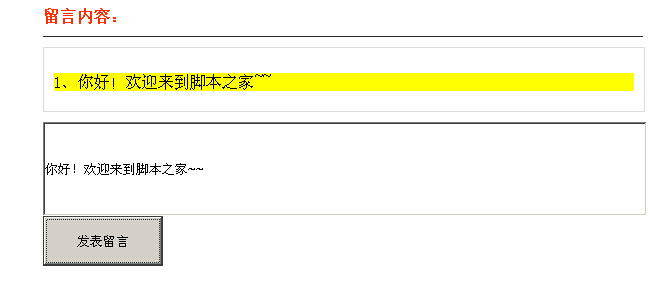
運行效果如下圖所示:
- 上一篇文章: JavaScript跨瀏覽器獲取相同class節點的方法詳解
- 下一篇文章: Node.js學習筆記之簡介、安裝與配置