最近參與一個富媒體專案,需要上傳影片。需求列下來其實很清楚:非同步上傳、有進度條、伺服器要回傳狀態碼、影片連結,還要一張縮圖。另外我還希望 <input type="file"> 不要被 <form> 包住——一方面表單不能巢狀,另一方面 <form> 在各瀏覽器還殘留一點預設樣式,包下去又得多寫幾行 CSS 補救。
伺服器預計回傳的結構是這樣:
{ "thumbnail": "/slsxpt//upload/thumbnail/fdceefc.jpg", "success": true, "link": "/slsxpt//upload/video/fdceefc.mp" }
繞過的幾條冤枉路
以前用過 ajaxFileUpload 做非同步上傳,但那東西很久沒維護、程式碼裡還帶著 bug,最後雖然勉強跑通,總覺得不踏實,而且它沒有直接支援 XHR2 的 progress 事件,接起來格外麻煩。
上網找資料時看到一種常見做法:把上傳進度寫進 Session,再讓前端輪詢伺服器讀取。但我對這個方案有疑慮——它量到的其實是「伺服器應用程式把檔案從暫存目錄複製到目標位置」的進度。因為所有請求都會先經過 Servlet 容器(Tomcat)封裝 session、request 等物件,檔案實際上也是由它接收的;也就是說,等到我的 Action 程式碼開始執行時,檔案早就上傳完了。這樣做出來的進度條,前 99% 的時間都會卡在 0%。
後來找到 jquery.form.js 外掛的 ajaxSubmit() 方法。它同樣以表單為送出單位,寫法是 $(form selector).ajaxSubmit({}),好處是外掛已經幫你處理好 XHR2 的 progress 事件,呼叫時傳一個 uploadProgress 函式進去就能拿到進度。而且就算不想用 <form> 包,程式碼裡 createElement 一下也能解決。可惜我當時犯了個小錯,最後沒成功,頗為可惜。
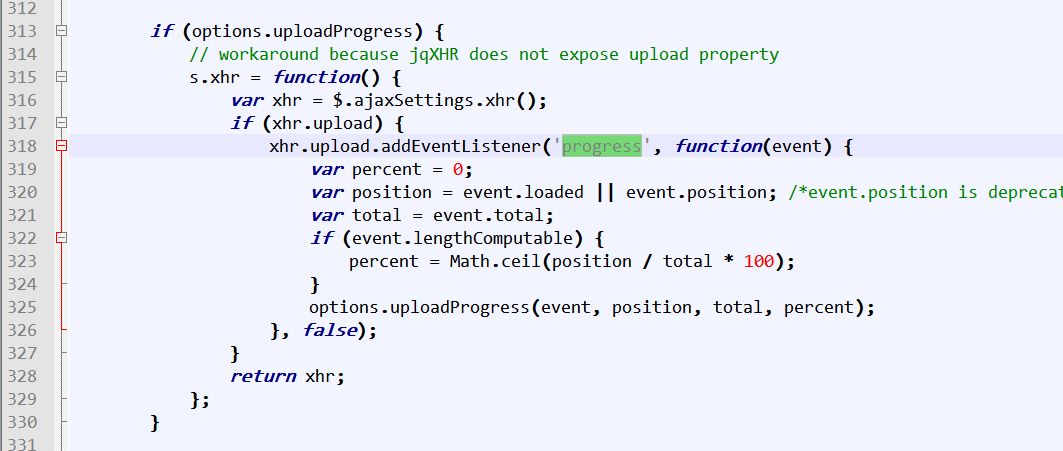
最終還是回到 $.ajax()。它不需要關聯表單,寫起來有點像靜態方法。唯一的遺憾是 options 裡沒有現成的 progress 鉤子——但它提供了一個 xhr 參數,讓你能自訂 XHR 物件,那就可以自己掛上 progress 事件監聽了。對照著 ajaxSubmit 裡的處理方式看一遍,頓時豁然開朗。
把它包成外掛
為了把 DOM 操作從上傳業務邏輯裡抽掉,我決定寫成一個 jQuery 外掛:
;(function ($) { var defaults = { uploadProgress : null, beforeSend : null, success : null, }, setting = { }; var upload = function($this){ $this.parent().on('change',$this,function(event){ var formData = new FormData(), target = event.target || event.srcElement; formData.append('file',target.files[]); settings.fileType && formData.append('fileType',settings.fileType); $.ajax({ url : $this.data('url'), type : "POST", data : formData, dataType : 'json', processData : false, contentType : false, cache : false, beforeSend : function(){ if(settings.beforeSend){ settings.beforeSend(); } }, xhr : function() { var xhr = $.ajaxSettings.xhr(); if(xhr.upload){ xhr.upload.addEventListener('progress',function(event){ var total = event.total, position = event.loaded || event.position, percent = ; if(event.lengthComputable){ percent = Math.ceil(position / total * ); } if(settings.uploadProgress){ settings.uploadProgress(event, position, total, percent); } }, false); } return xhr; }, success : function(data,status,jXhr){ if(settings.success){ settings.success(data); } }, error : function(jXhr,status,error){ if(settings.error){ settings.error(jXhr,status,error); } } }); }); }; $.fn.uploadFile = function (options) { settings = $.extend({}, defaults, options); return this.each(function(){ upload($(this)); }); } })($ || jQuery);
在頁面裡使用
<div class="col-sm-"> <input type="text" name="resource_url" id="resource_url" hidden="hidden"/> <div class="progress" style='display: none;'> <div class="progress-bar progress-bar-success uploadVideoProgress" role="progressbar" aria-valuenow="" aria-valuemin="" aria-valuemax="" style="width: %"> </div> </div> <input type="file" class="form-control file inline btn btn-primary uploadInput uploadVideo" accept="video/mp" data-url="${baseUrl}/upload-video.action" data-label="<i class='glyphicon glyphicon-circle-arrow-up'></i> 選擇文件" /> <script> (function($){ $(document).ready(function(){ var $progress = $('.uploadVideoProgress'); $('input.uploadInput.uploadVideo').uploadFile({ beforeSend : function(){ $progress.parent().show(); }, uploadProgress : function(event, position, total, percent){ $progress.attr('aria-valuenow',percent); $progress.width(percent+'%'); if(percent >= ){ $progress.parent().hide(); $progress.attr('aria-valuenow',); $progress.width(+'%'); } }, success : function(data){ if(data.success){ setTimeout(function(){ $('#thumbnail').attr('src',data.thumbnail); },); } } }); }); })(jQuery); </script> </div>
這裡在 success 裡刻意延遲 800 毫秒才去載入縮圖,因為提取縮圖是另一個程序在做,請求回來時縮圖可能還沒產生出來。

伺服器端:存檔並提取縮圖
package org.lyh.app.actions; import org.apache.commons.io.FileUtils; import org.lyh.app.base.BaseAction; import org.lyh.library.SiteHelpers; import org.lyh.library.VideoUtils; import java.io.File; import java.io.IOException; import java.util.HashMap; import java.util.Map; public class UploadAction extends BaseAction{ private String saveBasePath; private String imagePath; private String videoPath; private String audioPath; private String thumbnailPath; private File file; private String fileFileName; private String fileContentType; public String video() { Map<String, Object> dataJson = new HashMap<String, Object>(); String fileExtend = fileFileName.substring(fileFileName.lastIndexOf(".")); String newFileName = SiteHelpers.md(fileFileName + file.getTotalSpace()); String typeDir = "normal"; String thumbnailName = null,thumbnailFile = null; boolean needThumb = false,extractOk = false; if (fileContentType.contains("video")) { typeDir = videoPath; needThumb = true; thumbnailName = newFileName + ".jpg"; thumbnailFile = app.getRealPath(saveBasePath + thumbnailPath) + "/" + thumbnailName; } String realPath = app.getRealPath(saveBasePath + typeDir); File saveFile = new File(realPath, newFileName + fileExtend); if (!saveFile.exists()) { if (!saveFile.getParentFile().exists()) { saveFile.getParentFile().mkdirs(); } try { FileUtils.copyFile(file, saveFile); if(needThumb){ extractOk = VideoUtils.extractThumbnail(saveFile, thumbnailFile); } dataJson.put("success", true); } catch (IOException e) { dataJson.put("success", false); } }else{ dataJson.put("success", true); } if((Boolean)dataJson.get("success")){ dataJson.put("link", app.getContextPath() + "/" + saveBasePath + typeDir + "/" + newFileName + fileExtend); if(needThumb){ dataJson.put("thumbnail", app.getContextPath() + "/" + saveBasePath + thumbnailPath + "/" + thumbnailName); } } this.responceJson(dataJson); return NONE; } }
Action 組態:
<action name="upload-*" class="uploadAction" method="{}"> <param name="saveBasePath">/upload</param> <param name="imagePath">/images</param> <param name="videoPath">/video</param> <param name="audioPath">/audio</param> <param name="thumbnailPath">/thumbnail</param> </action>
這裡有個小設計:檔名加上檔案大小做 MD5 當成新檔名。我認為若兩個檔案的名稱與大小完全相同,它們是同一個檔案的機率相當高,如此可以順便避免重複上傳同一支影片。
靠 FFmpeg 提取縮圖
轉碼與截圖都交給 FFmpeg,需要的話可以到官方網站下載。
package org.lyh.library; import java.io.File; import java.io.IOException; import java.util.ArrayList; import java.util.List; public class VideoUtils { public static final String FFMPEG_EXECUTOR = "C:/Software/ffmpeg.exe"; public static final int THUMBNAIL_WIDTH = ; public static final int THUMBNAIL_HEIGHT = ; public static boolean extractThumbnail(File inputFile,String thumbnailOutput){ List<String> command = new ArrayList<String>(); File ffmpegExe = new File(FFMPEG_EXECUTOR); if(!ffmpegExe.exists()){ return false; } command.add(ffmpegExe.getAbsolutePath()); command.add("-i"); command.add(inputFile.getAbsolutePath()); command.add("-y"); command.add("-f"); command.add("image"); command.add("-ss"); command.add(""); command.add("-t"); command.add("."); command.add("-s"); command.add(THUMBNAIL_WIDTH+"*"+THUMBNAIL_HEIGHT); command.add(thumbnailOutput); ProcessBuilder builder = new ProcessBuilder(); builder.command(command); builder.redirectErrorStream(true); try { long startTime = System.currentTimeMillis(); Process process = builder.start(); return true; } catch (IOException e) { e.printStackTrace(); return false; } } }
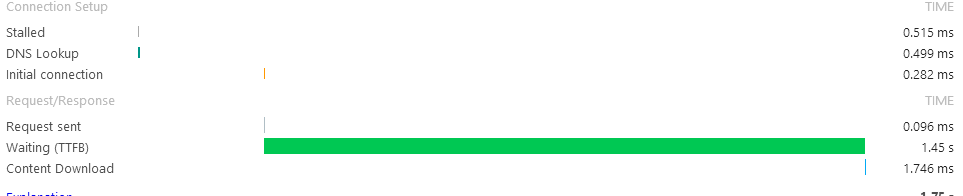
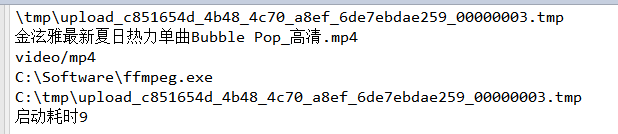
這裡由 Java 啟動另一個行程去跑 ffmpeg.exe。我的判斷是兩者互不相干:Java 啟動之後就回來繼續往下執行,所以不必另外開一條 Thread 去提取縮圖。實測耗時也不長,同一支檔案上傳兩次的總時間差異不大。
第一次:

第二次:
就使用者體驗而言,差別不明顯。
別忘了放寬上傳大小限制
要上傳較大的檔案,Tomcat 與 Struts 兩邊都得調。修改 Tomcat 的 conf/server.xml,為 Connector 節點加上 maxPostSize="0" 表示不限制上傳大小;另外在 struts.xml 補上對應的設定,數值單位是位元組。
三個必須補上的安全提醒
這個版本能跑,但直接上線風險不低:
- 副檔名是從使用者端傳來的,
fileContentType同樣可偽造。上傳目錄若不對外執行、或改用白名單判定檔型,攻擊者上傳一個.jsp就能取得遠端執行權。 - ProcessBuilder 的參數目前是陣列形式,這點是對的(避免 shell 注入),但
FFMPEG_EXECUTOR寫死本座機路徑,正式環境應抽成組態項。 - 上傳未完成就回 100%:因為進度條量的是瀏覽器到伺服器的傳輸,而縮圖與存檔還在後頭。若要在 UI 上反映完整流程,建議拆成「上傳中」與「處理中」兩段狀態。
- 上一篇文章: Ajax 請求碰上 Session 失效怎麼辦?攔截器搭配全域 ajaxSetup 一次解決
- 下一篇文章: Django 裡 jQuery Ajax POST 出現 403 怎麼解?談 CSRF 保護的兩種因應