上傳幾個 G 的單文件時,一次請求傳到底基本不可行:中途斷線就前功盡棄,進度條也無法準確顯示。分片上傳的解法是把文件切成固定大小的塊逐個上報,服務端追加寫入。
實現要點
關鍵 API 是 File.prototype.slice,它能按 [start, end) 截取文件的任意片段並返回 Blob。配合 XMLHttpRequest 逐片上報,再通過 upload.onprogress 累加上已傳字節數,就能得到真實的總體進度。
HTML 與樣式
<!DOCTYPE html PUBLIC "-//W3C//DTD XHTML 1.0 Strict//EN" "https://www.w3.org/TR/xhtml1/DTD/xhtml1-strict.dtd">
<html xmlns="https://www.w3.org/1999/xhtml" lang="zh-CN">
<head>
<title>分割大文件上傳</title>
<meta http-equiv="Content-Type" content="text/html; charset=utf-8" />
<style>
#test { width: 200px; height: 100px; border: 1px solid green; display: none; }
#img  { width: 50px; height: 50px; display: none; }
#upimg {
    text-align: center;
    font: 8px/10px '微軟雅黑', '黑體', sans-serif;
    width: 300px; height: 10px;
    border: 1px solid green;
}
#load { width: 0%; height: 100%; background: green; text-align: center; }
</style>
</head>
<body>
<form enctype="multipart/form-data" action="file.php" method="post">
<div id="upimg">
    <div id="load"></div>
</div>
<input type="file" name="mof" multiple="multiple"/>
<input type="button" value="uploadfile" onclick="upfile();" />
<input type="submit" value="submit" />
</form>
<div id="test">測試是否 DIV 消失</div>

<script type="text/javascript">
var xhr = new XMLHttpRequest();
var fd;
var des = document.getElementById('load');
var file;

const LENGTH = 10 * 1024 * 1024; // 每片 10MB
var start, end, blob, pecent;

function upfile() {
    start = 0;
    end = LENGTH + start;
    file = document.getElementsByName('mof')[0].files[0];
    if (!file) { alert('請選擇文件'); return; }
    up();
}

function up() {
    if (start < file.size) {
        xhr.open('POST', 'file.php', true);

        xhr.onreadystatechange = function () {
            if (this.readyState == 4) {
                if (this.status >= 200 && this.status < 300) {
                    if (this.responseText.indexOf('failed') >= 0) {
                        alert('文件發送失敗,請重新發送');
                        des.style.width = '0%';
                    } else {
                        start = end;
                        end = start + LENGTH;
                        setTimeout('up()', 1000); // 間隔 1 秒發送下一片
                    }
                }
            }
        };

        // 當前片的上傳進度,需加上已傳的 start 才是整體百分比
        xhr.upload.onprogress = function (ev) {
            if (ev.lengthComputable) {
                pecent = 100 * (ev.loaded + start) / file.size;
                if (pecent > 100) { pecent = 100; }
                des.style.width = pecent + '%';
                des.innerHTML = parseInt(pecent) + '%';
            }
        };

        blob = file.slice(start, end); // 切割核心
        fd = new FormData();
        fd.append('mof', blob);
        fd.append('test', file.name);  // 用自定義字段傳文件名,避免被覆蓋
        xhr.send(fd);
    }
}
</script>
</body>
</html>
服務端(file.php)
<?php
$file = $_FILES['mof'];
$type = trim(strrchr($_POST['test'], '.'), '.');

if ($file['error'] == 0) {
    if (!file_exists('./upload/upload.' . $type)) {
        // 第一片:直接移動
        if (!move_uploaded_file($file['tmp_name'], './upload/upload.' . $type)) {
            echo 'failed';
        }
    } else {
        // 後續片:追加寫入
        $content = file_get_contents($file['tmp_name']);
        if (!file_put_contents('./upload/upload.' . $type, $content, FILE_APPEND)) {
            echo 'failed';
        }
    }
} else {
    echo 'failed';
}
?>
判斷邏輯很直白:目標文件不存在說明是第一片,用 move_uploaded_file 落盤;已存在則讀取內容後以 FILE_APPEND 追加。
運行效果
1. 初始頁面:

2. 選擇一個 2G 的文件開始測試:
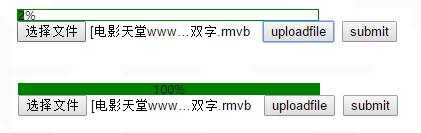
3. 全部傳完,文件可以正常播放:

這個示例的侷限與改進方向
服務端文件名寫死了。用 upload.後綴 作為唯一路徑,意味著同一時間只能傳一個文件,多人均可支配收入用戶並發時會互相覆蓋。應改為用「文件唯一標識 + 分片序號」命名暫存文件,全部到齊後再合併。
沒有斷點續傳。真正的續傳需要前端記錄已上傳的分片(可存 localStorage 或用文件的 hash 作為 key),重新進入時先詢問服務端已收到哪些片,只補傳缺失部分。
串行傳輸太慢。示例是一片傳完才發下一片。可以維護一個併發池(比如同時 3~4 片),顯著提升帶寬利用率,代價是服務端要能處理亂序到達並按序合併。
file_put_contents 追加大塊數據會佔用較多內存。更穩妥的寫法是 fopen($path, 'ab') 後用 stream_copy_to_stream 流式寫入。
setTimeout('up()', 1000) 這種字符串形式的定時器不推薦,應改為 setTimeout(up, 1000),避免不必要的 eval。
儘管如此,這個例子把分片上傳最核心的三件事——切割、逐片上報、進度彙總——都講清楚了,剩下的都是在此基礎上做工程化加固。
- 上一篇文章: HTML5 移動端文件上傳:ajax + FileReader + FormData 三件套
- 下一篇文章: 實現 Ctrl+V 粘貼上傳圖片:兼容 Chrome、Firefox 與 IE11 的處理方案