Ajax 傳遞 JSON 的完整實例:原生 XHR 與 PHP 後端
編輯:AJAX基礎知識
雖然 Ajax 的全稱是 Asynchronous JavaScript and XML,但現在實際開發時,傳遞 JSON 已經是事實上的標準——相比 XML,JSON 更簡單也更方便。本文用一個「員工查詢與建立」的實例,示範 GET 與 POST 兩種送法,全程使用原生 XMLHttpRequest,不依賴任何框架。
前端頁面
<!-- 前端頁面 -->
<!DOCTYPE html>
<html lang="en">
<head>
<meta charset="UTF-8">
<title>Document</title>
<style>
body { font-size: 20px; margin: 0; line-height: 1.5; }
select, button, input { font-size: 20px; line-height: 1.5; }
</style>
</head>
<body>
<h2>員工查詢</h2>
<label>請輸入員工編號:</label>
<input type="text" id="keyword">
<button id="search">查詢</button>
<p id="searchResult"></p>

<h2>員工創建</h2>
<form id="postForm">
<label>請輸入員工姓名:</label>
<input type="text" name="name"><br>
<label>請輸入員工編號:</label>
<input type="text" name="number"><br>
<label>請輸入員工性別:</label>
<select name="sex">
<option value="男">男</option>
<option value="女">女</option>
</select><br>
<label>請輸入員工職位:</label>
<input type="text" name="job"><br>
<button id="save" type="button">保存</button>
</form>
<p id="createResult"></p>

<script>
/* ===== GET ===== */
var oSearch = document.getElementById('search');

// GET 方式添加數據
function addURLParam(url, name, value) {
    url += (url.indexOf("?") == -1 ? "?" : "&");
    url += encodeURIComponent(name) + "=" + encodeURIComponent(value);
    return url;
}

oSearch.onclick = function () {
    // 創建 xhr 對象
    var xhr;
    if (window.XMLHttpRequest) {
        xhr = new XMLHttpRequest();
    } else {
        xhr = new ActiveXObject('Microsoft.XMLHTTP');
    }

    // 異步接受響應
    xhr.onreadystatechange = function () {
        if (xhr.readyState == 4) {
            if (xhr.status == 200) {
                var data = JSON.parse(xhr.responseText);
                if (data.success) {
                    document.getElementById('searchResult').innerHTML = data.msg;
                } else {
                    document.getElementById('searchResult').innerHTML = '出現錯誤:' + data.msg;
                }
            } else {
                alert('發生錯誤:' + xhr.status);
            }
        }
    };

    // 發送請求
    var url = 'service.php';
    url = addURLParam(url, 'number', document.getElementById('keyword').value);
    xhr.open('get', url, true);
    xhr.send();
};

/* ===== POST ===== */
var oSave = document.getElementById('save');

// POST 方式添加數據:把表單序列化
function serialize(form) {
    var parts = [], field = null, i, len, j, optLen, option, optValue;

    for (i = 0, len = form.elements.length; i < len; i++) {
        field = form.elements[i];
        switch (field.type) {
            case "select-one":
            case "select-multiple":
                if (field.name.length) {
                    for (j = 0, optLen = field.options.length; j < optLen; j++) {
                        option = field.options[j];
                        if (option.selected) {
                            optValue = "";
                            if (option.hasAttribute) {
                                optValue = (option.hasAttribute("value") ? option.value : option.text);
                            } else {
                                optValue = (option.attributes["value"].specified ? option.value : option.text);
                            }
                            parts.push(encodeURIComponent(field.name) + "=" + encodeURIComponent(optValue));
                        }
                    }
                }
                break;
            case undefined:      // fieldset
            case "file":         // file input
            case "submit":       // submit button
            case "reset":        // reset button
            case "button":       // custom button
                break;
            case "radio":        // radio button
            case "checkbox":     // checkbox
                if (!field.checked) {
                    break;
                }
                /* falls through */
            default:
                // 不包含沒有 name 的表單欄位
                if (field.name.length) {
                    parts.push(encodeURIComponent(field.name) + "=" + encodeURIComponent(field.value));
                }
        }
    }
    return parts.join("&");
}

oSave.onclick = function () {
    var xhr;
    if (window.XMLHttpRequest) {
        xhr = new XMLHttpRequest();
    } else {
        xhr = new ActiveXObject('Microsoft.XMLHTTP');
    }

    xhr.onreadystatechange = function () {
        if (xhr.readyState == 4) {
            if (xhr.status == 200) {
                var data = JSON.parse(xhr.responseText);
                if (data.success) {
                    document.getElementById('createResult').innerHTML = data.msg;
                } else {
                    document.getElementById('createResult').innerHTML = '出現錯誤:' + data.msg;
                }
            } else {
                alert('發生錯誤:' + xhr.status);
            }
        }
    };

    xhr.open('post', 'service.php', true);
    xhr.setRequestHeader("content-type", "application/x-www-form-urlencoded");
    xhr.send(serialize(document.getElementById('postForm')));
};
</script>
</body>
</html>
後端 service.php
同一支程式依請求方法分流:GET 走查詢、POST 走新增。
<?php
// 用於過濾不安全的字符
function test_input($data) {
    $data = trim($data);
    $data = stripslashes($data);
    $data = htmlspecialchars($data);
    return $data;
}

// 設置頁面內容的編碼格式是 utf-8,並宣告回傳 JSON
header("Content-Type:application/json;charset=utf-8");

// 定義多維數組,每條員工信息為一個數組
$staff = array(
    array("name" => "洪七", "number" => "101", "sex" => "男", "job" => '總經理'),
    array("name" => "郭靖", "number" => "102", "sex" => "男", "job" => '開發工程師'),
    array("name" => "黃蓉", "number" => "103", "sex" => "女", "job" => '產品經理')
);

// 如果是 GET 請求則搜索;如果是 POST 請求則新建
// $_SERVER["REQUEST_METHOD"] 返回訪問頁面使用的請求方法
if ($_SERVER["REQUEST_METHOD"] == "GET") {
    search();
} else if ($_SERVER["REQUEST_METHOD"] == "POST") {
    create();
}

// 通過員工編號搜索員工
function search() {
    // isset 檢測變量是否設置;empty 判斷值是否為空
    if (!isset($_GET['number']) || empty($_GET['number'])) {
        echo '{"success":false,"msg":"參數錯誤"}';
        return;
    }

    global $staff;
    $number = test_input($_GET['number']);
    $result = '{"success":false,"msg":"沒有找到員工"}';

    foreach ($staff as $value) {
        if ($value['number'] == $number) {
            $result = '{"success":true,"msg":"找到員工:員工編號為' . $value["number"]
                . ',員工姓名為' . $value["name"]
                . ',員工性別為' . $value["sex"]
                . ',員工職位為' . $value["job"] . '"}';
            break;
        }
    }
    echo $result;
}

// 創建員工
function create() {
    if (!isset($_POST['name']) || empty($_POST['name'])
        || !isset($_POST['number']) || empty($_POST['number'])
        || !isset($_POST['sex']) || empty($_POST['sex'])
        || !isset($_POST['job']) || empty($_POST['job'])) {
        echo '{"success":false,"msg":"參數錯誤,員工信息填寫不全"}';
        return;
    }
    echo '{"success":true,"msg":"員工' . test_input($_POST['name']) . '信息保存成功!"}';
}
?>
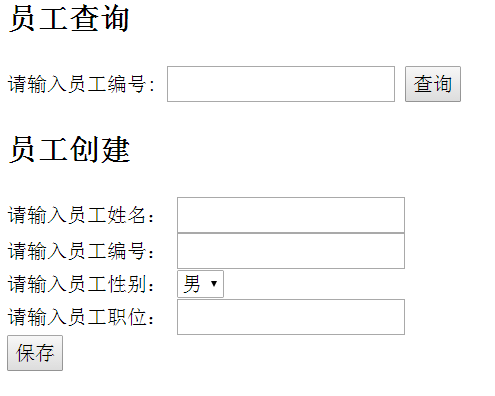
實例演示
用字串手工拼 JSON 只適合這種固定格式的教學範例。專案裡若資料動態性高,請改用 json_encode() 產生 JSON,並以 json_decode($str, true) 於前端/後端還原,同時對所有輸出的使用者內容做轉義,避免 XSS。
以上就是 Ajax 傳遞 JSON 的完整實例,希望對大家有所幫助。