用 JSON 完成 Ajax 資料傳輸:Servlet 與 JSP 實作
編輯:AJAX基礎知識
JSON(JavaScript Object Notation)是一種輕量級的資料交換格式,基於 ECMAScript 的子集,採用完全獨立於語言的純文字格式,卻沿用了 C 家族語言(C、C++、C#、Java、JavaScript、Perl、Python 等)的習慣寫法。這些特性讓它成為理想的資料交換語言:人容易讀寫,機器也容易解析與產生,有助於提升網路傳輸效率。
JSON 的兩種結構
簡單說,JSON 就是 JavaScript 中的物件與陣列,透過這兩種結構可以組出各種複雜的資料。
1. 物件:用大括號 {} 包住,結構為 {key: value, key: value, ...}。在物件導向語言裡,key 就是屬性、value 就是屬性值。取值方式為 物件.key,值可以是數字、字串、陣列或物件。
2. 陣列:用中括號 [] 包住,結構為 ["java", "javascript", "vb", ...]。取值方式與其他語言相同,用索引取值,元素型別同樣可以是數字、字串、陣列或物件。
前置準備
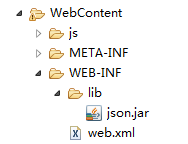
使用前需要先引入 json.jar:
傳輸單一物件
Servlet:
package com.itnba.maya.a;

import java.io.IOException;
import javax.servlet.ServletException;
import javax.servlet.annotation.WebServlet;
import javax.servlet.http.HttpServlet;
import javax.servlet.http.HttpServletRequest;
import javax.servlet.http.HttpServletResponse;
import org.json.JSONObject;

@WebServlet("/C")
public class C extends HttpServlet {
    private static final long serialVersionUID = 1L;

    protected void doGet(HttpServletRequest request, HttpServletResponse response)
            throws ServletException, IOException {
        request.setCharacterEncoding("utf-8");
        response.setCharacterEncoding("utf-8");

        // 模擬從資料庫查出的資料
        Dog a = new Dog();
        a.setName("小黃");
        a.setAge(5);
        a.setZl("哈士奇");

        JSONObject obj = new JSONObject();
        obj.put("name", a.getName());
        obj.put("age", a.getAge());
        obj.put("zl", a.getZl());

        JSONObject bb = new JSONObject();
        bb.put("obj", obj);

        response.getWriter().append(bb.toString());
    }

    protected void doPost(HttpServletRequest request, HttpServletResponse response)
            throws ServletException, IOException {
        doGet(request, response);
    }
}

JSP 頁面:
<%@ page language="java" contentType="text/html; charset=utf-8" pageEncoding="utf-8"%>
<!DOCTYPE html PUBLIC "-//W3C//DTD HTML 4.01 Transitional//EN" "https://www.w3.org/TR/html4/loose.dtd">
<html>
<head>
<meta http-equiv="Content-Type" content="text/html; charset=utf-8">
<title>Insert title here</title>
<script type="text/javascript" src="js/jquery-1.11.1.min.js"></script>
<script type="text/javascript">
$(document).ready(function () {
    $("#k").click(function () {
        $.ajax({
            url: "C",
            data: {},
            type: "POST",
            dataType: "JSON",
            success: function (httpdata) {
                $("#x").append("<li>" + httpdata.obj.name + "</li>");
                $("#x").append("<li>" + httpdata.obj.age + "</li>");
                $("#x").append("<li>" + httpdata.obj.zl + "</li>");
            }
        });
    });
});
</script>
</head>
<body>
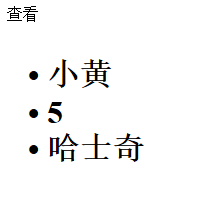
<span id="k">查看</span>
<h1>
<ul id="x">
</ul></h1>
</body>
</html>
傳輸集合或陣列
Servlet 這次用 JSONArray 把多筆物件包起來:
package com.itnba.maya.a;

import java.io.IOException;
import java.util.ArrayList;
import javax.servlet.ServletException;
import javax.servlet.annotation.WebServlet;
import javax.servlet.http.HttpServlet;
import javax.servlet.http.HttpServletRequest;
import javax.servlet.http.HttpServletResponse;
import org.json.JSONArray;
import org.json.JSONObject;

@WebServlet("/D")
public class D extends HttpServlet {
    private static final long serialVersionUID = 1L;

    protected void doGet(HttpServletRequest request, HttpServletResponse response)
            throws ServletException, IOException {
        request.setCharacterEncoding("utf-8");
        response.setCharacterEncoding("utf-8");

        // 模擬從資料庫查出的多筆資料
        Dog a1 = new Dog();
        a1.setName("小黃"); a1.setAge(5); a1.setZl("哈士奇");
        Dog a2 = new Dog();
        a2.setName("中黃"); a2.setAge(6); a2.setZl("泰迪");
        Dog a3 = new Dog();
        a3.setName("大黃"); a3.setAge(7); a3.setZl("京巴");

        ArrayList<Dog> list = new ArrayList<Dog>
        list.add(a1);
        list.add(a2);
        list.add(a3);

        JSONArray arr = new JSONArray();
        for (Dog d : list) {
            JSONObject obj = new JSONObject();
            obj.put("name", d.getName());
            obj.put("age", d.getAge());
            obj.put("zl", d.getZl());
            arr.put(obj);
        }

        response.getWriter().append(arr.toString());
    }

    protected void doPost(HttpServletRequest request, HttpServletResponse response)
            throws ServletException, IOException {
        doGet(request, response);
    }
}

JSP 頁面用迴圈把陣列渲染成表格:
<%@ page language="java" contentType="text/html; charset=utf-8" pageEncoding="utf-8"%>
<!DOCTYPE html PUBLIC "-//W3C//DTD HTML 4.01 Transitional//EN" "https://www.w3.org/TR/html4/loose.dtd">
<html>
<head>
<meta http-equiv="Content-Type" content="text/html; charset=utf-8">
<title>Insert title here</title>
<script type="text/javascript" src="js/jquery-1.11.1.min.js"></script>
<script type="text/javascript">
$(document).ready(function () {
    $("#k").click(function () {
        $.ajax({
            url: "D",
            data: {},
            type: "POST",
            dataType: "JSON",
            success: function (httpdata) {
                for (var i = 0; i < httpdata.length; i++) {
                    var n = httpdata[i].name;
                    var a = httpdata[i].age;
                    var z = httpdata[i].zl;
                    var tr = "<tr>"
                        + "<td>" + n + "</td>"
                        + "<td>" + a + "</td>"
                        + "<td>" + z + "</td>"
                        + "</tr>";
                    $("#x").append(tr);
                }
            }
        });
    });
});
</script>
</head>
<body>
<span id="k">查看</span>
<h1>
<table width="100%" id="x" border="1px">
</table>
</h1>
</body>
</html>

要注意的是,Servlet 最好明確加上 response.setContentType("application/json;charset=UTF-8"),只設定 setCharacterEncoding 在部分容器上不會帶到 Content-Type 標頭,中文就可能出現亂碼。
以上就是 JSON 在 Ajax 中傳遞單一物件與陣列的兩種完整寫法,希望對大家的學習有所幫助。