JavaScript 插件化開發(三):動手做一個可增刪的 Tab 插件
編輯:關於JavaScript
開場
前兩篇談的是「如何用 jQuery 的方式開發插件」,以及程序化設計與物件導向設計該如何結合。從這一篇開始,我們換成實例驅動,由淺入深做出屬於自己的插件庫。
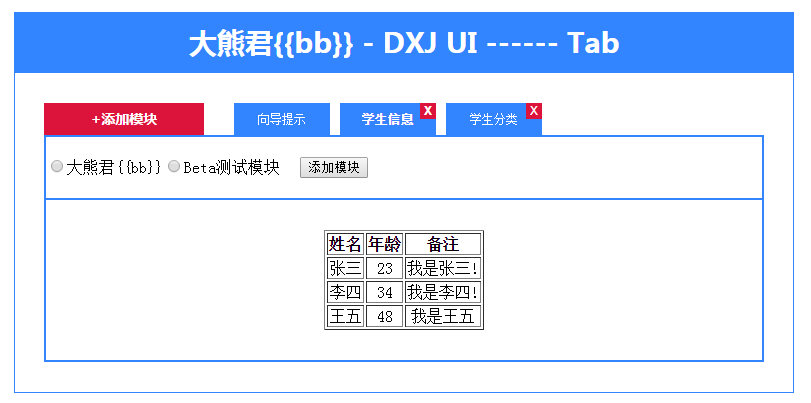
成品是一個選項卡插件。在單頁應用(SPA)或基於 B/S 架構的後台系統裡,頁籤是很常見的模組切換形式,透過這個插件可以有效管理模組的呈現與互動。
一、呼叫方式與參數
bigbear.ui.createTab($("#tab"), {
    buttonText: "添加模塊",
    result: [
        { text: "向導提示",     url: "help.html",     showClose: "0", status: "1" },
        { text: "學生信息",     url: "info.html",     showClose: "1", status: "1" },
        { text: "學生分類",     url: "category.html", showClose: "1", status: "1" },
        { text: "大熊君{{bb}}", url: "bb.html",       showClose: "1", status: "1" },
        { text: "Beta測試模塊", url: "test.html",     showClose: "1", status: "1" }
    ]
});
createTab 的第一個參數是 DOM 節點,第二個是選項。buttonText 是操作按鈕的文字;result 是頁籤項目清單,含文字描述、點擊時請求的 url、showClose(是否顯示關閉鈕)與 status(1 開啟、0 關閉)。
二、需要具備的功能
依參數動態產生頁籤條目:
bigbear.ui.createTab($("#tab"), {
    buttonText: "添加模塊",
    result: [
        { text: "jQuery源碼分析", url: "help.html", showClose: "0", status: "1" },
        { text: "大熊君{{bb}}",  url: "bb.html",   showClose: "1", status: "1" }
    ]
});
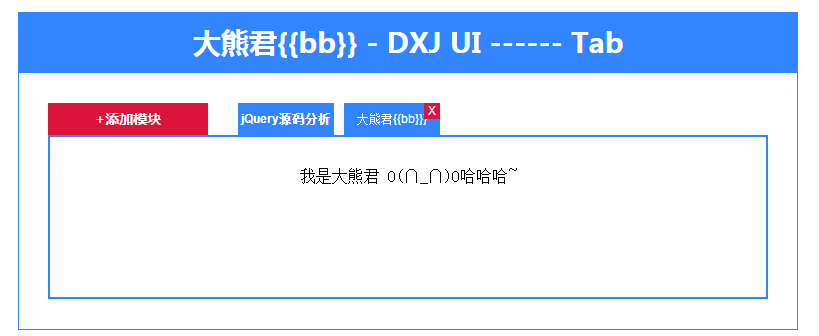
可自由新增與刪除項目:
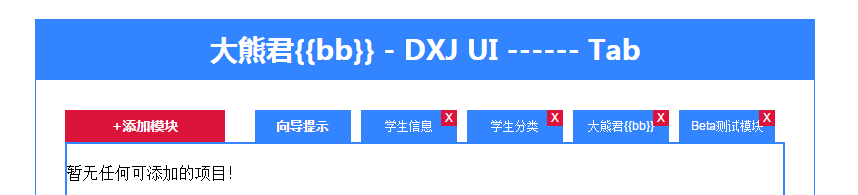
所有項目都被關閉時,內容區顯示提示文字:
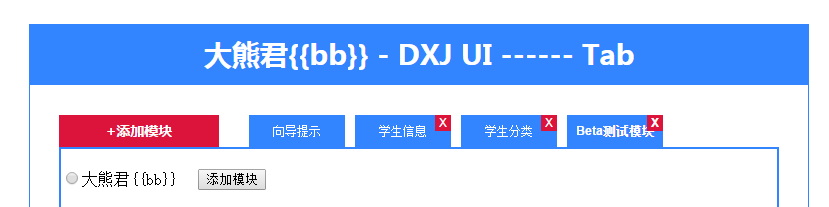
被刪掉的項目則能在面板中重新加入。
三、HTML 骨架
<div class="dxj-ui-hd">大熊君{{bb}} - DXJ UI ------ Tab</div>
<div class="dxj-ui-bd">
    <div id="tab">
        <div class="title">
            <div class="adder">+ 添加學生信息</div>
            <div class="items"></div>
        </div>
        <div class="console-panel"></div>
        <div class="content"></div>
    </div>
</div>
四、CSS 要點
.dxj-ui-hd { margin: 30px auto 0; width: 780px; height: 60px; line-height: 60px; background: #3385ff; color: #fff; font-family: "微軟雅黑"; font-size: 28px; text-align: center; font-weight: bold; }
.dxj-ui-bd { margin: 0 auto; width: 778px; padding: 30px 0; overflow: hidden; border: 1px solid #3385ff; }
.dxj-ui-bd #tab { margin: 0 auto; width: 720px; overflow: hidden; }
.dxj-ui-bd #tab .title { width: 720px; overflow: hidden; border-bottom: 2px solid #3385ff; }
.dxj-ui-bd #tab .title .adder { width: 160px; height: 32px; line-height: 32px; background: #DC143C; color: #fff; font-family: "微軟雅黑"; font-size: 14px; text-align: center; font-weight: bold; float: left; cursor: pointer; }
.dxj-ui-bd #tab .title .items { height: 32px; margin-left: 20px; width: 540px; overflow: hidden; float: left; }
.dxj-ui-bd #tab .title .items div { margin-left: 10px; width: 96px; height: 32px; line-height: 32px; background: #3385ff; color: #fff; font-family: arial; font-size: 12px; text-align: center; position: relative; float: left; cursor: pointer; }
.dxj-ui-bd #tab .title .items div span.del { width: 16px; height: 16px; line-height: 16px; display: block; background: #DC143C; position: absolute; right: 0; top: 0; cursor: pointer; }
.dxj-ui-bd #tab .content { width: 716px; padding-top: 30px; overflow: hidden; border: 2px solid #3385ff; border-top: 0; min-height: 130px; text-align: center; }
.dxj-ui-bd #tab .content table { margin: 0 auto; }
.dxj-ui-bd #tab .console-panel { width: 716px; padding: 20px 0; overflow: hidden; border: 2px solid #3385ff; border-top: 0; background: #fff; display: none; }
.active { font-weight: bold; }
五、插件主體(bigbear.js)
(function ($) {
    var win = window;
    var bb = win.bigbear = win.bigbear || { ui: {} };
    var ui = bb.ui = {};

    var Tab = function (elem, opts) {
        this.elem = elem;
        this.opts = opts;
    };
    var tabProto = Tab.prototype;

    // 刪除項目:淡出後清空內容、切換狀態、把焦點移到下一項
    tabProto._deleteItem = function (item) {
        var that = this;
        this.getElem().find(".title .items div")
            .eq(item["index"])
            .fadeOut(function () {
                that._resetContent();
                that._updateStatus(item);
                that._triggerItem(item["index"] + 1);
                that.getElem().find(".title .adder").trigger("click");
            });
    };

    tabProto._triggerItem = function (next) {
        var nextStatus = this._getStatus(next);
        var items = this.getElem().find(".title .items div");
        next = items.eq(next);
        if (next.length && "1" == nextStatus) {
            next.trigger("click");          // 後續節點存在且為開啟狀態
        } else {
            items.eq(0).trigger("click");   // 退回第一項
        }
    };

    tabProto._getStatus = function (index) {
        var status = "";
        $.each(this.getOpts()["result"], function (i, item) {
            if (index == item["index"]) {
                status += item["status"];
                return false;
            }
        });
        return status;
    };

    tabProto._updateStatus = function (item) {
        var status = item["status"];
        item["status"] = ("1" == status) ? "0" : "1";
    };

    tabProto.init = function () {
        var that = this;

        // 新增按鈕:滑開面板並列出所有關閉狀態的項目
        this.getElem().find(".title .adder")
            .text("+" + this.getOpts()["buttonText"])
            .on("click", function () {
                that._toggleConsolePanel(function () {
                    var root = that.getElem().find(".console-panel").empty();
                    $.each(that.getOpts()["result"], function (i, item) {
                        if ("0" == item["status"]) {
                            var elem = $("<div style='float:left'></div>")
                                .data("item", item)
                                .appendTo(root);
                            $("<input type='radio' name='addmod' />").appendTo(elem);
                            $("<span></span>").text(item["text"]).appendTo(elem);
                        }
                    });

                    if (root.find("div").length) {
                        $("<input type='button' value='添加模塊' style='margin-left:20px'/>")
                            .on("click", function () {
                                var data = root.find("input[type=radio]:checked").parent().data("item");
                                that._updateStatus(data);
                                that.getElem().find(".title .items div").eq(data["index"]).fadeIn().trigger("click");
                                that.getElem().find(".title .adder").trigger("click");
                            })
                            .appendTo(root);
                    } else {
                        root.text("暫無任何可添加的項目!");
                    }
                });
            });

        $.each(this.getOpts()["result"], function (i, item) {
            item["index"] = i;
            that._render(item);
        });

        this.getElem().find(".title .items div").eq(0).trigger("click");
    };

    tabProto._toggleConsolePanel = function (callback) {
        this.getElem().find(".console-panel").slideToggle(function () {
            $.isFunction(callback) && callback();
        });
    };

    tabProto._resetContent = function () {
        this.getElem().find(".content").html("");
    };

    tabProto._setContent = function (html) {
        this.getElem().find(".content").html(html);
    };

    tabProto._getContent = function (url) {
        return $.ajax({ url: url });
    };

    // 渲染單一頁籤
    tabProto._render = function (data) {
        var that = this;
        var item = $("<div></div>")
            .text(data["text"])
            .on("click", function () {
                that._setCurrent(data["index"]);
                that._getContent(data["url"]).done(function (result) {
                    that._setContent(result);
                }).fail(function () {
                    throw new Error("Net Error !");
                });
            })
            .appendTo(this.getElem().find(".title .items"));

        if ("1" == data["showClose"]) {
            $("<span class='del'>X</span>")
                .on("click", function () {
                    if (win.confirm("是否刪除此項?")) {
                        that._deleteItem(data);
                        return false;   // 阻止事件冒泡,避免觸發頁籤本身的點擊
                    }
                })
                .appendTo(item);
        }
    };

    tabProto._setCurrent = function (index) {
        var items = this.getElem().find(".title .items div").removeClass("active");
        items.eq(index).addClass("active");

        var contents = this.getElem().find(".content .c").hide();
        contents.eq(index).show();
    };

    tabProto.getElem = function () { return this.elem; };
    tabProto.getOpts = function () { return this.opts; };

    ui.createTab = function (elem, opts) {
        var tab = new Tab(elem, opts);
        tab.init();
        return tab;
    };
})(jQuery);
六、總結與思考
- 用物件導向的思路分析功能需求,先想清楚要有哪些行為。
- 以「類」的方式組織插件邏輯,把 DOM 操作收斂在少數方法中。
- 持續重構但別設計過度;程序化與物件導向結合往往最務實。
- 留一個問題給自己:頁籤中的單一項目是否可以獨立成 Item 類?如果可以,Tab 類又該怎麼調整?
相關文章
-
徹底搞懂 jQuery 的 $.extend()、$.fn 與 $.fn.extend() 封裝 jQuery placeholder 插件,讓舊版瀏覽器也有提示文字 Highcharts 氣泡圖實作:三維數據一圖呈現 從零學會寫 jQuery 插件:三種類型、七條規範與完整示例 用JS與CSS實作下拉刷新/上拉加載 jQuery 插件 用 jQuery 插件補足 CSS3 效果:11 個實用方案整理 jQuery.fn.extend 與 jQuery.extend 的用法區別詳解 《鋒利的 jQuery》讀書筆記:第 7、8 章插件與實戰 YesTop 插件:一行 jQuery 搞定返回頂部按鈕 拖曳滑塊驗證 jQuery 插件:告別扭曲的圖形驗證碼