改造 DedeCMS:用 JS 讓 TAG 不必再手打
編輯:關於JavaScript
DedeCMS 的 TAG 欄位預設只能手動輸入,漏字、錯字都很常見。以下透過五個小改動,讓編輯可以直接從現有的 TAG 列表中點選,不再需要憑記憶打字。
步驟一:在發文頁加入選擇函式
開啟 \dede\templets\album_add.htm,在顶部 head 的 script 區加入:
function setag(){
  var tagg = window.showModalDialog("tags_main.php", "tag",
    "dialogWidth=800px;dialogHeight=600px");
  if(typeof(tagg) != 'undefined') document.form1.tags.value = tagg;
}
步驟二:在 TAG 輸入欄旁加上按鈕
在 Tag 標籤輸入的那個 td 裡補上一顆按鈕:
<input type="button" onclick="setag()" value="選擇"
       style="width:70px;cursor:pointer;" />
步驟三:改造 tags_main.php 的 script
開啟 \dede\templets\tags_main.php,在 head 的 script 區加入:
// 選擇關鍵字
var tag = "";
function selectTag(str) {
  tag = tag + "," + str;
  if (tag.substr(0, 1) == ',') tag = tag.substr(1);
  $("#selecttag").val(tag);
}
function selectTagOK() {
  window.returnValue = $("#selecttag").val();
  window.close();
}
步驟四:加上顯示與確認的 UI
在 body 中你希望顯示的位置插入:
<div style="padding-left:20px;border:1px">
  所選 TAG:
  <input type="text" id="selecttag" name="selecttag" size="80" />
  <input type="button" onClick="selectTagOK()" value="確定選擇" />
</div>
步驟五:在 TAG 列表旁加上「選擇」連結
找到 TAG 列表中的這段:
<a href="../tags.php/?<?php echo urlencode($fields['tag']); ?>/"
   target="_blank">{dede:field.tag /}</a>
改成:
<a href="../tags.php/?<?php echo urlencode($fields['tag']); ?>/"
   target="_blank">{dede:field.tag /}</a>
<a href="#" onclick="selectTag('{dede:field.tag /}')">[選擇]</a>
使用畫面如下:
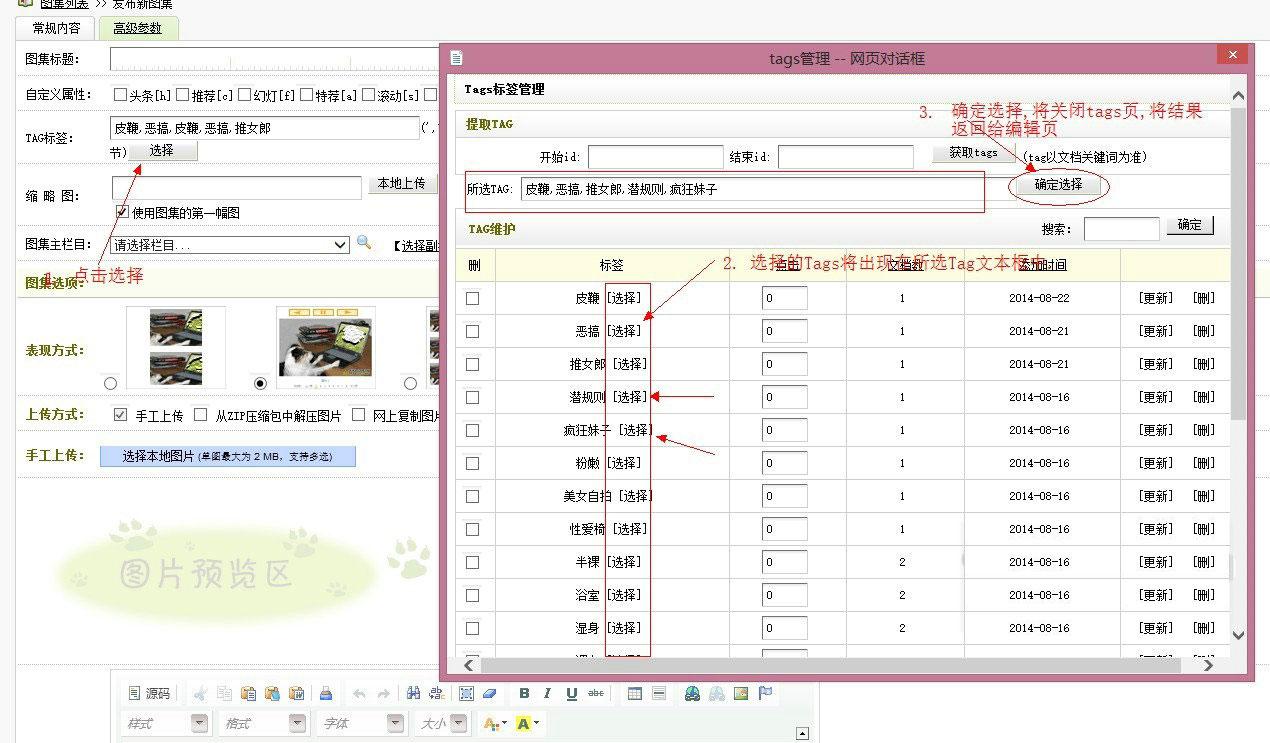
其他新增頁(如其他頻道的 add 頁)也可參照同樣的方式補上 script 與按鈕。
幾點提醒
1. showModalDialog 已被淘汰。它在大陸以外的環境與新版 Chrome、Firefox 中已移除,不建議再用於新專案;替代方案是 window.open 搭配 window.opener 回傳值,或直接用一個頁內彈出層(modal)呈現 TAG 列表。
2. 修改核心模板會被升級覆蓋。建議把改動集中記錄下來,或使用 DedeCMS 的後台外掛機制。
3. 字串拼接要處理引號。TAG 名稱若含單引號會破壞 onclick,記得先轉義。
4. 後端仍應過濾。tags 欄位的最終內容要在伺服器端做長度與字元過濾,避免注入。
相關文章
-
JavaScript 實作:模式視窗提交後刷新父視窗資料 showModalDialog 子視窗範例:接收參數與回傳結果 window.showModalDialog 模態視窗用法完整解析 js showModalDialog 參數詳解與父子視窗雙向傳值範例 window.showModalDialog() 用法與返回值完整整理(含 HTA 專屬參數) JS 模態對話框 showModalDialog 用法總結 showModalDialog 模態對話框使用詳解與瀏覽器兼容 用 JavaScript 打開模態對話框的實現方式 用 window.showModalDialog 搭配 ASP.NET Ajax 傳回彈出視窗的值 JS 彈出對話框函數:window.open 與 showModalDialog