jQuery + AJAX:滾動到頁面底部才向伺服器載入更多內容
編輯:關於JavaScript
「無限捲動」大概是現代 Web 最普及的載入模式之一。它的價值很單純:頁面打開時只抓一屏的資料,使用者需要更多時,再隨著滾動向伺服器追加。本文示範如何搭配 jQuery 與 AJAX 完成這件事,並附上 C# 的 WebMethod 服務端範例。
靈感來源
這個想法其實是被 Facebook 逼出來的。逛 Facebook 時我發現,當我往下捲,新的資料就會自動接續插入既有內容之後。那時我想用 C# 實作同樣的效果,上網搜了一圈卻找不到相關文章或部落格(Java 與 PHP 的倒是不少)。於是我讀完那些文章後自己動手寫,跑通之後決定把它分享出來。
整體結構
需要做的只有兩件事:
- 服務端提供一個方法,從資料庫或其他資料來源取資料,並組出符合目標容器格式的 HTML 字串。
- 客戶端把 scroll 事件綁到一個函式上,判斷是否已捲到底,若是則發出 AJAX 請求並把結果附加到列表尾端。
服務端方法
先用一個最簡單的版本說明概念——只產生帶序號的訊息:
[WebMethod]
public static string GetDataFromServer()
{
    string resp = string.Empty;
    for (int i = 0; i <= 10; i++)
    {
        resp += "<p><span>" + counter++ +
                "</span> This content is dynamically appended " +
                "to the existing content on scrolling.</p>";
    }
    return resp;
}
若要真的從資料庫抓資料,改成這樣:
[WebMethod]
public static string GetDataFromServer()
{
    DataSet ds = new DataSet();

    string strConnectionString = ""; // 在此填入你的連線字串
    SqlConnection con = new SqlConnection(strConnectionString);

    SqlCommand command = new SqlCommand("SELECT * FROM Person", con);
    SqlDataAdapter adp = new SqlDataAdapter(command);
    adp.Fill(ds);

    string resp = string.Empty;
    for (int i = 1; i <= ds.Tables[0].Rows.Count; i++)
    {
        string strComment = string.Empty;
        if (ds.Tables != null && ds.Tables[0] != null
            && ds.Tables[0].Rows.Count > 0
            && ds.Tables[0].Rows[i - 1][0] != DBNull.Value)
        {
            strComment = ds.Tables[0].Rows[i - 1][0].ToString();
        }
        resp += "<p><span>" + counter++ + "</span> " + strComment + "</p>";
    }
    return resp;
}
客戶端方法
客戶端使用 document.ready,並把 div 的 scroll 事件綁上去。這裡有兩個 div:mainDiv 作為可捲動的視窗,wrapperDiv 作為承載動態內容的容器。
$(document).ready(function() {
    $contentLoadTriggered = false;

    $("#mainDiv").scroll(function() {
        if ($("#mainDiv").scrollTop() >= ($("#wrapperDiv").height() - $("#mainDiv").height())
            && $contentLoadTriggered == false) {
            $contentLoadTriggered = true;
            $.ajax({
                type: "POST",
                url: "LoadOnScroll.aspx/GetDataFromServer",
                data: "{}",
                contentType: "application/json; charset=utf-8",
                dataType: "json",
                async: true,
                cache: false,
                success: function (msg) {
                    $("#wrapperDiv").append(msg.d);
                    $contentLoadTriggered = false;
                },
                error: function (x, e) {
                    alert("The call to the server side failed. " + x.responseText);
                }
            });
        }
    });
});
判斷是否已捲到底的條件是:
if ($("#mainDiv").scrollTop() >= ($("#wrapperDiv").height() - $("#mainDiv").height())
    && $contentLoadTriggered == false)
異步呼叫成功後,把資料附加到目標容器並解除鎖:
success: function (msg) {
    $("#wrapperDiv").append(msg.d);
    $contentLoadTriggered = false;
}
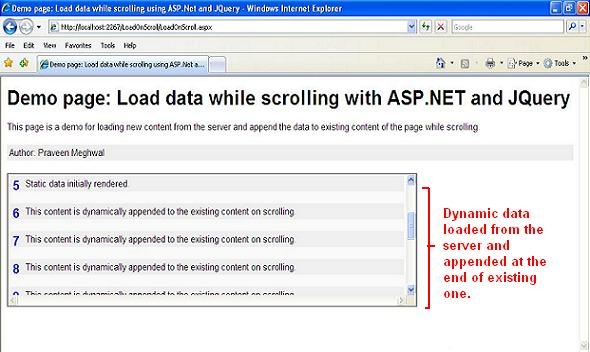
$contentLoadTriggered 這個旗標非常關鍵。少了它,捲到底時每一次 scroll 事件都會觸發一次請求,瞬間打出幾十個重複的查詢。加上它之後,只有在使用者真的捲到底、且上一批資料還沒回來時,才會送出請求。
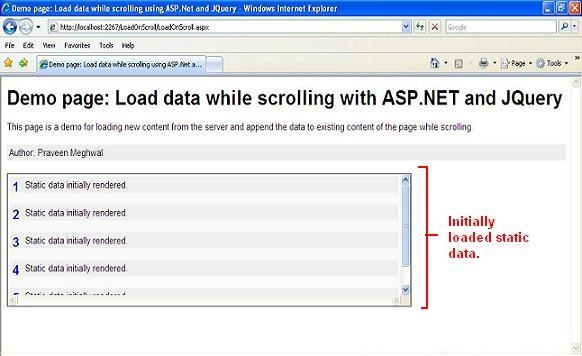
執行結果示意:
實務上還建議補上兩件事:一是「沒有更多資料了」的結束狀態,避免使用者捲到底卻永遠在轉圈圈;二是 request 節流,例如搭配 $.ajax 的 timeout 與失敗重試次數上限。