JS 從 Cookies 取出指定 Key 值的實作
編輯:關於JavaScript
工作時遇到一個需求:用 JavaScript 從 Cookie 裡取值。JS 沒有現成 API 能直接依 Key 取得對應值,只能自己解析 document.cookie 這個字串。以下用一個 ASP.NET 頁面示範完整流程。
1. 伺服器端:寫入幾個 Cookie
using System;
using System.Collections.Generic;
using System.Web;
using System.Web.UI;
using System.Web.UI.WebControls;

namespace WebApplication_TestJS
{
    public partial class _Default : System.Web.UI.Page
    {
        protected void Page_Load(object sender, EventArgs e)
        {
            Response.Cookies["DONO"].Value = "EDO1406300001";
            Response.Cookies["DOID"].Value = "ABCDEFG123456";
            Response.Cookies["DOSOURCE"].Value = "WUWUWUWU";
            Response.Cookies["DOTYPE"].Value = "2";
        }
    }
}
2. 客戶端:解析並取出目標值
<%@ Page Language="C#" AutoEventWireup="true" CodeBehind="Default.aspx.cs"
    Inherits="WebApplication_TestJS._Default" %>
<html>
<script language="javascript" type="text/javascript">
function GetCookie() {
    /* 先看看 cookie 字串的結構長怎樣 */
    var Cookies = document.cookie;
    document.getElementById("<%=txtContent.ClientID%>").innerText = Cookies;

    /* 處理字串,截取出需要的目標值 */
    var target = "DONO" + "=";
    if (document.cookie.length > 0) {
        start = document.cookie.indexOf(target);
        if (start != -1) {
            start += target.length;
            end = document.cookie.indexOf(";", start);
            if (end == -1) end = document.cookie.length;
        }
    }
    /* 把目標值賦給控制項 */
    document.getElementById("<%=txtTarget.ClientID%>").innerText =
        document.cookie.substring(start, end);
}
</script>
<head runat="server">
<title></title>
</head>
<body>
<form id="form1" runat="server">
<div>
<asp:Button ID="btnGetReq" runat="server" Text="獲取內容" OnClientClick="GetCookie()" />
<br />
<asp:TextBox ID="txtContent" runat="server" Columns="120"></asp:TextBox>
<br />
<asp:TextBox ID="txtTarget" runat="server" Columns="120"></asp:TextBox>
</div>
</form>
</body>
</html>
3. 執行結果
按下按鈕後可以看到,第一個文字框顯示的就是 document.cookie 的原始存放結構(形如 DONO=EDO1406300001; DOID=...; ),依此結構截取字串即可拿到目標值。
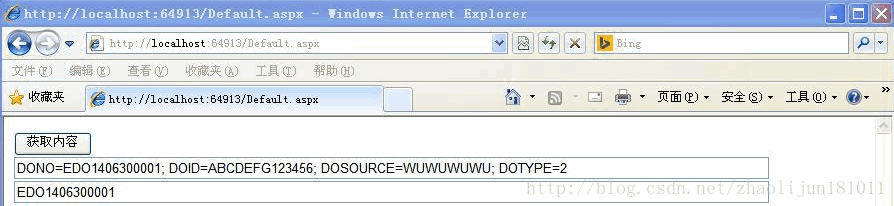
解析邏輯拆解一下:先用 indexOf 找 "DONO=" 的位置,把起點移到等號之後,再往後找分號作為終點;若找不到分號(代表是最後一筆),就取到字串結尾。
實務上更乾淨的寫法是先 split("; ") 切成陣列,再用 find 比對前綴,可讀性與健壯性都更好。另外別忘了 Cookie 的值在使用前應該做 decodeURIComponent,並避免把敏感資料明文存放。
相關文章
-
原生 JavaScript cookie 操作詳解:讀取、設定、刪除與 path/domain 陷阱 從右側截取指定長度字串:為 String 擴充一個 right 方法 如何判斷瀏覽器是否支援 Cookie?三種檢測手法 JavaScript 建立與讀取 Cookie 的完整實作 JavaScript Cookie 的設定、讀取與刪除完整指南 封裝一個好用的 Cookie 工具:存值、取值與過期設定 如何精準取出指定名稱的 Cookie 值 JavaScript 如何變通取得 Cookie 的過期時間 跨網域同步 Cookie 的 JavaScript 實作思路 JavaScript Cookie 操作完全指南:從基礎設定到進階應用