右下角可關閉、可最小化的浮動推薦區塊
編輯:關於JavaScript
這個實作用 JavaScript 做出一個固定在右下角的浮動框,可以用來展示推薦內容或最新文章。它支援兩個操作:點擊「−」最小化,只留標題列;點擊「×」整個關閉。
效果預覽:https://keleyi.com/keleyi/phtml/xuanfudiv/3.htm
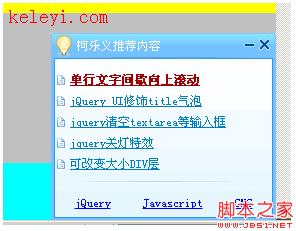
完整原始碼
<!DOCTYPE html PUBLIC "-//W3C//DTD XHTML 1.0 Transitional//EN" "https://w3.org/TR/xhtml1/DTD/xhtml1-transitional.dtd">
<html xmlns="https://www.w3.org/1999/xhtml">
<head>
<title>js 實現右下角可關閉最小化 div--柯樂義</title>
<script src="https://keleyi.com/keleyi/phtml/xuanfudiv/3/msg.js" type="text/javascript"></script>
<style type="text/css" media="screen">
/* 右下角跳出的廣告 */
#downmsg_emessage{
POSITION: fixed; _position:absolute; z-index:100;
bottom:0; right:0;
background:url(https://keleyi.com/keleyi/phtml/xuanfudiv/3/down_msg_bg.gif) no-repeat left top;
width:225px;
}
#donwmsg_head{
float:left; display:inline; font-size:12px; color:#FFFFFF;
margin-left: 26px; margin-top: 6px;
}
#downmsgBar .close{
float:right; width:11px; height:11px;
margin-top:6px; display:block; margin-right:5px;
}
#downmsgBar{height:25px;}
#donwmsg_content{height:162px;overflow:hidden;}
#donwmsg_content ul{
font-size:12px; color:#007cc1; top: 0px;
padding:0px 2px 0 6px; left: 6px;
line-height:180%; height:110px; overflow:hidden;
}
#donwmsg_content ul li{
background:url(https://keleyi.com/keleyi/phtml/xuanfudiv/3/down_msg_bg.gif) no-repeat -100px -245px;
text-indent:13px;
}
#donwmsg_content ul li a{color:#007cc1;}
#donwmsg_content ul .ll a{color:#a10000;font-weight:bold;}
#donwmsg_content p{position:absolute;left: 13px;top: 157px;}
#donwmsg_content .lb{padding:0px; text-align:center;}
#donwmsg_content .lb a{font-size:12px;color:Blue}
a.msg-hidden-btn-2{
width:11px; height:11px; overflow:hidden; float:right;
display:block; margin-right:5px; margin-top:6px;
background:url(https://keleyi.com/keleyi/phtml/xuanfudiv/3/down_msg_bg.gif) no-repeat -0px -250px;
}
a.msg-hidden-btn-1{
width:11px; height:11px; overflow:hidden; float:right;
display:block; margin-right:5px; margin-top:6px;
background:url(https://keleyi.com/keleyi/phtml/xuanfudiv/3/down_msg_bg.gif) no-repeat -50px -250px;
}
</style>
</head>
<body>
<div id="downmsg_emessage" style="DISPLAY: block">
<div id="downmsgBar">
<div id="donwmsg_head">柯樂義推薦內容</div>
<a class="close" href="javascript:closeDiv()"></a>
<a class="msg-hidden-btn-1" id="msg_hidden_btn" href="javascript:showHideDiv()"> </a>
</div>
<div id="donwmsg_content" style="DISPLAY: block; HEIGHT: 162px">
<ul>
<li class="ll"><a href="https://keleyi.com/a/bjac/768f469b95b61487.htm">單行文字間歇向上滾動</a></li>
<li><a href="https://keleyi.com/a/bjac/a6d651710217f7a0.htm">jQuery UI 修飾 title 氣泡</a></li>
<li><a href="https://keleyi.com/a/bjac/bf0eb8c02085b10d.htm">jquery 清空 textarea 等輸入框</a></li>
<li><a href="https://keleyi.com/a/bjac/939631bb07adb4dc.htm">jquery 關燈特效</a></li>
<li><a href="https://keleyi.com/a/bjac/7e8897e5ec0849e9.htm">可改變大小 DIV 層</a></li>
</ul>
<div class="lb">
<a href="https://keleyi.com/menu/jquery/" target="_blank">jQuery</a>
<a href="https://keleyi.com/menu/javascript/" target="_blank">Javascript</a>
<a href="https://keleyi.com/menu/cms/" target="_blank">CMS</a>
</div>
</div>
</div>
</body>
</html>
兩個函式的實際內容
原始碼中 closeDiv() 與 showHideDiv() 定義在外部的 msg.js 裡,本質上就是兩行:
function closeDiv() {
    document.getElementById("downmsg_emessage").style.display = "none";
}

function showHideDiv() {
    var box = document.getElementById("downmsg_emessage");
    var content = document.getElementById("donwmsg_content");
    var btn = document.getElementById("msg_hidden_btn");
    if (content.style.display == "none") {
        content.style.display = "block";
        btn.className = "msg-hidden-btn-1";   // 「−」圖示
    } else {
        content.style.display = "none";
        btn.className = "msg-hidden-btn-2";   // 「+」圖示
    }
}
值得學的兩個技巧
固定定位的舊 IE 相容:POSITION: fixed; _position:absolute; 這裡的下底線寫法是 IE 專用的 hack(只有 IE6 及以下會讀取底線開頭的屬性),用意是在不支援 fixed 的舊 IE 中退回 absolute。這是那個年代的標準手法,今日可以直接寫 position:fixed 就好。
用 CSS 精靈圖做圖示:關閉、最小化、列表項前的項目符號,全都取自同一張 down_msg_bg.gif,靠 background-position 的負值定位不同區塊。這樣只要一次 HTTP 請求就能拿到所有圖示,是經典的效能優化手法。
如果要拿來用在今天的專案
幾個建議:
- 「關閉」要真的記住。目前重新整理後它又跳出來,體驗很差。用
localStorage.setItem("recommend-dismissed", "1")記錄,下次載入時檢查即可。 - 圖示改用 SVG 或 Icon Font。精靈圖在不同解析度螢幕上會模糊,SVG 向量圖示可以任意縮放且能套用 CSS 顏色。
- 不要用
javascript:偽協議。改成<button type="button">並綁定事件,鍵盤使用者才能操作,螢幕閱讀器也能正確讀出這是個按鈕。 - 浮動元素會擋內容。在手機上,右下角浮動框很容易蓋住「回到頂端」按鈕或最後一行內文,建議加
@media (max-width:768px)直接隱藏,或改為頁面內嵌區塊。 - z-index 要留意。範例用 100,但你的 modal、tooltip 或 header 可能更高,浮動框會被蓋住或反之蓋住彈窗,建議建立明確的層級規範。
- 上一篇文章: JavaScript 操作 iframe 的方法整理與跨瀏覽器差異
- 下一篇文章: 如何截斷字串並正确处理中英混排的字寬