用 JavaScript 取得使用者滑鼠選取的文字
編輯:關於JavaScript
下面是一個可直接運作的完整範例:
 <html>
<head>
<meta http-equiv="Content-Type" content="text/html; charset=gb2312" />
<title>js獲取鼠標選中的文字</title>
<SCRIPT LANGUAGE="JavaScript">
<!--
function SelectText() {
  try {
    var selecter = window.getSelection();
    if (selecter != null && selecter.trim() != "") {
      alert(selecter);
    }
  } catch (err) {
    var selecter = document.selection.createRange();
    var s = selecter.text;
    if (s != null && s.trim() != "") {
      alert(s);
    }
  }
}

String.prototype.trim = function() {
  return this.replace(/(^\s*)|(\s*$)/g, "");
};
//-->
</SCRIPT>
</head>
<body>
<span onClick="SelectText()">河中魚類離奇死亡,下游居民頻染怪病,沿岸植物不斷變異,是殘留農藥?還是生化攻擊?敬請關注今晚CCTV-10《科學探索》,即將播出的專題節目:《神秘的河邊洗腳人--中國男足》</span>
</body>
</html>
核心邏輯是「先試標準 API,失敗再退回 IE 舊寫法」:window.getSelection() 回傳一個 Selection 物件,轉成字串就是使用者目前選中的內容;舊版 IE 則得走 document.selection.createRange().text。
精簡後的版本如下:
 var userSelection;

if (window.getSelection) {
  // 一般瀏覽器
  userSelection = window.getSelection();
} else if (document.selection) {
  // 舊版 IE、Opera
  userSelection = document.selection.createRange();
}

userSelection.toString();
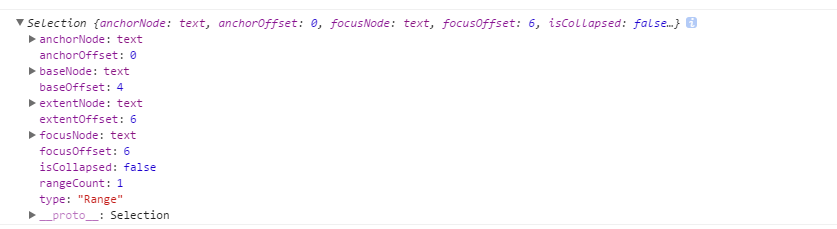
幾個實務上的補充:
- trim 不必自己擴充。ES5 之後所有主流瀏覽器都原生支援
String.prototype.trim(),範例中自行掛上同名方法反而會覆蓋原生實作,現代專案請直接移除。 - 取得的是 Selection 物件而非純字串。若要文字內容,記得明確呼叫
.toString();若需要選取範圍的座標或節點資訊,可直接操作 Selection 的rangeCount、getRangeAt()等成員。 - 選取會被清除。使用者點擊其他地方後 selection 就空了,若要在後續動作中使用,應在事件觸發的當下先把文字存進變數。
- 監聽選取變化可用
document.addEventListener('selectionchange', ...),比綁在單一元素上的 click 更貼近實際行為。
這個能力常被拿來做「選字後浮現工具列」的功能,例如劃重點、快速搜尋、一鍵引用等。