GreyBox 和 Lightbox、Thickbox 屬於同一類元件,用比較別緻的方式以模態對話框呈現網頁、圖片或其他內容。官網:https://orangoo.com/labs/GreyBox/
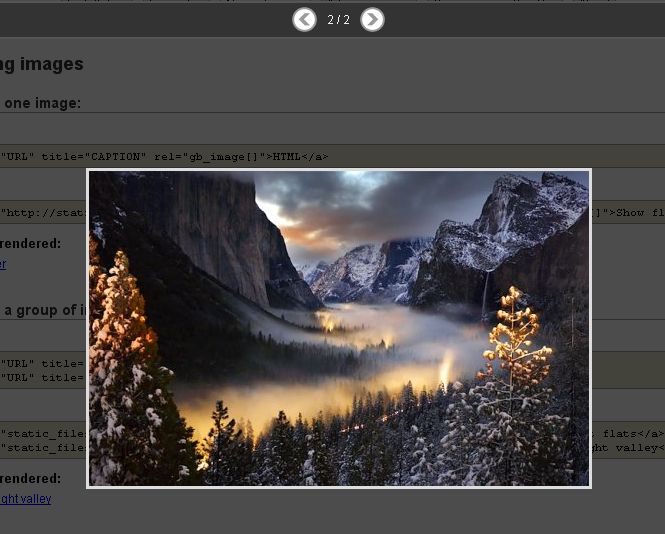
效果預覽
以模態視窗開啟網頁:

以相簿形式瀏覽一組圖片:
基本用法
第一步,到官網下載壓縮檔。
第二步,解壓後裡頭的 installation.html 已有說明,一看就懂。步驟整理如下:
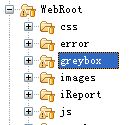
第三步,把 greybox 資料夾複製到 Web 專案根目錄。這裡要特別注意:一定要放在根目錄,放到其他資料夾或子目錄下很可能就無法運作。筆者一開始把它放在 js 資料夾裡(因為所有腳本都在那兒,jQuery 也在),怎麼樣都用不了,最後移回根目錄才正常。
第四步,用一個測試頁驗證:
<!DOCTYPE HTML PUBLIC "-//W3C//DTD HTML 4.01 Transitional//EN">
<html>
<head>
<title>test.html</title>
<!-- GreyBox 引用開始 -->
<script type="text/javascript">
var GB_ROOT_DIR = "./greybox/"; // 注意這裡的路徑!!!
</script>
<script type="text/javascript" src="greybox/AJS.js"></script>
<script type="text/javascript" src="greybox/AJS_fx.js"></script>
<script type="text/javascript" src="greybox/gb_scripts.js"></script>
<link href="greybox/gb_styles.css" rel="stylesheet" type="text/css" />
<!-- GreyBox 引用結束 -->
</head>
<body>
<a href="https://www.baidu.com" title="百度" rel="gb_page[500, 500]">百度一下</a>
</body>
</html>
GB_ROOT_DIR 這個全域變數是關鍵,元件靠它定位自己的資源檔,路徑寫錯就會出現樣式跑掉或功能失效。
進階用法一:用按鈕觸發模態視窗
官網範例全都是點超連結開視窗:


但實務上更常需要點 Button 就彈視窗。稍作修改即可,直接呼叫元件提供的 GB_showCenter 或 GB_showFullScreen:
<!DOCTYPE HTML PUBLIC "-//W3C//DTD HTML 4.01 Transitional//EN">
<html>
<head>
<title>test.html</title>
<!-- GreyBox 引用開始 -->
<script type="text/javascript">
var GB_ROOT_DIR = "./greybox/";
</script>
<script type="text/javascript" src="greybox/AJS.js"></script>
<script type="text/javascript" src="greybox/AJS_fx.js"></script>
<script type="text/javascript" src="greybox/gb_scripts.js"></script>
<link href="greybox/gb_styles.css" rel="stylesheet" type="text/css" />
<!-- GreyBox 引用結束 -->
<script type="text/javascript">
// 居中彈出模態視窗
function openWinCenter() {
    // GB_showCenter(caption, url, /* optional */ height, width, callback_fn)
    GB_showCenter("百度一下", "https://www.baidu.com", 600, 900);
}
// 全屏彈出模態視窗
function openWinFull() {
    // GB_showFullScreen(caption, url, callback_fn)
    GB_showFullScreen("百度一下", "https://www.baidu.com");
}
</script>
</head>
<body>
<input type="button" value="居中彈出" onclick="openWinCenter()"><br/>
<input type="button" value="全屏彈出" onclick="openWinFull()"><br/>
</body>
</html>
更完整的用法可參考官方文件的「Advance Usage」章節。
進階用法二:關閉視窗時重新整理父頁
開發中常見的需求:在彈出的視窗裡完成操作後關閉,同時要讓父頁重新整理以反映最新資料。先看看傳統 window.open 是怎麼寫的:
<script language="javascript">
// 彈出視窗
function openSubWin() {
    window.open("", "name1", "width=100,height=200,toolbar=no,scrollbars=no,menubar=no,screenX=100,screenY=100");
}
// 關閉子視窗,重新整理父視窗
function closeSubWin() {
    window.opener.location = "https://www.baidu.com";
    window.close();
}
</script>
GreyBox 的做法不同,它是在頁面內建立 iframe 來承載內容,所以要往上跨兩層才能取到最外層視窗。注意這段 JS 要寫在子視窗的網頁裡:
<script type="text/javascript">
function close() {
    parent.parent.location.reload();
    parent.parent.GB_hide();
}
</script>
這裡的 parent.parent 是重點:子頁的 parent 是 GreyBox 建立的 iframe 容器,再上一層才是原本的頁面;GB_hide() 則是元件提供的關閉方法。層數寫錯就會出現存取被拒或作用到錯誤的視窗。
到這裡,GreyBox 的日常用法大致就涵蓋完了。要提醒的是,這個元件已多年未更新,若要在新專案中使用,建議先評估改用原生 <dialog> 元素或主流的模態視窗函式庫,在無障礙與行動裝置體驗上會好很多。
- 上一篇文章: 用 className 切換做出表單提示的簡單做法
- 下一篇文章: JavaScript 程式編碼規範要點整理
相關文章
-
window.showModalDialog 模態視窗用法完整解析 10 個值得參考的 AJAX 與 JavaScript 特效範例 12 個經典的 Lightbox 彈出層方案比較:從 Thickbox 到 LITBox JS 關閉模態視窗後自動刷新父頁面的做法 jQuery UI Dialog 對話框用法完整指南 window.showModalDialog 回傳值的取得與常見問題 showModalDialog 模態視窗:概念、參數與父子視窗互動 純 CSS 加少量 JS 打造可拖曳的模態視窗 JQueryDialog:可拖曳的 JavaScript 模態視窗完整解析 jQuery 居中彈出層實作:Panel、Overlay 與通用對話框封裝