模擬瀏覽器分頁的 Tab 元件實作
編輯:關於JavaScript
瀏覽器式的分頁介面有幾個明確行為:點標籤切換內容、可關閉、關掉目前分頁後要自動聚焦到鄰居、全部關完則整個元件解構。下面用原型導向的方式實作。
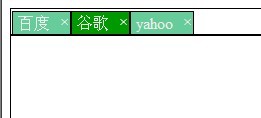
單一分頁
結構上,head 是 <span>,body 是 <iframe>:
var Tab = function(id, title, url, isClose) {
this.id = id;
this.title = title;
this.url = url;
this.head = jQuery('<span class="tab-head">' + this.title + '</span>');
this.body = jQuery('<iframe name="ifm' + this.id + '" src="' + this.url +
'" frameborder="0" class="tab-body"></iframe>').hide();
isClose && (this.close = jQuery('<span class="tab-head-closeBtn">×</span>'),
this.closeBtn());
};
Tab.prototype = {
closeBtn: function() {
var self = this;
self.close.bind("mouseover", function() { jQuery(this).addClass("tab-closeBtn-hover"); });
self.close.bind("mouseout", function() { jQuery(this).removeClass("tab-closeBtn-hover"); });
self.head.append(self.close);
},
getFocus: function() { this.head.addClass("tab-head-active"); this.body.show(); },
loseFocus: function() { this.head.removeClass("tab-head-active"); this.body.hide(); },
destory: function() { this.head.remove(); this.body.remove(); }
};
分頁容器
head 是 <div> 裡放多個 <span>,body 是另一個 <div> 放多個 <iframe>:
var TabView = function(container) {
  this.container = container;
  this.head = jQuery('<div class="tabView-head"></div>');
  this.body = jQuery('<div class="tabView-body"></div>');
  this.tabs = [];
  this.tabId = 0;
  this.focusTab = null;
  this.init();
};

TabView.prototype = {
  init: function() { this.container.append(this.head).append(this.body); },
  add: function(title, url, isClose) {
    var self = this;
    var tab = new Tab(self.tabId, title, url, isClose);
    self._tabEvents(tab);
    (self.tabs.length == 0) && (tab.getFocus(), self.focusTab = tab);
    self.tabs.push(tab);
    self.head.append(tab.head);
    self.body.append(tab.body);
    self.tabId++;
  },
  remove_ref: function(tab) {
    var self = this;
    for (var i = 0; i < self.tabs.length; i++) {
      if (tab.id === self.tabs[i].id) {
        tab.destory();
        self.tabs.splice(i, 1);
        return i;
      }
    }
    return -1;
  },
  destory: function() { this.head.remove(); this.body.remove(); },
  _tabEvents: function(tab) {
    var self = this;
    tab.head.bind("click", function() {
      if (self.focusTab.id != tab.id) {
        tab.getFocus();
        self.focusTab.loseFocus();
        self.focusTab = tab;
      }
    });
    tab.close && tab.close.bind("click", function() {
      tab.destory();
      var i = self.remove_ref(tab);
      if (tab.id == self.focusTab.id) {       // 關閉的是目前分頁
        if (self.tabs.length == 0) {          // 全關完了
          self.destory();
        } else {
          var nextIndex = self.tabs.length == i ? i - 1 : i;
          self.focusTab = self.tabs[nextIndex];
          self.focusTab.getFocus();
        }
      }
    });
  }
};
設計上值得說明的兩點
焦點轉移的邏輯。關掉目前分頁時,nextIndex 的計算處理了邊界:若被關掉的是最後一個,就退一格(i - 1),否則原本位置上的下一個會自動補上來(i)。這個細節決定了關閉分頁的手感順不順。
Tab 與 TabView 的職責切分。Tab 只管自己的顯示與隱藏,TabView 管集合與焦點調度。這種切分讓「新增一種類型的分頁」(例如載入外部 URL 而非 iframe)變成只需換掉 Tab 的實作。
實作上有幾處可以精簡:bind() 已改名為 on();destory 拼錯了(應為 destroy);用 jQuery('<iframe src="' + url + '">') 拼接 HTML 時,若 url 含引號會破壞結構,應改用屬性指派。另外 iframe 需要注意跨域時無法從外部控制其內容,這是瀏覽器的安全限制而非程式問題。
- 上一篇文章: 判斷頁面上某個控制項是否存在
- 下一篇文章: 原型鏈的由來:從 new Base() 談起