微信小程序加載更多 點擊查看更多
編輯:關於JavaScript
本文實例為大家分享了微信小程序加載更多功能實現的具體代碼,供大家參考,具體內容如下
微信小程序加載更多,是將之前的數據和點擊加載後請求的數據用concat拼接在一起並執行setData,下面是一個簡單的栗子:
index.wxml代碼如下
<view wx:for="{{duanziInfo}}" wx:for-item="name" wx:for-index="id">
 <view class="duanzi-view">
 <view class="duanzi-content">
 <text class="dz-content">{{name.content}}</text>
 </view>
 </view>
</view>
<view class="button-wrapper">
 <button type="default" size="default" loading="{{loading}}" disabled="{{disabled}}" bindtap="setLoading">
 {{loadText}}
 </button>
</view>
加載更多按鈕綁定setLoading
index.js文件代碼如下
Page({
 data: {
  loadText:'加載更多',
  duanziInfo:[]
 },
 //初始化請求
 onLoad: function (res) {
 var that = this
 //內容
 wx.request({
  url: 'http://xxxxx.com/index.php?m=Industry&a=getDuanziInfo',
  data: {token:token},
  method: 'GET',
  success: function(res){
  console.log(res.data.result) //打印初始化數據
  that.setData({
  duanziInfo:res.data.result
  })
  }
 })
 },
 //加載更多
 setLoading: function(e) {
 var duanziInfoBefore = this.data.duanziInfo
 var that = this
 wx.showToast({ //期間為了顯示效果可以添加一個過度的彈出框提示“加載中”
  title: '加載中',
  icon: 'loading',
  duration: 200
  })
 wx.request({
  url: 'http://xxxxx.com/index.php?m=Industry&a=getDuanziInfo',
  data: {token:token},
  method: 'GET',
  success: function(res){
  console.log(duanziInfoBefore.concat(res.data.result)) //打印拼接之後數據
  that.setData({
  loadText:"數據請求中",
  loading:true,
  duanziInfo:duanziInfoBefore.concat(res.data.result),
  loadText:"加載更多",
  loading:false,
  })
  }
 })
 }
})
初始化和加載更多中的打印數據如下
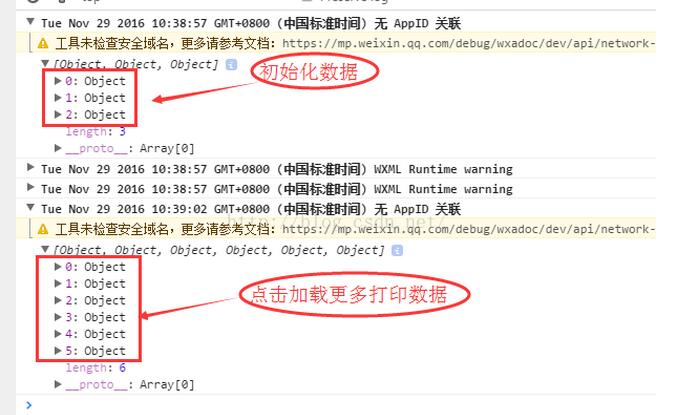
(以上是點擊查看更多,還可以根據距離視圖區域的距離來加載更多,具體實現是將視圖用<scroll-view>標簽,並給其一個固定高度,在給定參數中設置距離像素觸發事件。具體文檔:https://mp.weixin.qq.com/debug/wxadoc/dev/component/scroll-view.html?t=20161122)
為大家推薦現在關注度比較高的微信小程序教程一篇:《微信小程序開發教程》小編為大家精心整理的,希望喜歡。
以上就是本文的全部內容,希望對大家的學習有所幫助,也希望大家多多支持。
小編推薦
熱門推薦