理解Javascript文件動態加載
編輯:關於JavaScript
Javascript文件動態加載一直是比較困擾的一件事情,像網絡上傳的比較常見的做法:
function loadjs(fileurl){
 var sct = document.createElement("script");
 sct.src = fileurl;
 document.head.appendChild(sct);
}
然後我們來測試一下結果:
<html>
  <head>
   <link rel="stylesheet" type="text/css" href="//maxcdn.bootstrapcdn.com/bootstrap/3.3.2/css/bootstrap.min.css" media="screen" />
  </head>
  <body>
    <script>
    function loadjs(fileurl){
     var sct = document.createElement("script");
     sct.src = fileurl;
     document.head.appendChild(sct);
    }
    loadjs("http://code.jquery.com/jquery-1.12.0.js");
    loadjs("http://maxcdn.bootstrapcdn.com/bootstrap/3.3.2/js/bootstrap.min.js")

    loadjs("http://bootboxjs.com/bootbox.js")
    </script>
  </body>
</html>
代碼加載完後,會出現下圖的錯誤:
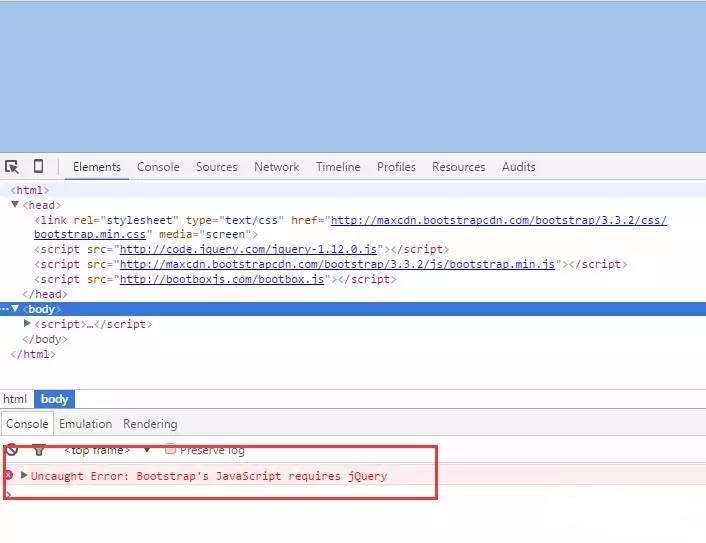
jquery明明是加載在第一個處理,為什麼還是報jQuery不存在的對象呢?
因為這樣加載,相當於開啟了三個線程,只是jquery這個文件先啟動線程,而jquery執行完這個線程的時間,超過了後面兩個時間. 因此後面執行完的,可能沒能找到jquery這個對象。
然這種方式怎麼處理呢?
其實文件的加載是有個狀態處理的.文件的加載有個onload事件,就是可以監聽文件是否加載完成的事件.
因此我們可以考慮這個方法來處理我們想要的結果.我們用直觀的方式來處理.改進後的代碼如下:
 <html>
  <head>
   <link rel="stylesheet" type="text/css" href="http://maxcdn.bootstrapcdn.com/bootstrap/3.3.2/css/bootstrap.min.css" media="screen" />
  </head>
  <body>
    <script>

    function loadjs(fileurl, fn){
     var sct = document.createElement("script");
     sct.src = fileurl;
     if(fn){
      sct.onload = fn;
     }
     document.head.appendChild(sct);
    }


    loadjs("http://code.jquery.com/jquery-1.12.0.js",function(){
     loadjs("http://maxcdn.bootstrapcdn.com/bootstrap/3.3.2/js/bootstrap.min.js",function(){
        loadjs("http://bootboxjs.com/bootbox.js")
     })
    });


    </script>
  </body>
</html>
OK,執行完這個代碼之後,加載文件都是在前一個加載完成後,才會加載另外一個,這樣就不會造成找不到用到的對象了.
然後我們來執行一個彈出框的效果,代碼裡面使用了 Bootbox.js 插件. 加載代碼如下:
loadjs("http://code.jquery.com/jquery-1.12.0.js",function(){
  loadjs("http://maxcdn.bootstrapcdn.com/bootstrap/3.3.2/js/bootstrap.min.js",function(){
       loadjs("http://bootboxjs.com/bootbox.js",function(){
          bootbox.alert("Hello world!", function() {
           Example.show("Hello world callback");
          });
       })
   })
 });
刷新頁面,就會直接顯示彈出框:
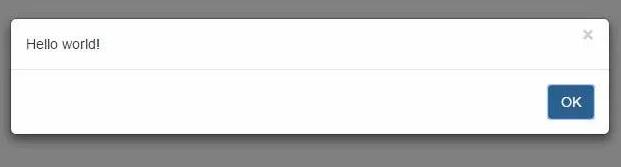
動態加載的代碼,往往容易在這裡花費很多時間調試.大家最好的辦法就是寫一個最簡單的例子,理解其中的原因. 這裡的代碼都可以進行封裝,還可以加入CSS文件的加載.作為自己的插件使用。
小編推薦
熱門推薦