javascript中字體浮動效果的簡單實例演示
編輯:關於JavaScript
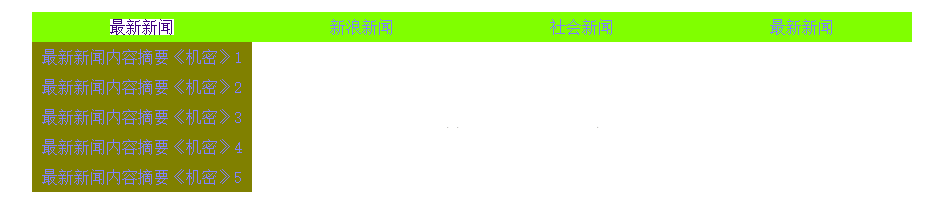
在淘寶,京東等其他網頁上我們能夠看到,當鼠標移上去的時候,能夠使其下面出現其它選項,現在就演示一下這種功能
主要是用到css裡面的display,以及鼠標觸發的事件onmouseover(),和onmouseout()方式,在加上css樣式的設置和標簽之間額使用就能實現。
具體如下:
1,為了很好的控制,采用了列表的樣式,並且在設置css樣式時很方便
2,采用了<a>標簽的樣式,能夠讓鼠標移上去對其他的有反應
具體的js函數寫的功能:
<script type="text/javascript">
    function open1(node){
      var node1=node;
      var nodes=node1.getElementsByTagName("ul")[0];
      with(nodes.style){
        display= (display=="block")? "none" : "block";
      }
    }
</script>
html部分的代碼:
<div id="news">
    <ul id="newsid1">
      <li onmouseover="open1(this)"; onmouseout="open1(this)">
        <!--<a href="javascript:void(0)" onmouseover="open1(this)"; onmouseout="open1(this)" >最新新聞</a> 在這裡,移動第一個之後就會消失,不能夠點擊下面的-->
        <a href="javascript:void(0)">最新新聞</a>
                <ul><!--這樣包裝為了能更好的封裝下面的內容,到時候鼠標移動上面,就能對下面的這個操作了-->
          <li><a href="http://www.baidu.com">最新新聞內容摘要《機密》1</a></li>
          <li><a href="http://www.baidu.com">最新新聞內容摘要《機密》2</a></li>
          <li><a href="http://www.baidu.com">最新新聞內容摘要《機密》3</a></li>
          <li><a href="http://www.baidu.com">最新新聞內容摘要《機密》4</a></li>
          <li><a href="http://www.baidu.com">最新新聞內容摘要《機密》5</a></li>
        </ul>
      </li>
      <li onmouseover="open1(this)"; onmouseout="open1(this)">
        <a href="javascript:void(0)" onclick="">新浪新聞</a>
        <ul>
           <li><a href="http://www.jb51.net">最新新聞內容摘要《機密》1</a></li>
          <li><a href="http://www.jb51.net">最新新聞內容摘要《機密》2</a></li>
          <li><a href="http://www.jb51.net">最新新聞內容摘要《機密》3</a></li>
          <li><a href="http://www.jb51.net">最新新聞內容摘要《機密》4</a></li>
          <li><a href="http://www.jb51.net">最新新聞內容摘要《機密》5</a></li>
        </ul>
      </li>
      <li onmouseover="open1(this)"; onmouseout="open1(this)">
        <a href="javascript:void(0)" onclick="">社會新聞</a>
        <ul>
          <li><a href="http://www.jb51.net">最新新聞內容摘要《機密》1</a></li>
          <li><a href="http://www.jb51.net">最新新聞內容摘要《機密》2</a></li>
          <li><a href="http://www.jb51.net">最新新聞內容摘要《機密》3</a></li>
          <li><a href="http://www.jb51.net">最新新聞內容摘要《機密》4</a></li>
          <li><a href="http://www.jb51.net">最新新聞內容摘要《機密》5</a></li>
        </ul>
      </li>
      <li onmouseover="open1(this)"; onmouseout="open1(this)">
        <a href="javascript:void(0)" onclick="">最新新聞</a>
        <ul>
           <li><a href="http://www.jb51.net">最新新聞內容摘要《機密》1</a></li>
          <li><a href="http://www.jb51.net">最新新聞內容摘要《機密》2</a></li>
          <li><a href="http://www.jb51.net">最新新聞內容摘要《機密》3</a></li>
          <li><a href="http://www.jb51.net">最新新聞內容摘要《機密》4</a></li>
          <li><a href="http://www.jb51.net">最新新聞內容摘要《機密》5</a></li>
        </ul>
      </li></ul></div>
除了上面很重要css的設置也很重要,如下:
<style type="text/css">
    #newsid1 {
      list-style:none;
    }
    #newsid1 li ul{
      list-style:none;
      margin:0px;
      padding:0px;
    }
    #newsid1 li{
      float:left;/*讓其並排顯示*/
      width:220px;
      text-align:center;
      background-color:#80ff00;
      /*設置寬度,讓每一列平均顯示*/
    }
    #newsid1 li a{
      color:#8080ff;
      text-decoration:none;/*讓超鏈接下面沒有橫線*/
      text-align:center;
      line-height:30px;

    }
    #newsid1 li a:hover{
      /*a:hover移上去有反應設置的具體的顏色和背景顏色
*/
      color:#400080;
      background-color:#ffffff;
    }
    #newsid1 li ul li{
      line-height:30px;
      color:#ff8040;
      background-color:#808000;;
    }
    #newsid1 li ul{
      display:none;/*默認的必須全部隱藏,然後在鼠標移上去觸發時間之後設置 dispaly:block;
*/
    }
  </style>
效果圖 1:鼠標沒有移上去時候

效果圖 2 :
完整代碼:
<!DOCTYPE html>
<html>
 <head>
  <!--主要目的  當鼠標滑過文字時候出現其他文字顯示
    采用<ul>和<li><a href="標題"><ul><li>隱藏的內容
    采用大量的css模型進行修飾
    傳入this對象
    function open1(node){
      var node1=node;
      var nodes=node1.getElementsByTagName("ul")[0];
      with(nodes.style){
        display= (display=="block")? "none" : "block";
      }
    }
  -->
  <title>Menufloat.html</title>
  <style type="text/css">
    #newsid1 {
      list-style:none;
    }
    #newsid1 li ul{
      list-style:none;
      margin:0px;
      padding:0px;
    }
    #newsid1 li{
      float:left;/*讓其並排顯示*/
      width:220px;
      text-align:center;
      background-color:#80ff00;
      /*設置寬度,讓每一列平均顯示*/
    }
    #newsid1 li a{
      color:#8080ff;
      text-decoration:none;/*讓超鏈接下面沒有橫線*/
      text-align:center;
      line-height:30px;

    }
    #newsid1 li a:hover{
      /*a:hover移上去有反應設置的具體的顏色和背景顏色
*/
      color:#400080;
      background-color:#ffffff;
    }
    #newsid1 li ul li{
      line-height:30px;
      color:#ff8040;
      background-color:#808000;;
    }
    #newsid1 li ul{
      display:none;/*默認的必須全部隱藏,然後在鼠標移上去觸發時間之後設置 dispaly:block;
*/
    }
  </style>
  <script type="text/javascript">
    function open1(node){
      var node1=node;
      var nodes=node1.getElementsByTagName("ul")[0];
      with(nodes.style){
        display= (display=="block")? "none" : "block";
      }
    }
  </script>
  <!--<link rel="stylesheet" type="text/css" href="./styles.css">-->

 </head>

 <body>
  <div id="news">
    <ul id="newsid1">
      <li onmouseover="open1(this)"; onmouseout="open1(this)">
        <!--<a href="javascript:void(0)" onmouseover="open1(this)"; onmouseout="open1(this)" >最新新聞</a> 在這裡,移動第一個之後就會消失,不能夠點擊下面的-->
        <a href="javascript:void(0)">最新新聞</a>
                <ul><!--這樣包裝為了能更好的封裝下面的內容,到時候鼠標移動上面,就能對下面的這個操作了-->
          <li><a href="http://www.jb51.net">最新新聞內容摘要《機密》1</a></li>
          <li><a href="http://www.jb51.net">最新新聞內容摘要《機密》2</a></li>
          <li><a href="http://www.jb51.net">最新新聞內容摘要《機密》3</a></li>
          <li><a href="http://www.jb51.net">最新新聞內容摘要《機密》4</a></li>
          <li><a href="http://www.jb51.net">最新新聞內容摘要《機密》5</a></li>
        </ul>
      </li>
      <li onmouseover="open1(this)"; onmouseout="open1(this)">
        <a href="javascript:void(0)" onclick="">新浪新聞</a>
        <ul>
           <li><a href="http://www.jb51.net">最新新聞內容摘要《機密》1</a></li>
          <li><a href="http://www.jb51.net">最新新聞內容摘要《機密》2</a></li>
          <li><a href="http://www.jb51.net">最新新聞內容摘要《機密》3</a></li>
          <li><a href="http://www.jb51.net">最新新聞內容摘要《機密》4</a></li>
          <li><a href="http://www.jb51.net">最新新聞內容摘要《機密》5</a></li>
        </ul>
      </li>
      <li onmouseover="open1(this)"; onmouseout="open1(this)">
        <a href="javascript:void(0)" onclick="">社會新聞</a>
        <ul>
          <li><a href="http://www.jb51.net">最新新聞內容摘要《機密》1</a></li>
          <li><a href="http://www.jb51.net">最新新聞內容摘要《機密》2</a></li>
          <li><a href="http://www.jb51.net">最新新聞內容摘要《機密》3</a></li>
          <li><a href="http://www.jb51.net">最新新聞內容摘要《機密》4</a></li>
          <li><a href="http://www.jb51.net">最新新聞內容摘要《機密》5</a></li>
        </ul>
      </li>
      <li onmouseover="open1(this)"; onmouseout="open1(this)">
        <a href="javascript:void(0)" onclick="">最新新聞</a>
        <ul>
           <li><a href="http://www.jb51.net">最新新聞內容摘要《機密》1</a></li>
          <li><a href="http://www.jb51.net">最新新聞內容摘要《機密》2</a></li>
          <li><a href="http://www.jb51.net">最新新聞內容摘要《機密》3</a></li>
          <li><a href="http://www.jb51.net">最新新聞內容摘要《機密》4</a></li>
          <li><a href="http://www.jb51.net">最新新聞內容摘要《機密》5</a></li>
        </ul>
      </li>

    </ul>

  </div>
 </body>
</html>
小編推薦
熱門推薦