JavaScript實現將數組數據添加到Select下拉框的方法
編輯:關於JavaScript
本文實例講述了JavaScript實現將數組數據添加到Select下拉框的方法。分享給大家供大家參考。具體如下:
這裡演示將數組中的數據添加到Select下拉菜單中的效果,當你點擊下拉框的時候,就動態加載了數據,更換Select內容的時候,直接替換數組中的內容就可以了。適合前端設計者實現前台的部分本地化腳本操作。
運行效果截圖如下:
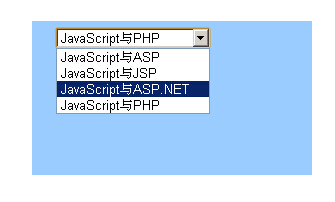
在線演示地址如下:
http://demo.jb51.net/js/2015/js-array-add-select-data-codes/
具體代碼如下:
<!DOCTYPE HTML PUBLIC "-//W3C//DTD HTML 4.01 Transitional//EN"
"http://www.w3.org/TR/html4/loose.dtd">
<html>
<head>
<meta http-equiv="Content-Type" content="text/html; charset=gb2312">
<title>將數組中的數據添加到下拉菜單中</title>
<style type="text/css">
<!--
.style1 {color: #FFFFFF}
-->
</style>
<script type="text/javascript">
var counts;
counts=0;
arr = new Array("JavaScript與ASP","JavaScript與JSP","JavaScript與ASP.NET","JavaScript與PHP");
counts=arr.length;
function Myselect(){
 var i;
 for (i=0;i < counts; i++) {
 document.form1.sel.options[i] = new Option(arr[i],i);
 }
}
</script>
</head>
<body>
<table width="280" height="160" border="0" align="center" cellpadding="5" cellspacing="0">
 <tr>
 <td height="34" align="center"><span class="style1" style="font-weight:bold ">將數組中的數據添加到下拉菜單中</span></td>
 </tr>
 <tr>
 <td align="center" valign="top" bgcolor="#9ACCFF"><form name="form1">
  <table width="235" height="69" border="0" align="center" cellpadding="0" cellspacing="0">
  <tr>
   <td height="21"><select name="sel" id="sel" onFocus="Myselect()">
   </select></td>
  </tr>
  <tr>
   <td height="120"> </td>
  </tr>
  </table>
 </form></td>
 </tr>
</table>
</body>
</html>
希望本文所述對大家的javascript程序設計有所幫助。
小編推薦
熱門推薦