用 jQuery 限制輸入框字數並即時提示剩餘字數
編輯:關於JavaScript
後台常見需求:文章摘要之類的欄位,字數必須可控。下面這個外掛會即時顯示「還能輸入幾個字」,超出的時候變色警告,同時自動停用送出按鈕。
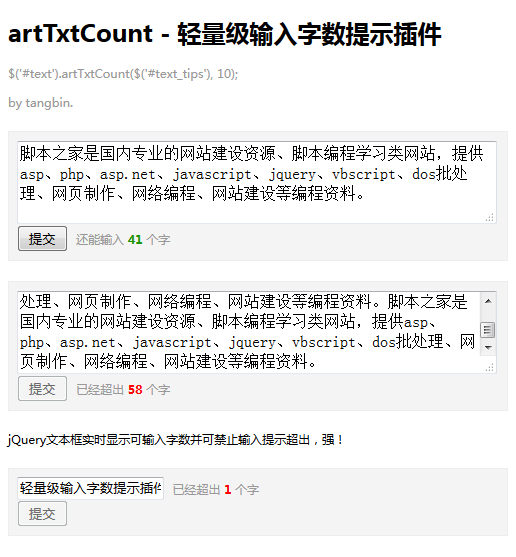
<!DOCTYPE HTML>
<html>
<head>
<meta charset="utf-8">
<title>字數限制測試</title>
<script type="text/javascript" src="https://apps.bdimg.com/libs/jquery/1.4.2/jquery.min.js"></script>
<script type="text/javascript">
(function ($) {
  // tipWrap: 提示訊息的容器
  // maxNumber: 最大可輸入字數
  $.fn.artTxtCount = function (tipWrap, maxNumber) {
    var countClass = 'js_txtCount',    // 內部容器的 CSS class
        fullClass = 'js_txtFull',      // 超出字數時的 CSS class
        disabledClass = 'disabled';    // 送出按鈕停用狀態的 CSS class

    var count = function () {
      var btn = $(this).closest('form').find(':submit'),
          val = $(this).val().length,
          disabled = {
            on: function () {
              btn.removeAttr('disabled').removeClass(disabledClass);
            },
            off: function () {
              btn.attr('disabled', 'disabled').addClass(disabledClass);
            }
          };

      if (val == 0) disabled.off();

      if (val <= maxNumber) {
        if (val > 0) disabled.on();
        tipWrap.html('<span class="' + countClass + '">還能輸入 <strong>'
          + (maxNumber - val) + '</strong> 個字</span>');
      } else {
        disabled.off();
        tipWrap.html('<span class="' + countClass + ' ' + fullClass + '">已經超出 <strong>'
          + (val - maxNumber) + '</strong> 個字</span>');
      }
    };

    $(this).bind('keyup change', count);
    return this;
  };
})(jQuery);

// 使用示範
jQuery(function () {
  // 批次套用
  $('.autoTxtCount').each(function () {
    $(this).find('.text').artTxtCount($(this).find('.tips'), 140);
  });

  // 單獨套用
  $('#test').artTxtCount($('#test_tips'), 10);
});
</script>
<style>
body { font-size: 75%; font-family: '微軟雅黑'; }
#demo { width: 500px; }
#demo .help, #demo .help a { color: #999; }
#demo form { margin: 20px 0; padding: 8px; background: #F4F4F4; border: 1px solid #EDEDED; }
#demo .tips { color: #999; padding: 0 5px; }
#demo .tips strong { color: #1E9300; }
#demo .tips .js_txtFull strong { color: #F00; }
#demo textarea.text { width: 474px; }
</style>
</head>
<body>
<div id="demo">
  <h1>artTxtCount - 輕量級輸入字數提示外掛</h1>
  <p class="help">$('#text').artTxtCount($('#text_tips'), 10);</p>

  <form class="autoTxtCount" action="" method="get">
    <div><textarea class="text" name="" cols="50" rows="3"></textarea></div>
    <div>
      <button type="submit">提交</button>
      <span class="tips"></span>
    </div>
  </form>

  <form class="autoTxtCount" action="" method="get">
    <div><textarea class="text" name="" cols="50" rows="3"></textarea></div>
    <div>
      <button type="submit">提交</button>
      <span class="tips"></span>
    </div>
  </form>

  <form action="" method="get">
    <input class="text" id="test" name="" type="text" />
    <span id="test_tips" class="tips"></span><br />
    <button type="submit">提交</button>
  </form>
</div>
</body>
</html>
幾個實作細節:
- 監聽
keyup與change兩個事件,前者處理打字,後者涵蓋貼上與程式化改值的情況。 - 用
$(this).closest('form').find(':submit')找到所屬表單的送出按鈕,因此同一頁可以有多組互不干擾。 - 字數為 0 時停用送出,避免送出空白內容;超出上限時也停用並以紅字標示超出量。
- 回傳
this以維持鏈式呼叫,並支援批次初始化,這是好外掛該有的基本禮貌。