JavaScript 將十六進位色碼轉為 RGB:原生實作與原理解析
編輯:關於JavaScript
做主題配色、取色工具或 canvas 繪圖時,常需要把 #ff9900 這種十六進位色碼拆成 R、G、B 三個數字。這個轉換的數學很簡單,本文示範如何用原生 JavaScript 完成,並附一個可直接操作的頁面。
轉換原理
六位十六進位色碼其實是三組兩位數的組合:前兩位是紅、中間兩位是綠、後兩位是藍。每組的範圍是 00 到 FF,也就是十進位的 0 到 255。所以只要切三段,各自用 parseInt(str, 16) 轉成十進位即可。
程式碼
<!DOCTYPE html PUBLIC "-//W3C//DTD XHTML 1.0 Transitional//EN" "https://www.w3.org/TR/xhtml1/DTD/xhtml1-transitional.dtd">
<html xmlns="https://www.w3.org/1999/xhtml">
<head>
<meta http-equiv="Content-Type" content="text/html; charset=utf-8" />
<title>16進制顏色值轉RGB</title>
<style>
*{ margin:0; padding:0; font-family:'Microsoft yahei' }
.replace{ width:400px; height:210px; margin:0 auto; padding-top:40px; }
.title{ text-align:center; display:block }
form{ width:200px; margin:30px auto; }
input{ outline:none; }
input[type="button"]{ cursor:pointer; }
</style>
<script>
function hexToR(h) {
  return parseInt((cutHex(h)).substring(0, 2), 16)
}
function hexToG(h) {
  return parseInt((cutHex(h)).substring(2, 4), 16)
}
function hexToB(h) {
  return parseInt((cutHex(h)).substring(4, 6), 16)
}
// 去掉開頭可能存在的 # 號
function cutHex(h) {
  return h.charAt(0) == "#" ? h.substring(1, 7) : h
}
function setBgColorById(id, sColor) {
  var elems;
  if (document.getElementById) {
    if (elems = document.getElementById(id)) {
      if (elems.style) elems.style.backgroundColor = sColor;
    }
  }
}
</script>
</head>
<body>
  <div class="replace">
    <span class="title">JavaScript原生16進制顏色值轉RGB值</span>
    <form name="rgb">
      <input value="ffffff" maxlength="7" size="16" name="hex" />
      <input onclick="setBgColorById('colorSample', this.form.hex.value);
        this.form.r.value = hexToR(this.form.hex.value);
        this.form.g.value = hexToG(this.form.hex.value);
        this.form.b.value = hexToB(this.form.hex.value);"
        value="轉換" type="button" name="btn"/>
      <br /><br />
      R:<input style="width:30px" size="3" name="r" />
      G:<input style="width:30px" size="3" name="g" />
      B:<input style="width:30px" size="3" name="b" />
    </form>
  </div>
</body>
</html>
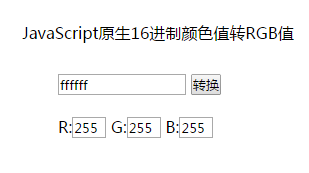
運行效果
為什麼要寫 cutHex
使用者輸入時可能帶 # 也可能不帶,cutHex 就是為了統一處理這個差異:若首字元是 #,就從索引 1 開始取六位。少了這一步,輸入 #ffffff 時 substring(0,2) 會得到 "#f",parseInt("#f", 16) 回傳 NaN,畫面就會出現空白欄位。
一個更短的现代寫法
現在可以直接用 slice 搭配字串展開完成同樣的事:
function hexToRgb(hex){
  var h = hex.replace('#', '');
  if (h.length === 3) h = h.split('').map(function(c){ return c + c }).join('');
  return {
    r: parseInt(h.slice(0, 2), 16),
    g: parseInt(h.slice(2, 4), 16),
    b: parseInt(h.slice(4, 6), 16)
  };
}
// hexToRgb('#f90') → { r: 255, g: 153, b: 0 }
這裡額外處理了「三位數縮寫」(如 #f90 等價於 #ff9900),是原版沒有的。若需要反方向的 RGB 轉 HEX,用 ('#0' + n.toString(16)).slice(-2) 就能補零輸出兩位字串。