socket.io 命名空間(namespace)實作教學
編輯:關於JavaScript
如果你只是想在自己開發的應用程式裡完全掌控訊息與事件的收發,那麼使用預設的 / 命名空間就已足夠。但如果你打算把應用程式當成第三方服務提供給其他程式使用,就應該為對外提供的 socket 連接定義獨立的命名空間,避免訊息互相干擾。
io.of(namespace)
建立 chat 與 news 兩個命名空間
伺服器端:
var express = require("express");
var http    = require("http");
var sio     = require("socket.io");

var app    = express();
var server = http.createServer(app);

app.get("/", function (req, res) {
  res.sendfile(__dirname + "/index.html");
});

server.listen(1337, "127.0.0.1", function () {
  console.log("開始監聽1337");
});

var io = sio.listen(server);

var chart = io.of("/chat").on("connection", function (socket) {
  socket.send("歡迎訪問chat空間!");
  socket.on("message", function (msg) {
    console.log("chat命名空間接收到信息:" + msg);
  });
});

var news = io.of("/news").on("connection", function (socket) {
  socket.emit("send message", "歡迎訪問news空間!");
  socket.on("send message", function (data) {
    console.log("news命名空間接受到send message事件,數據為:" + data);
  });
});
客戶端:
<!DOCTYPE html>
<html>
<head lang="en">
  <meta charset="UTF-8">
  <title></title>
  <script src="/socket.io/socket.io.js"></script>
  <script>
    var chat = io.connect("https://localhost/chat"),
        news = io.connect("https://localhost/news");

    chat.on("connect", function () {
      chat.send("你好.");
      chat.on("message", function (msg) {
        console.log("從chat空間接收到消息:" + msg);
      });
    });

    news.on("connect", function () {
      news.emit("send message", "hello");
      news.on("send message", function (data) {
        console.log("從news命名空間接收到send message事件,數據為:" + data);
      });
    });
  </script>
</head>
<body>
</body>
</html>
執行結果
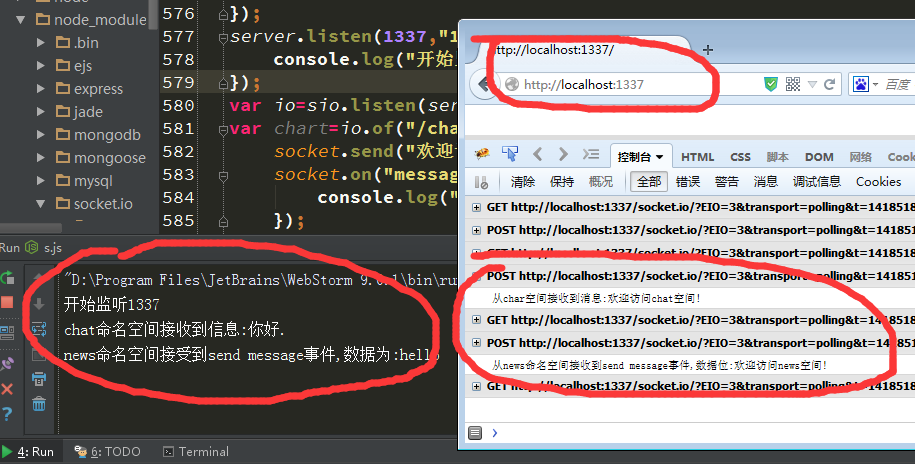
兩個命名空間彼此獨立,訊息不會互相串流。掌握這個技巧後,你就能在同一個 socket.io 服務上,為不同業務模組切分出乾淨的通道。
- 上一篇文章: Node.js 中 fs.fstatSync 方法詳解與使用教學
- 下一篇文章: 如何在 Express 專案中整合 socket.io