Ext4.2 中 RowExpander 無法觸發事件的解決辦法
編輯:關於JavaScript
Ext4.2+ 的 Ext.grid.plugin.RowExpander 存在 bug:添加的 collapsebody、expandbody 事件無法觸發。查看源碼發現它根本沒有添加這兩個事件,即使按網上方法重寫 init 和 toggleRow 方法也無法觸發。
解決辦法是:給 grid 對象添加 collapsebody、expandbody 事件並配置這兩個事件,同時重寫 RowExpander 的 toggleRow 方法,在其中觸發 grid 上添加的這兩個事件即可。
測試源代碼如下:
 <!DOCTYPE html PUBLIC "-//W3C//DTD XHTML 1.0 Transitional//EN" "https://www.w3.org/TR/xhtml1/DTD/xhtml1-transitional.dtd">
 <html>
 <head>
 <meta http-equiv="Content-Type" content="text/html; charset=gb2312">
 <title>Ext4.2+ RowExpander無法觸發collapsebody,expandbody事件解決辦法</title>
 <link rel="stylesheet" type="text/css" href="../../resources/css/ext-all.css" />
 <script type="text/javascript" src="../../ext-all-debug.js"></script>
 <script>
 Ext.override(Ext.grid.plugin.RowExpander, {
 // Override to fire collapsebody & expandbody
 init: function(grid) {
 this.callParent(arguments);
 //存儲grid對象
 this.grid=grid
 this.grid.addEvents('collapsebody', 'expandbody');//給grid對象添加事件
 },
 toggleRow: function(rowIdx, record) {
 var me = this, view = me.view, rowNode = view.getNode(rowIdx), row = Ext.fly(rowNode, '_rowExpander'), nextBd = row.down(me.rowBodyTrSelector, true), isCollapsed = row.hasCls(me.rowCollapsedCls), addOrRemoveCls = isCollapsed ? 'removeCls' : 'addCls', ownerLock, rowHeight, fireView;
 Ext.suspendLayouts();
 row[addOrRemoveCls](me.rowCollapsedCls);
 Ext.fly(nextBd)[addOrRemoveCls](me.rowBodyHiddenCls);
 me.recordsExpanded[record.internalId] = isCollapsed;
 view.refreshSize();
 if (me.grid.ownerLockable) {
 ownerLock = me.grid.ownerLockable;
 view = ownerLock.lockedGrid.view;
 fireView=ownerLock.lockedGrid.view;
 rowHeight = row.getHeight();
 row.setHeight(isCollapsed ? rowHeight : '');
 row = Ext.fly(view.getNode(rowIdx), '_rowExpander');
 row.setHeight(isCollapsed ? rowHeight : '');
 row[addOrRemoveCls](me.rowCollapsedCls);
 view.refreshSize();
 } else {
 fireView = view;
 }
 //通過grid觸發事件,而不是view
 this.grid.fireEvent(isCollapsed ? 'expandbody' : 'collapsebody', row.dom, record, nextBd);
 Ext.resumeLayouts(true);
 },
 });
 Ext.onReady(function() {
 Ext.QuickTips.init();
 var store = new Ext.data.Store({
 fields:[
 {name:'fileName',type:'string'},
 {name:'room',type:'string'},
 {name:'recordDate',type:'string'},
 ],
 data:[
 {fileName:'文件1',room:'會議室1',recordDate:'2014-07-03'},
 {fileName:'文件2',room:'會議室2',recordDate:'2014-07-03'},
 {fileName:'文件3',room:'會議室3',recordDate:'2014-07-03'}
 ],
 autoLoad:true
 });
 var expander = new Ext.grid.plugin.RowExpander({
 rowBodyTpl:new Ext.XTemplate('<div class="detailData">pp</div>'),
 listeners:{
 expandbody:function(){//無法觸發
 console.log('Ext.grid.plugin.RowExpander');
 }
 }
 });
 Ext.create('Ext.grid.Panel',{
 xtype: 'row-expander-grid',
 store: store,
 listeners:{
 expandbody:function(){//OK,可以觸發
 console.log('fired from grid');
 }
 },
 renderTo:Ext.getBody(),
 columns: [
 {text: "文件名稱", flex: 1, dataIndex: 'fileName'},
 {text: "會議室", dataIndex: 'room'},
 {text: "錄制日期", renderer: Ext.util.Format.dateRenderer('Y-m-d'), dataIndex: 'recordDate'}
 ],
 width: 600,
 height: 300,
 plugins:expander,
 collapsible: true,
 animCollapse: false,
 title: 'Expander Rows in a Collapsible Grid',
 iconCls: 'icon-grid'
 });
 });
 </script>
 </head>
 <body id="docbody"></body>
 </html>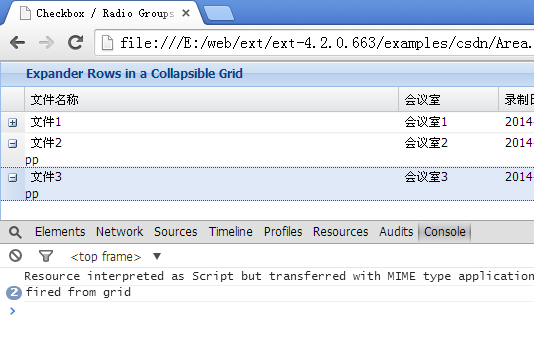
關鍵點在於把事件綁定與觸發的對象從 view 改為 grid,這樣监听 grid 的地方就能正常收到 expandbody / collapsebody 了。
- 上一篇文章: 用 JS 設置控件隱藏與顯示的兩種方法
- 下一篇文章: window.open 提示「已經計劃系統關機」的原因分析
熱門推薦