仿糯米團彈窗效果 Demo 實作分享
編輯:關於JavaScript
本文分享一個仿糯米團登陸彈窗效果的完整 Demo,包含半透明遮罩、置中彈窗、關閉按鈕,以及點擊城市欄位時展開熱門城市列表的互動效果。
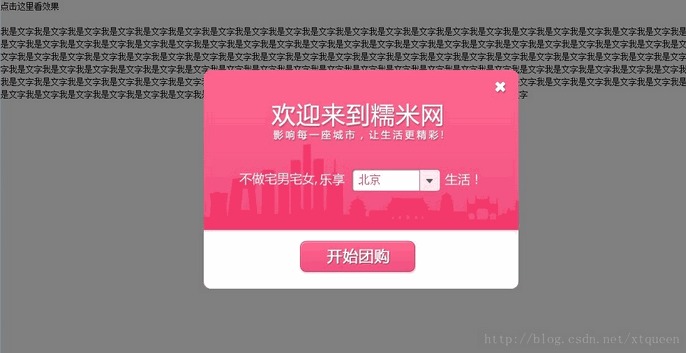
程式碼如下:
<!doctype html>
<html lang="en">
<head>
<meta charset="UTF-8">
<title>Tabs</title>
<style type="text/css">
/* 樣式重置與版面配置 */
body,h1,h2,h3,h4,h5,h6,hr,p,blockquote,dl,dt,dd,ul,ol,li,pre,form,fieldset,legend,button,input,textarea,th,td { margin:0; padding:0; }
body,button,input,select,textarea { font:12px/1.5 宋體,arial,sans-serif; }
ul,ol { list-style:none; }
a { text-decoration:none; }
a:hover { text-decoration:underline; }
.clearfix:after { content:'\20'; display:block; height:0; clear:both; }
.clearfix { *zoom:1; }
</style>
</head>
<body>
<style type="text/css">
body { height:1000px; }
.dialog-wrap, .dialog { display:none; }
.dialog-wrap { position:absolute; top:0px; left:0px; width:100%; z-index:99; background:#000; }
.dialog { border:10px; background:url(images/welcome91981.png) no-repeat; z-index:199; position:fixed; _position:absolute; width:451px; height:313px; top:50%; left:50%; margin:-156px 0px 0px -225px; border-radius:10px; text-align:left; }
.dialog .close { position:absolute; width:18px; height:18px; top:16px; right:16px; z-index:205; }
.cityBox { position:absolute; cursor:pointer; top:143px; left:212px; height:30px; line-height:30px; font-size:16px; color:#f4396d; padding:0 30px 0 10px; z-index:200; }
.cityBox span { width:90px; overflow:hidden; white-space:nowrap; text-overflow:ellipsis; display:inline-block }
.hotCityBox { position:absolute; width:272px; top:160px; left:170px; display:none; z-index:200; }
.hotCityList { background:#fff; border-radius:5px; box-shadow:1px 1px 1px #333; top:22px; position:absolute; width:270px; border:1px solid #ddd; z-index:202; }
.hotCityList p a { padding:0 8px; height:22px; line-height:22px; color:#333; font-size:14px; margin:3px 5px; display:inline-block; float:left }
.hotCityList p a:hover { background:#f55583; color:#fff; text-decoration:none }
.evet { display:none; position:absolute; top:0px; left:0px; width:100%; height:100%; z-index:198; }
</style>
<div class="dialog-wrap"></div>
<div class="dialog">
<div class="city-box">
<div class="close"><a title="關閉" href="javascript:close_dialog();"></a></div>
<div class="cityBox"><span>北京</span></div>
<div class="hotCityBox">
<div class="hotCityList">
<p class="clearfix">
<a href="">北京</a><a href="">上海</a><a href="">天津</a><a href="">杭州</a><a href="">西安</a><a href="">成都</a><a href="">鄭州</a><a href="">廈門</a><a href="">青島</a><a href="">深圳</a><a href="">太原</a><a href="">重慶</a><a href="">武漢</a><a href="">南京</a><a href="">廣州</a><a href="">沈陽</a><a href="">濟南</a><a href="">哈爾濱</a>
</p>
</div>
</div>
<div class="cityConfirm"><a title="開始團購" href=""></a></div>
<div class="evet"></div>
</div>
</div>
<script type="text/javascript" src="jquery.js"></script>
<script type="text/javascript">
function dialog(){
  var h = $('body').height();
  $('.dialog-wrap').css({'height':h,'opacity':0.5,'display':'block'});
  $('.dialog').show();
}
function close_dialog(){
  $('.dialog, .dialog-wrap').hide();
}
$('.cityBox').click(function(){
  $('.hotCityBox, .evet').show();
});
$('.evet, .dialog-wrap').click(function(){
  $('.hotCityBox, .evet').hide();
  $('.evet').hide();
});
</script>
<p onClick="dialog()" style="cursor:pointer">點擊這裡看效果</p>
<br>
我是文字我是文字文字我字我是文字我是文字
</body>
</html>
這個 Demo 的幾個設計重點包括:以 .dialog-wrap 作為半透明黑色遮罩,並透過 dialog() 函式動態設定其高度與透明度;彈窗 .dialog 使用 position:fixed 搭配負的 margin 實現置中;城市選擇則透過點擊 cityBox 展開 hotCityBox,並以 .evet 作為透明覆蓋層,點擊空白處即可收起列表。整體大量運用 jQuery 的事件綁定與樣式操作,是練習彈窗互動相當不錯的範例。
- 上一篇文章: JS 取得客戶端 IP、MAC 與主機名的七種方法匯總
- 下一篇文章: 支付頁面 Demo 分享(附截圖)