支付頁面 Demo 分享(附截圖)
編輯:關於JavaScript
本文分享一個線上充值/支付的頁面 Demo,示範了金額輸入、銀行選擇與表單提交等常見的支付介面元素。
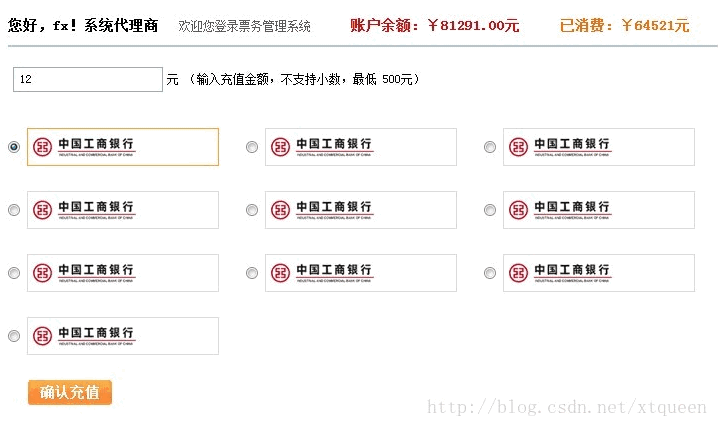
程式碼如下:
<!DOCTYPE html PUBLIC "-//W3C//DTD XHTML 1.0 Transitional//EN" "https://www.w3.org/TR/xhtml1/DTD/xhtml1-transitional.dtd">
<html xmlns="https://www.w3.org/1999/xhtml">
<head>
<meta http-equiv="Content-Type" content="text/html; charset=utf-8" />
<link rel="stylesheet" type="text/css" href="https://yanshi.bj8dream.com/static/xiaoniren/css/common.css" />
<base target="_self" />
<title>思瑜科技在線充值</title>
<script type="text/javascript" src="https://yanshi.bj8dream.com/static/xiaoniren/js/jQuery_v172_min.js"></script>
<style type="text/css">
.ui-list-icons li { float:left; margin:0px 10px 25px 0px; width:218px; padding-right:10px; display:inline; }
.ui-list-icons li input { vertical-align:middle; }
.ui-list-icons li .icon-box { cursor:pointer; width:190px; background:#FFF; line-height:36px; border:1px solid #DDD; vertical-align:middle; position:relative; display:inline-block; zoom:1; }
.ui-list-icons li .icon-box.hover, .ui-list-icons li .icon-box.current { border:1px solid #FA3; }
.ui-list-icons li .icon { float:left; width:126px; padding:0px; height:36px; display:block; line-height:30px; color:#07f; font-weight:bold; white-space:nowrap; overflow:hidden; position:relative; z-index:1; }
.ui-list-icons li .bank-name { position:absolute; left:5px; z-index:0; height:36px; width:121px; overflow:hidden; }
.ui-list-icons li .ABC, .ui-list-icons li .ICBC, .ui-list-icons li .CCB { background:#FFF url(images/ICBC_bank.gif) no-repeat 5px center; }
.paybok { padding:0px 0px 0px 20px; }
.paybok .csbtx { border-radius:3px; color:#FFF; font-weight:bold; }
</style>
<script type="text/javascript">
$(function(){
  // 銀行選項 hover 效果
  $('.ui-list-icons > li').hover(function(){
    $(this).children('.icon-box').addClass('hover');
  }, function(){
    $(this).children('.icon-box').removeClass('hover');
  });
  // 銀行選項點擊選中效果
  $('.ui-list-icons > li').click(function(){
    for (var i = 0; i < $('.ui-list-icons > li').length; i++) {
      $('.ui-list-icons > li').eq(i).children('.icon-box').removeClass('current');
    }
    $(this).children('.icon-box').addClass('current');
  });
})
</script>
</head>
<body>
<div class="paying">
<p class="paytit">
<strong>您好,fx!系統代理商</strong>
<span>歡迎您登錄票務管理系統</span>
<em>賬戶余額:¥81291.00元</em>
<i>已消費:¥64521元</i>
</p>
<form action="/huayi_test/order/charge.php" method="post" class="validator" name="f" onsubmit="return chongzhi();">
<div class="payamont">
<input type="text" id="money" name="money" value="" />
<span>元 (輸入充值金額,不支持小數,最低 500元)</span>
</div>
<div class="clr"></div>
<ul class="ui-list-icons clrfix">
<li>
<input type="radio" name="bank" id="ABC" value="" checked="checked">
<label class="icon-box current" for="ABC"><span class="icon ABC" title="中國農業銀行"></span><span class="bank-name">中國農業銀行</span></label>
</li>
<li>
<input type="radio" name="bank" id="ICBC" value="">
<label class="icon-box" for="ICBC"><span class="icon ICBC" title="中國工商銀行"></span><span class="bank-name">中國工商銀行</span></label>
</li>
<li>
<input type="radio" name="bank" id="CCB" value="">
<label class="icon-box" for="CCB"><span class="icon CCB" title="中國建設銀行"></span><span class="bank-name">中國建設銀行</span></label>
</li>
<li>
<input type="radio" name="bank" id="PSBC" value="">
<label class="icon-box" for="PSBC"><span class="icon PSBC" title="中國郵政儲蓄銀行"></span><span class="bank-name">中國郵政儲蓄銀行</span></label>
</li>
<li>
<input type="radio" name="bank" id="BOC" value="">
<label class="icon-box" for="BOC"><span class="icon BOC" title="中國銀行"></span><span class="bank-name">中國銀行</span></label>
</li>
<li>
<input type="radio" name="bank" id="CMB" value="">
<label class="icon-box" for="CMB"><span class="icon CMB" title="招商銀行"></span><span class="bank-name">招商銀行</span></label>
</li>
<li>
<input type="radio" name="bank" id="COMM" value="">
<label class="icon-box" for="COMM"><span class="icon COMM" title="交通銀行"></span><span class="bank-name">交通銀行</span></label>
</li>
<li>
<input type="radio" name="bank" id="SPDB" value="">
<label class="icon-box" for="SPDB"><span class="icon SPDB" title="浦發銀行"></span><span class="bank-name">浦發銀行</span></label>
</li>
<li>
<input type="radio" name="bank" id="CEB" value="">
<label class="icon-box" for="CEB"><span class="icon CEB" title="中國光大銀行"></span><span class="bank-name">中國光大銀行</span></label>
</li>
</ul>
<div class="paybok"><input class="csbtx" type="button" value="確認充值" onclick="this.form.submit();" /></div>
</form>
</div>
</body>
</html>
這個 Demo 的幾個亮點在於:以 label 搭配隱藏的 radio 實作可點擊的銀行卡片,透過 .current 與 .hover 兩個 class 切換選中與滑過時的邊框高亮;jQuery 部分則負責處理滑過效果與點擊時的唯一選中邏輯(先清除所有 current,再為當前項加上 current)。這種以 label 包覆單選鈕的做法,能兼顧可訪問性與視覺呈現,是製作支付、表單選擇類介面時相當實用的技巧。
- 上一篇文章: 仿糯米團彈窗效果 Demo 實作分享
- 下一篇文章: 網站接入 QQ 登入的兩種方法教學