jQuery 入門教學(三):事件綁定與命名空間
編輯:關於JavaScript
事件是互動式頁面的骨架。jQuery 把這件事整理得相當清爽,主要包括下面幾個方法。
核心事件方法
- bind()——為事件綁定處理程序,一次可以綁多個事件類型:
$("p").bind("mouseenter mouseleave", function(e){ $(this).toggleClass("over"); }); - unbind()——取消已綁定的處理程序,例如
$(document).unbind('ready');若不帶參數,則清除所有事件處理程序。$("#unbind").click(function () { $("#theone").unbind('click', aClick); }); - trigger()——觸發某類事件。
$("button:first").trigger('click'); - triggerHandler()——觸發事件,但不執行瀏覽器的預設行為,例如
a元素的跳轉。$("input").triggerHandler("focus"); - one()——綁定只會被觸發一次的處理程序。
$("div").one("click", function(){ // 只會執行一次 }); - ready()/click()/change()/toggle(fn,fn)/dblclick()……——各種常見事件的快捷寫法。帶參數
xxx(fn)是綁定處理程序,不帶參數xxx()則是觸發事件。
jQuery 1.2 的命名空間機制
從 1.2 版起,事件支援命名空間,這讓外掛作者可以只管理自己掛上去的那一份處理程序:
$("div").bind("click", function(){ alert("hello"); });
$("div").bind("click.plugin", function(){ alert("goodbye"); });
$("div").trigger("click!"); // 只會 alert("hello")
加上 .plugin 的綁定被歸入特定命名空間,而 trigger("click!") 的驚嘆號語法則表示「只觸發不屬於任何命名空間的事件」。
完整 Demo
下面的範例示範如何同時掛上 propertychange 與 change:前者即時把 textarea 的內容同步到下方 div,後者在值改變時跳出提示。
<!DOCTYPE html PUBLIC "-//W3C//DTD XHTML 1.0 Transitional//EN"
  "https://www.w3.org/TR/xhtml1/DTD/xhtml1-transitional.dtd">
<html xmlns="https://www.w3.org/1999/xhtml">
<head>
  <title>Events</title>
  <script src="../scripts/jquery-1.2.3.intellisense.js"
          type="text/javascript"></script>
  <style type="text/css">
    textarea { height: 118px; width: 280px; }
  </style>
  <script type="text/javascript">
    $(function(){
        $('textarea')
          .bind('propertychange',function(){
              $('#result').html($('textarea').val())
          })
          .bind('change',function(){
              alert($('textarea').val());
          });
    });
  </script>
</head>
<body>
  <textarea></textarea>
  <div id='result'></div>
</body>
</html>
執行效果如下:
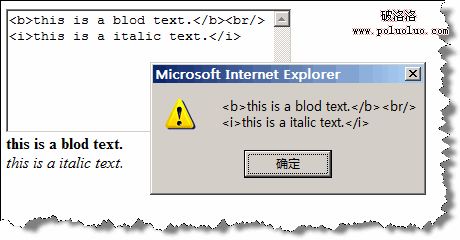
值得留意的是,propertychange 屬於 IE 特有的私有事件,並非跨瀏覽器的標準做法;正式專案裡若要即時偵測輸入變化,應以 input 事件為主。
參考資料:https://docs.jquery.com/Events
- 上一篇文章: jQuery 入門教學(二):優雅的選擇器表達式
- 下一篇文章: jQuery 入門教學(四):鏈式程式碼的威力