jQuery 入門教學(四):鏈式程式碼的威力
編輯:關於JavaScript
一般 JavaScript 程式碼是一行一行往下寫,而 jQuery 的程式碼可以一串一串寫下去。這個特性前面已經露過臉,這篇就把它講清楚。
動手做個按鈕實驗室
下面的 Demo 動態產生四個按鈕,分別負責:觸發 alert、觸發別人的點擊、解除事件綁定、以及顯示/隱藏一個區塊。
<!DOCTYPE html PUBLIC "-//W3C//DTD XHTML 1.0 Transitional//EN"
  "https://www.w3.org/TR/xhtml1/DTD/xhtml1-transitional.dtd">
<html xmlns="https://www.w3.org/1999/xhtml">
<head>
  <title>chaining code</title>
  <script src="../scripts/jquery-1.2.3.intellisense.js"
          type="text/javascript"></script>
  <script type="text/javascript">
    $(function(){
        // 一次加入四個按鈕
        $('<input type="button" value="click me"/><input type="button" value="trigger click me"/><input type="button" value="detach handler"/><input type="button" value="show/hide text"/>').appendTo($('body'));

        $('input[type="button"]')
            .eq(0)                       // 第一個按鈕
            .click(function(){
                alert('you clicked me!');
            })
            .end().eq(1)                 // 回到全集合,取第二個
            .click(function(){
                $('input[type="button"]:eq(0)').trigger('click');
            })
            .end().eq(2)                 // 回到全集合,取第三個
            .click(function(){
                $('input[type="button"]:eq(0)').unbind('click');
            })
            .end().eq(3)                 // 回到全集合,取第四個
            .toggle(function(){
                $('.panel').hide('slow');
            },function(){
                $('.panel').show('slow');
            });
    });
  </script>
  <style type="text/css">
    .panel {
        padding: 20px;
        background-color: #000066;
        color: #FFFFFF;
        font-weight: bold;
        width: 200px;
        height: 50px;
    }
  </style>
</head>
<body>
  <div class="panel">welcome to jQuery!</div>
</body>
</html>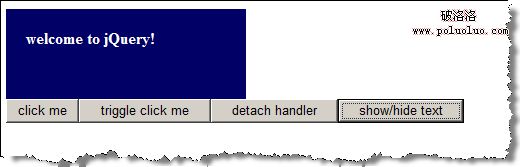
end() 是鏈條的「復原鍵」
鏈式寫法如今已成為 jQuery 最具代表性的特色。在串接的過程中,你常需要用 eq()、filter() 等方法縮小 jQuery 物件所對應的範圍(可參考 https://docs.jquery.com/Traversing),接著再用 end() 把範圍還原回操作前的狀態。上面範例中每個 .end().eq(n) 就是這個模式:先回到「所有按鈕」的集合,再取下一個。
要留意的是,並非所有方法都會回傳 jQuery 物件,一旦回傳的不是 jQuery 物件,鏈條就斷在那裡了。最典型的例子是 get()——它回傳的是原生 DOM 元素陣列,因此不能像 eq() 那樣繼續串下去。
- 上一篇文章: jQuery 入門教學(三):事件綁定與命名空間
- 下一篇文章: jQuery 入門教學(五):AJAX 也可以很簡單