jQuery 入門教學(五):AJAX 也可以很簡單
編輯:關於JavaScript
jQuery 為 AJAX 提供了非常完整的支援(可參考 Ajax 章節),其中最根本的莫過於 $.ajax()。透過不同的參數組合,這一個方法就能靈活涵蓋各種 AJAX 情境:
$.ajax({
  url: "test.html",
  cache: false,
  success: function(html){
    $("#results").append(html);
  }
});
完整的參數清單請見官方 options 文件。實務上最常派上用場的,通常是這幾個:
load()——直接把 AJAX 回應塞進 jQuery 物件的內容$.get()——以 GET 方式請求$.post()——以 POST 方式提交ajaxStart()/ajaxComplete()/ajaxError()……——全域的 AJAX 事件回應
Demo:求立方數的小服務
先建一個 Generic Handler 作為伺服器端(CubeHandler.ashx):
<%@ WebHandler Language="C#" Class="CubeHandler" %>

using System;
using System.Web;

public class CubeHandler : IHttpHandler {

    public void ProcessRequest (HttpContext context) {
        context.Response.ContentType = "text/plain";
        int number = 0;
        int.TryParse(context.Request.Params["number"], out number);
        context.Response.StatusCode = 200;
        context.Response.Cache.SetCacheability(HttpCacheability.NoCache);
        context.Response.Write(string.Format("{0} cubed is {1}", number, Math.Pow(number, 3)));
    }

    public bool IsReusable {
        get { return true; }
    }
}
因為讀取參數用的是 Request.Params,這個 handler 同時吃 GET 與 POST 兩種提交方式。
<!DOCTYPE html PUBLIC "-//W3C//DTD XHTML 1.0 Transitional//EN"
  "https://www.w3.org/TR/xhtml1/DTD/xhtml1-transitional.dtd">
<html xmlns="https://www.w3.org/1999/xhtml">
<head>
  <title>ajax</title>
  <script src="../scripts/jquery-1.2.3.intellisense.js"
          type="text/javascript"></script>
  <script type="text/javascript">
    $(function(){
        // 全域指示器:請求開始顯示、成功或失敗時隱藏
        $('#divIndicator').ajaxStart(function(){ $(this).show() })
            .ajaxSuccess(function(){ $(this).hide() })
            .ajaxError(function(msg){ $(this).hide(); alert(msg); });

        // GET 請求
        $('#btnGetCubeInGet').click(function(){
            var number = $('#txtNumber').val();
            $.get('CubeHandler.ashx?number=' + number, function(result){
                alert(result);
            });
        });

        // POST 提交
        $('#btnGetCubeInPost').click(function(){
            var number = $('#txtNumber').val();
            $.post('CubeHandler.ashx', {'number': number}, function(result){
                alert(result);
            });
        });
    });
  </script>
  <style type="text/css">
    .indicator {
        color: #FF0000;
        position: absolute;
        top: 0px;
        right: 0px;
        display: none;
    }
  </style>
</head>
<body>
  <div id="divIndicator" class="indicator">
    <img src="indicator.gif" />loading
按下按鈕後的效果:
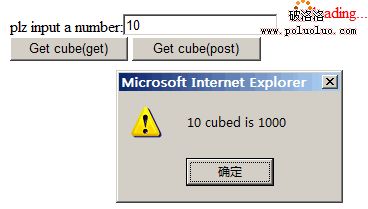
這個範例有兩個值得學的習慣:一是用全域的 ajaxStart/ajaxComplete 家族統一管理 loading 指示器,不必在每個請求裡重複處理;二是依需求在 $.get() 與 $.post() 之間做選擇,而不是一律走同一種方式。
- 上一篇文章: jQuery 入門教學(四):鏈式程式碼的威力
- 下一篇文章: jQuery 入門教學(六):animate 打造自訂動畫