基於 BootstrapValidator 的表單驗證實戰(以使用者註冊為例)
編輯:關於JavaScript
表單驗證是資料的正門把。你可以自己刻 JS,也可以用 jQuery Validate,而對 Bootstrap 專案來說,BootstrapValidator 是相當順手的選擇——它與 Bootstrap 完全相容,樣式與提示位置都幫你處理好了。
0x01 引入 BootstrapValidator
可從官網下載檔案自行引入,也可以走 CDN:
<link href="//cdn.bootcss.com/bootstrap-validator/0.5.3/css/bootstrapValidator.min.css" rel="stylesheet">
<script src="//cdn.bootcss.com/bootstrap-validator/0.5.3/js/bootstrapValidator.min.js"></script>
0x02 使用者註冊範例
以下用一個註冊表單涵蓋常見的驗證情境(JS 與 CSS 的路徑請依實際專案調整):
<!DOCTYPE html>
<html lang="zh-cn">
<head>
<meta charset="UTF-8">
<title>用戶注冊</title>
<meta name="viewport" content="width=device-width, initial-scale=1">
<link href="../../../css/bootstrap.min.css" rel="stylesheet">
<link href="//cdn.bootcss.com/bootstrap-validator/0.5.3/css/bootstrapValidator.min.css" rel="stylesheet">
<script src="https://cdn.bootcss.com/jquery/1.11.1/jquery.min.js"></script>
<script src="../../../js/bootstrap.min.js"></script>
<script src="//cdn.bootcss.com/bootstrap-validator/0.5.3/js/bootstrapValidator.min.js"></script>
</head>
<body>
<div class="container col-lg-3 col-lg-offset-3">
  <div class="page-header">
    <h3>用戶注冊</h3>
  </div>
  <div>
    <form id="registerForm" method="POST" class="form-horizontal" action="用戶注冊.html">
      <div class="form-group">
        <!--注冊的用戶名-->
        <label class="control-label" for="username">*請輸入注冊用戶名:</label>
        <input type="text" class="form-control" placeholder="請輸入注冊用戶名" name="username" id="username">
      </div>
      <div class="form-group">
        <!--注冊密碼-->
        <label class="control-label" for="password">*請輸入注冊密碼:</label>
        <input type="password" class="form-control" placeholder="請輸入注冊密碼" name="password" id="password">
      </div>
      <div class="form-group">
        <!--確認密碼-->
        <label class="control-label" for="repassword">*請輸入確認密碼:</label>
        <input type="password" class="form-control" placeholder="請輸入確認密碼" name="repassword" id="repassword">
      </div>
      <div class="form-group">
        <label class="control-label" for="phone">*請輸入手機號碼:</label>
        <input type="text" class="form-control" placeholder="請輸入手機號碼" name="phone" id="phone">
      </div>
      <div class="form-group">
        <label class="control-label" for="email">*請輸入電子郵箱:</label>
        <input type="text" class="form-control" placeholder="請輸入電子郵箱" name="email" id="email">
      </div>
      <div class="form-group">
        <label class="control-label" for="inviteCode">*請輸入邀請碼:</label>
        <input type="text" class="form-control" placeholder="請輸入邀請碼" name="inviteCode" id="inviteCode">
      </div>
      <div class="form-group">
        <button type="submit" class="btn btn-primary form-control">提交注冊</button>
      </div>
    </form>
  </div>
</div>
<script>
$(function () {
    <!--數據驗證-->
    $("#registerForm").bootstrapValidator({
        message:'This value is not valid',
        // 定義未通過驗證的狀態圖標
        feedbackIcons: {/*輸入框不同狀態,顯示圖片的樣式*/
            valid: 'glyphicon glyphicon-ok',
            invalid: 'glyphicon glyphicon-remove',
            validating: 'glyphicon glyphicon-refresh'
        },
        // 字段驗證
        fields:{
            // 用戶名
            username:{
                message:'用戶名非法',
                validators:{
                    // 非空
                    notEmpty:{
                        message:'用戶名不能為空'
                    },
                    // 限制字符串長度
                    stringLength:{
                        min:3,
                        max:20,
                        message:'用戶名長度必須位於3到20之間'
                    },
                    // 基於正則表達是的驗證
                    regexp:{
                        regexp:/^[a-zA-Z0-9_\.]+$/,
                        message:'用戶名由數字字母下劃線和.組成'
                    }
                }
            },
            // 密碼
            password:{
                message:'密碼非法',
                validators:{
                    notEmpty:{
                        message:'密碼不能為空'
                    },
                    stringLength:{
                        min:3,
                        max:20,
                        message:'密碼長度必須位於3到20之間'
                    },
                    // 相同性檢測
                    identical:{
                        // 需要驗證的field
                        field:'password',
                        message:'兩次密碼輸入不一致'
                    },
                    regexp:{
                        regexp:/^[a-zA-Z0-9_\.]+$/,
                        message:'密碼由數字字母下劃線和.組成'
                    }
                }
            },
            // 確認密碼
            repassword:{
                message:'密碼非法',
                validators:{
                    notEmpty:{
                        message:'密碼不能為空'
                    },
                    stringLength:{
                        min:3,
                        max:20,
                        message:'密碼長度必須位於3到20之間'
                    },
                    identical:{
                        field:'password',
                        message:'兩次密碼輸入不一致'
                    },
                    regexp:{
                        regexp:/^[a-zA-Z0-9_\.]+$/,
                        message:'密碼由數字字母下劃線和.組成'
                    }
                }
            },
            // 電子郵箱
            email:{
                validators:{
                    notEmpty:{
                        message:'郵箱地址不能為空'
                    },
                    emailAddress:{
                        message:'請輸入正確的郵箱地址'
                    }
                }
            },
            // 手機號碼
            phone:{
                validators:{
                    notEmpty:{
                        message:'手機號碼不能為空'
                    },
                    stringlength:{
                        min:11,
                        max:11,
                        message:'請輸入11位手機號碼'
                    },
                    regexp:{
                        regexp:/^1[3|5|8]{1}[0-9]{9}$/,
                        message:'請輸入正確的手機號碼'
                    }
                }
            },
            // 邀請碼
            inviteCode:{
                validators:{
                    notEmpty:{
                        message:'邀請碼不能為空'
                    },
                    stringlength:{
                        min:9,
                        max:9,
                        message:'請輸入9位邀請碼'
                    },
                    regexp:{
                        regexp:/^[\w]{8}$/,
                        message:'邀請碼由數字和字母組成'
                    }
                }
            }
        }
    })
})
</script>
</body>
</html>
驗證效果如下:
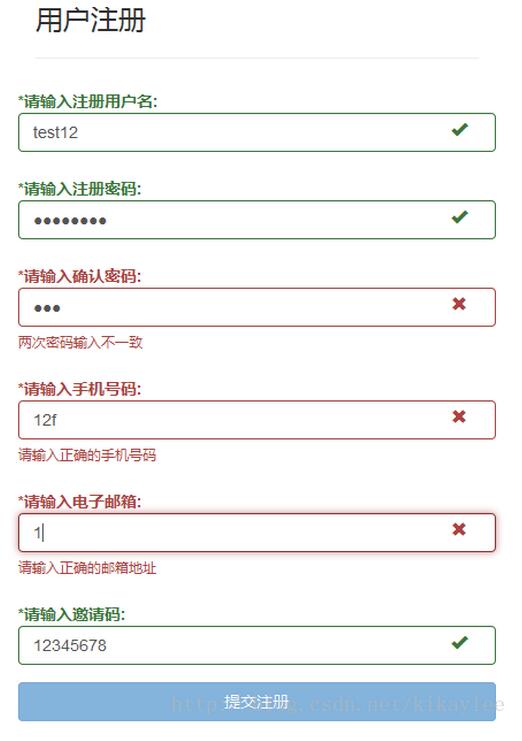
從這份設定可以歸納出幾個常用驗證器:notEmpty 檢查必填、stringLength 限制長度、regexp 做格式比對、emailAddress 驗證信箱、identical 比對兩個欄位是否一致(表單中的密碼與確認密碼即靠它配對)。而 feedbackIcons 則負責在輸入框右側顯示待驗證、通過、失敗三種狀態的圖示。
0x03 後記
實務上還會遇到 Ajax 異步驗證的需求(例如註冊時即時檢查帳號是否已被使用),處理思路大同小異,之後再結合實際案例說明。
另外必須強調:BootstrapValidator 這類以 JS 為基礎的驗證屬於客戶端驗證,目的在於提升使用者體驗,並不能保證提交資料的安全性。後端仍必須實作完整的伺服器端驗證,這道防線無法省略。
- 上一篇文章: JavaScript 利用正則表達式替換字串內容的幾種寫法
- 下一篇文章: 原生 JS 焦點圖輪播實作:左右切換、圓點同步與自動定時播放
相關文章
-
AngularJS + Bootstrap 自製分頁元件實例 jQuery 表單驗證實戰:從必填標記到即時提醒的完整流程 不靠插件:用原生 jQuery 手寫一個表單驗證 jquery.validate.js 遇到多個相同 name 欄位該怎麼處理 在 Bootstrap 專案中以 Vue.js 取代 jQuery jQuery Validate 表單驗證實作:格式檢查與重名校驗 Bootstrap 入門範例:條紋表格、表單與登入頁設計 JavaScript即時表單驗證:input與propertychange雙寫法 SpringMVC 與 Bootstrap 模態框分頁查詢 用 Bootstrap 美化 Ajax 頁面:載入、刪除與詳情彈窗