用 JavaScript 判斷滑鼠從哪個方向移入元素:atan2 與角度換算詳解
編輯:關於JavaScript

要做到「滑鼠從哪個方向進來,動畫就從那個方向開始」,關鍵在於判斷移入與移出時的方位。
$("li").on("mouseenter mouseleave",function(e) {
    var w = this.offsetWidth;
    var h = this.offsetHeight;
    var x = e.pageX - this.getBoundingClientRect().left - w/2;
    var y = e.pageY - this.getBoundingClientRect().top - h/2;
    var direction = Math.round((((Math.atan2(y, x) * 180 / Math.PI) + 180) / 90) + 3) % 4;
    //direction的值為“0,1,2,3”分別對應著“上,右,下,左”
    var eventType = e.type;
    var res = Math.atan2(y, x) / (Math.PI / 180) + 180 ;
    $('.line').css('transform','rotate('+ res +'deg)');
    var dirName = new Array('上方','右側','下方','左側');
    $('.res').text(res + 'deg');
    if(eventType == 'mouseenter'){
        $('.res').text(dirName[direction]+'進入');
        animationIn(direction);
    }else{
        $('.res').text(dirName[direction]+'離開');
        animationOut(direction);
    }
});
核心:direction 是怎麼算出來的
Math.atan2(y, x) 回傳 -PI 到 PI 之間的值(即 -180° 到 180°),代表從 X 軸正向逆時針旋轉到點 (x, y) 所經過的角度,結果是弧度。要轉成角度,先算出「一度的弧度」Math.PI / 180,再用弧度除以它即可。

此時的範圍是:右側 -45°~45°,底部 45°~135°,左側 135°~180° 與 -180°~-135°,頂部 -135°~-45°。
負值不利於後續計算,也不符合我們的習慣,所以把結果加上 180,範圍就變成 0~360°,此時 0° 落在左側中央:

0 度的位置
於是範圍重新劃分為:
- 0~44 與 360~315:左側
- 45~134:上側
- 135~224:右側
- 225~314:下側
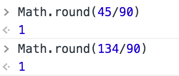
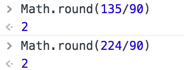
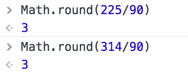
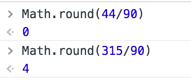
接著把角度除以 90 並四捨五入,讓 45° 成為分界線。
上側算出來是 1
右側算出來是 2
下側算出來是 3
左側有兩種結果:0~44 一定是 0,315~360 則是 4。
此時一共有 5 個可能值(左側佔 2 個,其餘三面各 1 個)。最後一步是把結果都加 3 再對 4 取餘:
- 左側:3 和 7 → 取餘後都是 3
- 上側:4 → 0
- 右側:5 → 1
- 下側:6 → 2
最終對應關係就是 0 → 上、1 → 右、2 → 下、3 → 左,再據此控制 left 與 top 即可完成方向性動畫。
完整可執行範例
<!DOCTYPE html>
<html lang="en">
<head>
<meta charset="UTF-8">
<title>Document</title>
<style type="text/css">
* { padding: 0; margin: 0; }
html, body { width: 100%; height: 100%; }
ul {
    list-style: none;
    position: relative;
    width: 600px;
    width: 100%;
}
ul> li {
    margin: 50px auto;
    position: relative;
    width: 300px;
    height: 300px;
    background-color: black;
    overflow: hidden;
}
ul> li .bg {
    position: absolute;
    width: 300px;
    height: 300px;
    left: -100%;
    top: 0;
    background-color: red;
    text-align: center;
    line-height: 300px;
    color: blue;
    font-size: 150px;
}
.line {
    position: absolute;
    width: 50%;
    height: 1px;
    background: red;
    right: 0;
    top: 50%;
    transition: all .3s;
    transform-origin: left;
}
.res { text-align: center; }
</style>
</head>
<body>
<ul>
  <li>
    <div class="bg"> SB </div>
  </li>
</ul>
<div class="res"></div>
<script src="js/jquery-3.1.1.js"></script>
<script>
$("li").on("mouseenter mouseleave", function(e) {
    var $bg = $(this).find('.bg');
    var w = this.offsetWidth; //獲取元素寬度
    var h = this.offsetHeight; //獲取元素高度
    var toTop = this.getBoundingClientRect().top + document.body.scrollTop; //兼容滾動條
    var x = e.pageX - this.getBoundingClientRect().left - w / 2; //獲取當前鼠標的x軸位置(相對於這個li的中心點)
    var y = e.pageY - toTop - h / 2; //獲取當前鼠標的y軸位置(相對於這個li的中心點)
    var direction = Math.round((((Math.atan2(y, x) * 180 / Math.PI) + 180) / 90) + 3) % 4;
    //direction的值為“0,1,2,3”分別對應著“上,右,下,左”
    var eventType = e.type;
    var res = Math.atan2(y, x) / (Math.PI / 180) + 180;
    $('.line').css('transform', 'rotate(' + res + 'deg)');
    var dirName = new Array('上方', '右側', '下方', '左側');
    if(eventType == 'mouseenter') {
        $('.res').text(dirName[direction] + '進入');
        animationIn(direction, $bg);
    } else {
        $('.res').text(dirName[direction] + '離開');
        animationOut(direction, $bg);
    }
});

function animationIn(direction, ele) {
    switch(direction) {
        case 0:
            ele.css({ left: 0, top: '-100%' }).animate({ top: 0 }, 300);
            break;
        case 1:
            ele.css({ left: '100%', top: 0 }).animate({ left: 0 }, 300);
            break;
        case 2:
            ele.css({ left: 0, top: '100%' }).animate({ top: 0 }, 300);
            break;
        case 3:
            ele.css({ left: '-100%', top: 0 }).animate({ left: 0 }, 300);
            break;
    }
}

function animationOut(direction, ele) {
    switch(direction) {
        case 0:
            ele.animate({ top: '-100%' }, 300);
            break;
        case 1:
            ele.animate({ left: '100%' }, 300);
            break;
        case 2:
            ele.animate({ top: '100%' }, 300);
            break;
        case 3:
            ele.animate({ left: '-100%' }, 300);
            break;
    }
}
</script>
</body>
</html>
完整範例中多了一個 toTop 的處理,用來把 document.body.scrollTop 計入,避免頁面捲動後 y 座標算錯——這是實作時很容易被忽略的細節。
- 上一篇文章: JavaScript 如何取得伺服器時間:讀取 XMLHttpRequest 回應標頭的時間戳
- 下一篇文章: JavaScript 高效能資料存取與記憶體管理:作用域鏈、閉包與記憶體洩漏