Bootstrap Table 是前端開發中相當常被使用的表格套件,但當資料結構變得複雜時,單靠基本設定往往不夠用。本文以一個「學員學習完成情況」的統計頁為例,示範兩個實務上很常見的需求:一是做出具有多層表頭的外層表格,二是點擊某一列後展開,在展開區塊內再放進兩張子表格。
一、建立多層表頭的外層表格
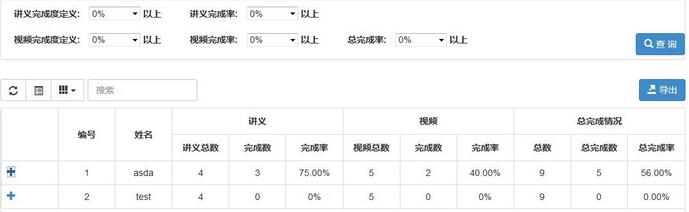
多層表頭的做法是把 columns 寫成「二維陣列」:第一層放需要跨欄或跨列合併的欄位,第二層放實際的資料欄位。合併靠 rowspan 與 colspan 控制。同時開啟 detailView 並指定 detailFormatter,就能取得展開明細的能力。
 $('#tableActivity').bootstrapTable('destroy').bootstrapTable({
  url: '',
  detailView: true,
  detailFormatter: "detailFormatter", // 點擊展開時先行執行
  cache: false,
  height: 550,
  showExport: true,
  exportDataType: "all",
  pagination: true,
  pageSize: 10,
  pageList: [10, 25, 50, 100],
  search: true,
  searchAlign: 'left',
  showRefresh: true,
  showToggle: true,
  showColumns: true,
  toolbarAlign: 'right',
  toolbar: "#toolbar",
  buttonsAlign: 'left',
  clickToSelect: true,
  idField: '',
  columns: [
    [
      { title: '編號', field: 'index', rowspan: 2, align: 'center', valign: 'middle' },
      { title: '姓名', field: 'userName', rowspan: 2, align: 'center', valign: 'middle', sortable: true },
      { title: '講義', colspan: 3, align: 'center' },
      { title: '視頻', colspan: 3, align: 'center' },
      { title: '總完成情況', colspan: 3, align: 'center' }
    ],
    [
      { field: 'handoutCount', title: '講義總數', sortable: true, align: 'center' },
      { field: 'handoutComCount', title: '完成數', sortable: true, align: 'center' },
      { field: 'handoutCountDegree', title: '完成率', sortable: true, align: 'center' },
      { field: 'videoCount', title: '視頻總數', sortable: true, align: 'center' },
      { field: 'videoComCount', title: '完成數', sortable: true, align: 'center' },
      { field: 'videoCountDegree', title: '完成率', sortable: true, align: 'center' },
      { field: 'allCount', title: '總數', sortable: true, align: 'center' },
      { field: 'allComCount', title: '總完成數', sortable: true, align: 'center' },
      { field: 'allDegree', title: '總完成率', sortable: true, align: 'center' }
    ]
  ]
});
二、產生展開後的表格內容
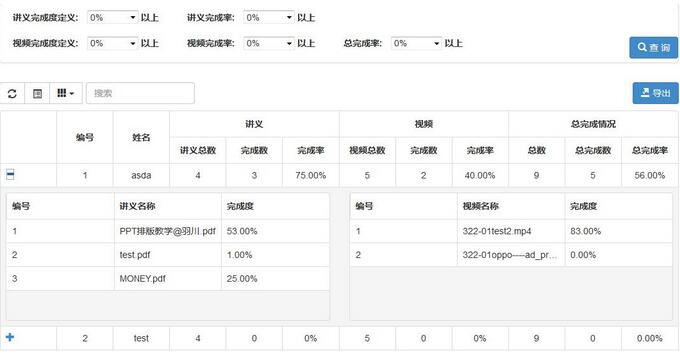
detailFormatter 回傳的是一段 HTML 字串,也就是展開後要顯示的骨架。這裡用 Bootstrap 的格線系統把空間切成左右兩半,各放一張表格,並刻意為表格 id 加上 index 後綴——因為每一列的展開區都需要各自獨立的 id,否則會互相衝突。
 function detailFormatter(index, row) {
  handoutColums = [];
  handoutData  = [];
  videoColums  = [];
  videoData    = [];
  var html = [];
  html.push('<div class="row">');
  html.push('<div class="col-md-6">');
  html.push('<table id="tableHandout' + index + '"></table>');
  html.push('</div>');
  html.push('<div class="col-md-6">');
  html.push('<table id="tableVideo' + index + '"></table>');
  html.push('</div>');
  html.push('</div>');

  handoutColums.push(
    { field: 'handoutIndex', title: '編號', sortable: true, width: 150 },
    { field: 'handoutName',  title: '講義名稱', sortable: true, width: 150 },
    { field: 'degree',       title: '完成度', sortable: true, width: 150 }
  );
  videoColums.push(
    { field: 'videoIndex', title: '編號', sortable: true, width: 150 },
    { field: 'videoName',  title: '視頻名稱', sortable: true, width: 150 },
    { field: 'degree',     title: '完成度', sortable: true, width: 150 }
  );

  $.each(row, function (key, value) {
    if (key == "handout") {
      $.each(value, function (i, handout) {
        var r = {};
        r['handoutIndex'] = i + 1;
        r['handoutName']  = handout.handoutName;
        r['degree']       = handout.degree;
        handoutData.push(r);
      });
    }
    if (key == "video") {
      $.each(value, function (i, video) {
        var r = {};
        r['videoIndex'] = i + 1;
        r['videoName']  = video.videoName;
        r['degree']     = video.degree;
        videoData.push(r);
      });
    }
  });
  return html.join('');
}
三、在展開時機填充子表格資料
骨架只是空表格,真正的資料要等到使用者展開的那一瞬間才初始化。Bootstrap Table 提供了 expand-row.bs.table 事件,正好對應這個時機。這樣做有個額外好處:沒有被展開的列不會浪費資源去渲染子表格。
 $('#tableActivity').on('expand-row.bs.table', function (e, index, row, $detail) {
  initHandoutTable(handoutColums, handoutData, index);
  initVideoTable(videoColums, videoData, index);
});

function initHandoutTable(colums, data, index){
  $('#tableHandout' + index).bootstrapTable('destroy').bootstrapTable({
    cache: false,
    height: 200,
    clickToSelect: true,
    idField: '',
    columns: colums,
    data: data
  });
}

function initVideoTable(colums, data, index){
  $('#tableVideo' + index).bootstrapTable('destroy').bootstrapTable({
    cache: false,
    height: 200,
    clickToSelect: true,
    idField: '',
    columns: colums,
    data: data
  });
}
實作上的幾點提醒
子表格初始化前先呼叫 destroy,是為了避免同一個 DOM 被重複綁定而產生的錯亂,這在單頁應用裡反覆展開收合時尤其重要。另外,範例中把 handoutColums 等變數宣告在函數外,是為了讓 detailFormatter 與後續事件能共用;在正式專案中,更好的做法是把這些狀態收進一個物件或閉包裡管理,並改用 let / const 宣告,避免全域變數污染。
掌握「多層表頭用二維 columns」與「展開明細用 detailView 加事件觸發」這兩個要點,Bootstrap Table 就能應付絕大多數複雜報表場景。
相關文章
-
Bootstrap Table 使用方法解析 Bootstrap Table 跨表格行拖拽與撤銷(Ctrl+Z)實作全解 Bootstrap Table 多行拖拽實作:從可用到精準定位的優化歷程 JS 表格組件神器 Bootstrap Table 詳解(基礎版) Bootstrap Table 元件詳解:後端分頁與資料填充實作 Bootstrap Table 分頁實作常見問題與解法 Bootstrap Table 終結篇:客製列樣式、行內編輯、合併儲存格與資料匯出 Bootstrap Table 進階玩法:父子表、行列拖曳排序與每欄篩選 Bootstrap Table 遇上 KnockoutJS:MVVM 思維打造增刪改查(上篇) Bootstrap Table 入門:資料填充、搜尋與伺服器端分頁實作