ReactJS 是 Facebook 推出的產品。早在 2013 年的 QCon 大會(上海)上,Facebook 的前端工程師就專門做過一次講座介紹它。
ReactJS 可以說就是「用來 Render」的。它能達到游戲級別的渲染,fps 可穩定在 60 左右,相當了不起。它通過一個虛擬 DOM tree 加速了渲染過程,據當時的數據,比 AngularJS 快 20% 以上。
前沿
對於 React,去年就有所耳聞,一直挺不想學的——前端那麼多東西,學完一個框架又有新框架要學,內心是拒絕的。這幾天有空研究了一下 ReactJS,順手寫了幾個小案例,發現它和以前寫的單向 DOM 數據流輸出效果差不多,本質上就是一個 JS 單向數據流動庫(one way binding)。
寫了幾個 Demo 之後,發現 React 還挺好用的。因為它的思維會強迫我們把 JS 的頁面結構分解成各個模塊和組件,有利於模塊復用——其實和 AngularJS 中的指令是一個意思,只是 React 更專注於 HTML 的 View。
唯一的遺憾是,如果頁面的 html 結構改動比較大,就得重新修改各個組件的 html,這點相對麻煩一些。
下面用 React 實現一個 tab 頁簽切換效果:
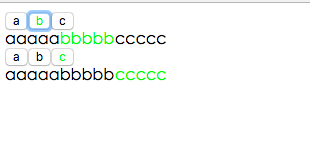
把組件分解為三塊:第一塊是 Tab,它包含 Nav 導航條組件和 content 內容組件兩個子組件。Tab 組件負責用戶的點擊事件以及子模塊的狀態,子模塊只負責內容渲染、不用關心邏輯,個人覺得這種思路非常清晰。
<!DOCTYPE html> <html> <head> <meta charset="UTF-8" /> <title>React</title> <script src="https://unpkg.com/react@15.3.2/dist/react.js"></script> <script src="https://unpkg.com/react-dom@15.3.2/dist/react-dom.js"></script> <script src="https://unpkg.com/babel-core@5.8.38/browser.min.js"></script> <style> .active{ color:#00ff00; } </style> </head> <body> <div id="example"> </div> <div id="example1"> </div> <script type="text/babel"> var NavClass = React.createClass({ render : function() { return (<div> {this.props.navs.map((el,index)=>{ return (<button onClick={this.props.clk.bind(null,index)} className={this.props.index==index?"active":""} key={index}>{el}</button>) })} </div>); } }) var ContentsClass = React.createClass({ render : function() { return (<div> {this.props.contents.map((el, index)=>{ return (<span key={index} className={this.props.index==index?"active":""}> {el} </span>) })} </div>) } }); var Tab = React.createClass({ getInitialState : function() { return { index : 0 }; }, handleClick : function(index) { console.log(this) this.setState({ index : index }) }, render : function() { return (<div className="tabs"> <NavClass ref="nav" clk={this.handleClick} index={this.state.index} navs={this.props.navs} /> <ContentsClass ref="con" index={this.state.index} contents={this.props.contents} /> </div>) } }); var obj = { navs : ["a","b","c"], contents : ["內容a","內容bbbbb","內容ccccc"] } //console.time(); ReactDOM.render( <Tab navs={obj.navs} contents={obj.contents}/>, document.getElementById('example') ); ReactDOM.render( <Tab navs={obj.navs} contents={obj.contents}/>, document.getElementById('example1') ); </script> </body> </html>
再用 React 實現一個鼠標移入展開的菜單欄效果:
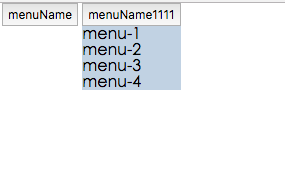
把每一個菜單都作為獨立組件,可以很方便地復用。組件的 open 狀態表示該元素的菜單是否顯示,每個組件各自維護自己的狀態、互不干擾。
<!DOCTYPE html> <html> <head> <meta charset="UTF-8" /> <title>Hello React</title> <script src="https://unpkg.com/react@15.3.2/dist/react.js"></script> <script src="https://unpkg.com/react-dom@15.3.2/dist/react-dom.js"></script> <script src="https://unpkg.com/babel-core@5.8.38/browser.min.js"></script> <style> *{ margin:0; padding:0; } ul{ list-style:none; } .menus .menu{ float:left; margin-left:4px; } .menus .menu button{ padding:4px; } .menus ul.sub-menu{ background:#c1d2e3; } .menus ul li{ padding-left:4px; } </style> </head> <body> <div id="example"> </div> <script type="text/babel"> var Menu = React.createClass({ mover : function() { this.setState({ open : true }); }, mout : function() { this.setState({ open : false }); }, getInitialState : function() { return { open : false } }, render : function() { return ( <div className="menu"> <button onMouseOver={this.mover} onMouseOut={this.mout}> {this.props.menuData.name} </button> <ul className="sub-menu" style={{display:this.state.open ? "block" : "none"}}> {this.props.menuData.arr.map((el, index) => { return (<div key={index}>{el}</div>) })} </ul> </div>) } }); var Menus = React.createClass({ render : function() { return (<div className="menus"> {this.props.data.map((el ,index)=>{ return (<Menu key={index} menuData={el}/>) })} </div>); } }); var data = [ { name : "menuName", arr : [ "menu1", "menu2", "menu3", "menu4" ] }, { name : "menuName1111", arr : [ "menu-1", "menu-2", "menu-3", "menu-4" ] } ]; ReactDOM.render(<Menus data={data} />, document.getElementById("example")); </script> </body> </html>
手風琴切換效果:
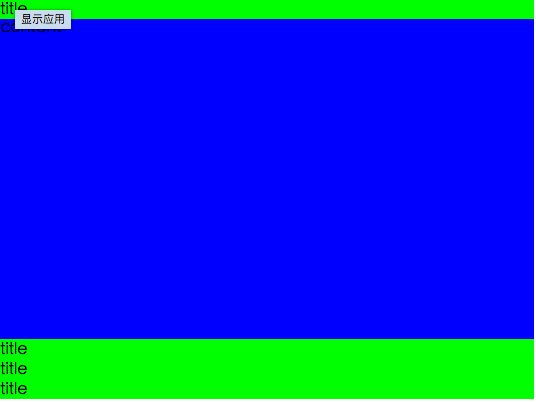
<!DOCTYPE html> <html> <head> <meta charset="UTF-8" /> <title>React</title> <script src="https://unpkg.com/react@15.3.2/dist/react.js"></script> <script src="https://unpkg.com/react-dom@15.3.2/dist/react-dom.js"></script> <script src="https://unpkg.com/babel-core@5.8.38/browser.min.js"></script> <style> *{ margin:0; padding:0; } .accordion{ background:#f00; height:400px; } .accordion .div{ float:left; width:100%; } .accordion .title{ background:#0f0; height: 20px; line-height:20px; cursor:pointer; } .accordion .content{ transition:height 1s; height:0; background:#00f; overflow:auto; } .accordion .content.full{ height:320px; } .accordion:after{ clear:both; content:""; display:block; } </style> </head> <body> <div id="example"> </div> <script type="text/babel"> var AccordionDivComponent = React.createClass({ render : function() { return ( <div className="div"> <div className="title" onClick={this.props.clk}>title</div> <div className={"content "+(this.props.active ? "full" : "")} >content</div> </div> ); } }); var Accordion = React.createClass({ getInitialState : function() { return { index : 0 } }, handlClick : function(index , ev) { this.setState({ index : index }) }, render : function() { return (<div className="accordion"> {this.props.data.map((el, index)=> { return (<AccordionDivComponent active={this.state.index == index} clk={this.handlClick.bind(null,index)} key={index} />) })} </div>); } }); var arr = [ { title : "title", content : "content" }, { title : "title1", content : "content1" }, { title : "title2", content : "content2" }, { title : "title2", content : "content2" } ]; //console.time(); ReactDOM.render( <Accordion data={arr}/>, document.getElementById('example') ); </script> </body> </html>
進度條效果:進度條是一個組件,啟動一個定時器,每 100 毫秒重新渲染一次界面。
<!DOCTYPE html> <html> <head> <meta charset="UTF-8" /> <title>React</title> <script src="https://unpkg.com/react@15.3.2/dist/react.js"></script> <script src="https://unpkg.com/react-dom@15.3.2/dist/react-dom.js"></script> <script src="https://unpkg.com/babel-core@5.8.38/browser.min.js"></script> <style> .process-bar{ border:1px solid #ccc; height:20px; border-radius:4px; } .process{ height:20px; line-height:20px; text-align:center; background:#a1b2c3; } </style> </head> <body> <div id="example"> </div> <script type="text/babel"> var ProcessBar = React.createClass({ render : function() { var width = parseInt(this.props.percent)+"%"; return ( <div className="process-bar"> <div className="process" style={{width:width}}> {this.props.percent}% </div> </div>) } }); //直接渲染組件 //ReactDOM.render(<ProcessBar percent="40" />, document.getElementById("example")); //啟動一個組件和定時器, 每一百毫秒重新渲染組件; var per = 0; setInterval(function() { per++; if(per>=101)per=0; ReactDOM.render(<ProcessBar percent={per} />, document.getElementById("example")); },100) </script> </body> </html>
以上就是用 ReactJS 實現 tab 頁切換、菜單欄切換、手風琴切換和進度條效果的分享,希望對大家有所幫助。如有疑問歡迎留言交流。
- 上一篇文章: 淺談 JavaScript 的異步執行機制
- 下一篇文章: 讓編輯器支持 Word 粘貼與截屏粘貼的 JS 實現