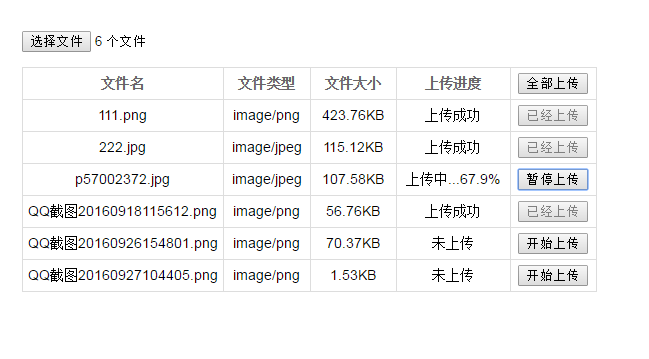
先以圖片為例,看看最終的效果。

一、一些知識准備
斷點續傳,既然有「斷」,那就理應有文件分割的過程——把文件一段一段地傳。
以前文件無法分割,但隨著 HTML5 新特性的引入,我們可以像操作普通字符串、數組那樣,用 slice 方法來分割文件。
所以,斷點續傳最基本的實現就是:前端通過 FileList 對象拿到文件,按指定方式把大文件分成若干段,再一段一段地傳給後端,後端按順序把各段拼接起來。
由於我們需要修改 FileList 對象再提交,而 FileList 不能直接更改,因此無法直接通過表單的 .submit() 上傳,需要結合 FormData 對象生成新數據,再通過 Ajax 上傳。
二、實現過程
這個例子實現了文件斷點續傳的基本功能,不過手動「暫停上傳」尚未實現成功,可以在上傳過程中刷新頁面來模擬中斷,體驗「斷點續傳」的效果。或許還有一些小 bug,但基本邏輯大致如此。
1. 前端實現
先選擇文件,列出選中文件的列表信息,然後自定義上傳操作。
(1)先設置好頁面 DOM 結構
<!-- 上傳的表單 --> <form method="post" id="myForm" action="/fileTest.php" enctype="multipart/form-data"> <input type="file" id="myFile" multiple> <!-- 上傳的文件列表 --> <table id="upload-list"> <thead> <tr> <th width="35%">文件名</th> <th width="15%">文件類型</th> <th width="15%">文件大小</th> <th width="20%">上傳進度</th> <th width="15%"> <input type="button" id="upload-all-btn" value="全部上傳"> </th> </tr> </thead> <tbody> </tbody> </table> </form> <!-- 上傳文件列表中每個文件的信息模版 --> <script type="text/template" id="file-upload-tpl"> <tr> <td>{{fileName}}</td> <td>{{fileType}}</td> <td>{{fileSize}}</td> <td class="upload-progress">{{progress}}</td> <td> <input type="button" class="upload-item-btn" data-name="{{fileName}}" data-size="{{totalSize}}" data-state="default" value="{{uploadVal}}"> </td> </tr> </script>
順帶把 CSS 樣式也列出來:
<style type="text/css"> body { font-family: Arial; } form { margin: 50px auto; width: 600px; } input[type="button"] { cursor: pointer; } table { display: none; margin-top: 15px; border: 1px solid #ddd; border-collapse: collapse; } table th { color: #666; } table td, table th { padding: 5px; border: 1px solid #ddd; text-align: center; font-size: 14px; } </style>
(2)接下來是 JS 的實現解析
通過 FileList 對象,我們能獲取到文件的一些信息:
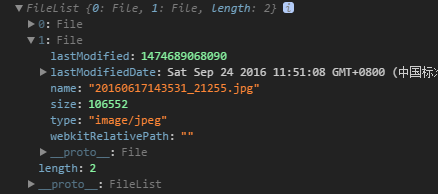
其中的 size 就是文件大小,文件的分片需要依賴它。這裡的 size 是字節數,所以在界面顯示文件大小時,可以這樣換算:
// 計算文件大小 size = file.size > 1024 ? file.size / 1024 > 1024 ? file.size / (1024 * 1024) > 1024 ? (file.size / (1024 * 1024 * 1024)).toFixed(2) + 'GB' : (file.size / (1024 * 1024)).toFixed(2) + 'MB' : (file.size / 1024).toFixed(2) + 'KB' : (file.size).toFixed(2) + 'B';
選擇文件後顯示文件信息,在模版裡替換數據即可:
// 更新文件信息列表 uploadItem.push(uploadItemTpl .replace(/{{fileName}}/g, file.name) .replace('{{fileType}}', file.type || file.name.match(/\.\w+$/) + '文件') .replace('{{fileSize}}', size) .replace('{{progress}}', progress) .replace('{{totalSize}}', file.size) .replace('{{uploadVal}}', uploadVal) );
不過,顯示文件信息時,這個文件可能之前已經上傳過了。為了斷點續傳,需要判斷並在界面上給出提示。做法是查詢本地是否已有相應記錄(這裡的處理是:若本地記錄顯示已上傳 100%,就直接重新上傳而非續傳):
// 初始通過本地記錄,判斷該文件是否曾經上傳過 percent = window.localStorage.getItem(file.name + '_p'); if (percent && percent !== '100.0') { progress = '已上傳 ' + percent + '%'; uploadVal = '繼續上傳'; }
顯示文件信息列表後:
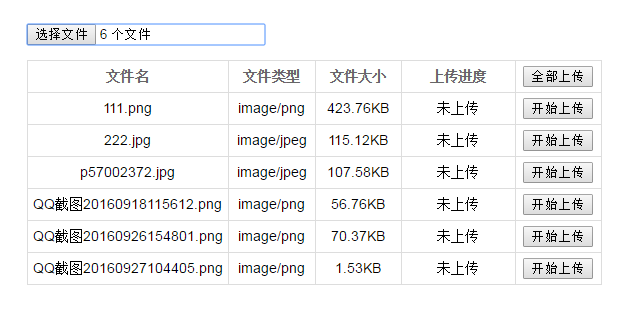
點擊開始上傳,即可上傳對應文件:
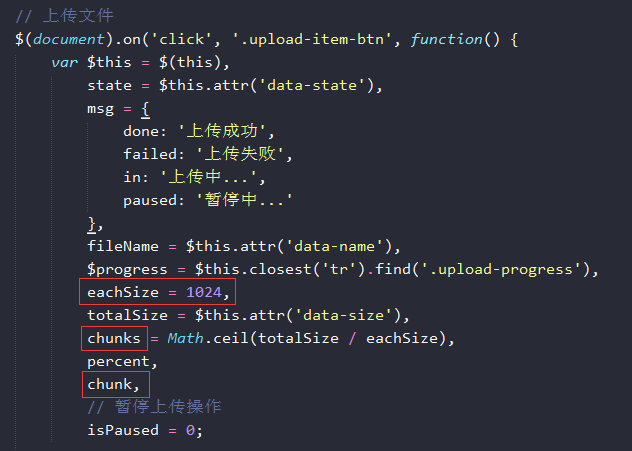
上傳文件時,需要先把文件分片分段。比如這裡配置每段 1024B,總共 chunks 段(用於判斷是否為末段)、第 chunk 段、當前已上傳的百分比 percent 等。要提一下的是,暫停上傳這個操作我還沒實現出來,暫停不了頗感無奈……
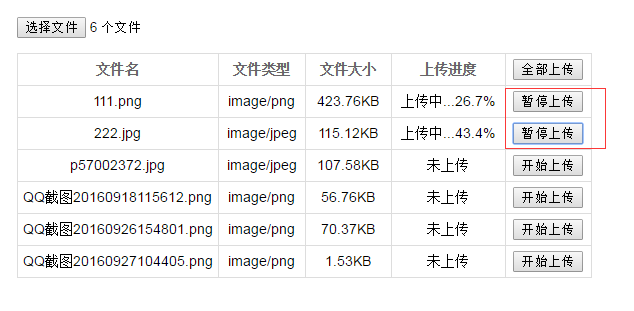

接下來是分段過程:
// 設置分片的開始結尾 var blobFrom = chunk * eachSize, // 分段開始 blobTo = (chunk + 1) * eachSize > totalSize ? totalSize : (chunk + 1) * eachSize, // 分段結尾 percent = (100 * blobTo / totalSize).toFixed(1), // 已上傳的百分比 timeout = 5000, // 超時時間 fd = new FormData($('#myForm')[0]); fd.append('theFile', findTheFile(fileName).slice(blobFrom, blobTo)); // 分好段的文件 fd.append('fileName', fileName); // 文件名 fd.append('totalSize', totalSize); // 文件總大小 fd.append('isLastChunk', isLastChunk); // 是否為末段 fd.append('isFirstUpload', times === 'first' ? 1 : 0); // 是否是第一段(第一次上傳) // 上傳之前查詢是否以及上傳過分片 chunk = window.localStorage.getItem(fileName + '_chunk') || 0; chunk = parseInt(chunk, 10);
文件應支持覆蓋上傳,所以如果文件已上傳完成、現在又重新上傳,就應該重置數據以支持覆蓋(否則後端會直接追加 blob 數據):
// 如果第一次上傳就為末分片,即文件已經上傳完成,則重新覆蓋上傳 if (times === 'first' && isLastChunk === 1) { window.localStorage.setItem(fileName + '_chunk', 0); chunk = 0; isLastChunk = 0; }
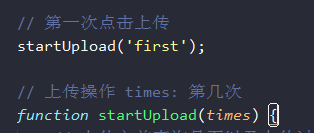
這個 times 其實就是個參數,因為要在上一段傳完之後再傳下一段,所以這裡的做法是在回調中繼續調用這個上傳操作:
接下來就是真正的文件上傳操作了。用 Ajax 上傳,因為用到了 FormData 對象,所以別忘了在 $.ajax({}) 里加上 processData: false。上傳一個分段後,通過返回結果判斷是否上傳完畢、是否繼續:
success: function(rs) { rs = JSON.parse(rs); // 上傳成功 if (rs.status === 200) { // 記錄已經上傳的百分比 window.localStorage.setItem(fileName + '_p', percent); // 已經上傳完畢 if (chunk === (chunks - 1)) { $progress.text(msg['done']); $this.val('已經上傳').prop('disabled', true).css('cursor', 'not-allowed'); if (!$('#upload-list').find('.upload-item-btn:not(:disabled)').length) { $('#upload-all-btn').val('已經上傳').prop('disabled', true).css('cursor', 'not-allowed'); } } else { // 記錄已經上傳的分片 window.localStorage.setItem(fileName + '_chunk', ++chunk); $progress.text(msg['in'] + percent + '%'); // 這樣設置可以暫停,但點擊後動態的設置就暫停不了.. // if (chunk == 10) { // isPaused = 1; // } console.log(isPaused); if (!isPaused) { startUpload(); } } } // 上傳失敗,上傳失敗分很多種情況,具體按實際來設置 else if (rs.status === 500) { $progress.text(msg['failed']); } }, error: function() { $progress.text(msg['failed']); }
繼續下一分段上傳時,就是一次遞歸調用,按順序把下一段傳上去。截個圖:
這是完整的 JS 邏輯,代碼注釋寫得比較齊全,應該不難看懂:
<script type="text/javascript" src="jquery.js"></script> <script type="text/javascript"> // 全部上傳操作 $(document).on('click', '#upload-all-btn', function() { // 未選擇文件 if (!$('#myFile').val()) { $('#myFile').focus(); } // 模擬點擊其他可上傳的文件 else { $('#upload-list .upload-item-btn').each(function() { $(this).click(); }); } }); // 選擇文件-顯示文件信息 $('#myFile').change(function(e) { var file, uploadItem = [], uploadItemTpl = $('#file-upload-tpl').html(), size, percent, progress = '未上傳', uploadVal = '開始上傳'; for (var i = 0, j = this.files.length; i < j; ++i) { file = this.files[i]; percent = undefined; progress = '未上傳'; uploadVal = '開始上傳'; // 計算文件大小 size = file.size > 1024 ? file.size / 1024 > 1024 ? file.size / (1024 * 1024) > 1024 ? (file.size / (1024 * 1024 * 1024)).toFixed(2) + 'GB' : (file.size / (1024 * 1024)).toFixed(2) + 'MB' : (file.size / 1024).toFixed(2) + 'KB' : (file.size).toFixed(2) + 'B'; // 初始通過本地記錄,判斷該文件是否曾經上傳過 percent = window.localStorage.getItem(file.name + '_p'); if (percent && percent !== '100.0') { progress = '已上傳 ' + percent + '%'; uploadVal = '繼續上傳'; } // 更新文件信息列表 uploadItem.push(uploadItemTpl .replace(/{{fileName}}/g, file.name) .replace('{{fileType}}', file.type || file.name.match(/\.\w+$/) + '文件') .replace('{{fileSize}}', size) .replace('{{progress}}', progress) .replace('{{totalSize}}', file.size) .replace('{{uploadVal}}', uploadVal) ); } $('#upload-list').children('tbody').html(uploadItem.join('')) .end().show(); }); /** * 上傳文件時,提取相應匹配的文件項 * @param {String} fileName 需要匹配的文件名 * @return {FileList} 匹配的文件項目 */ function findTheFile(fileName) { var files = $('#myFile')[0].files, theFile; for (var i = 0, j = files.length; i < j; ++i) { if (files[i].name === fileName) { theFile = files[i]; break; } } return theFile ? theFile : []; } // 上傳文件 $(document).on('click', '.upload-item-btn', function() { var $this = $(this), state = $this.attr('data-state'), msg = { done: '上傳成功', failed: '上傳失敗', in: '上傳中...', paused: '暫停中...' }, fileName = $this.attr('data-name'), $progress = $this.closest('tr').find('.upload-progress'), eachSize = 1024, totalSize = $this.attr('data-size'), chunks = Math.ceil(totalSize / eachSize), percent, chunk, // 暫停上傳操作 isPaused = 0; // 進行暫停上傳操作 // 未實現,這裡通過動態的設置isPaused值並不能阻止下方ajax請求的調用 if (state === 'uploading') { $this.val('繼續上傳').attr('data-state', 'paused'); $progress.text(msg['paused'] + percent + '%'); isPaused = 1; console.log('暫停:', isPaused); } // 進行開始/繼續上傳操作 else if (state === 'paused' || state === 'default') { $this.val('暫停上傳').attr('data-state', 'uploading'); isPaused = 0; } // 第一次點擊上傳 startUpload('first'); // 上傳操作 times: 第幾次 function startUpload(times) { // 上傳之前查詢是否以及上傳過分片 chunk = window.localStorage.getItem(fileName + '_chunk') || 0; chunk = parseInt(chunk, 10); // 判斷是否為末分片 var isLastChunk = (chunk == (chunks - 1) ? 1 : 0); // 如果第一次上傳就為末分片,即文件已經上傳完成,則重新覆蓋上傳 if (times === 'first' && isLastChunk === 1) { window.localStorage.setItem(fileName + '_chunk', 0); chunk = 0; isLastChunk = 0; } // 設置分片的開始結尾 var blobFrom = chunk * eachSize, // 分段開始 blobTo = (chunk + 1) * eachSize > totalSize ? totalSize : (chunk + 1) * eachSize, // 分段結尾 percent = (100 * blobTo / totalSize).toFixed(1), // 已上傳的百分比 timeout = 5000, // 超時時間 fd = new FormData($('#myForm')[0]); fd.append('theFile', findTheFile(fileName).slice(blobFrom, blobTo)); // 分好段的文件 fd.append('fileName', fileName); // 文件名 fd.append('totalSize', totalSize); // 文件總大小 fd.append('isLastChunk', isLastChunk); // 是否為末段 fd.append('isFirstUpload', times === 'first' ? 1 : 0); // 是否是第一段(第一次上傳) // 上傳 $.ajax({ type: 'post', url: '/fileTest.php', data: fd, processData: false, contentType: false, timeout: timeout, success: function(rs) { rs = JSON.parse(rs); // 上傳成功 if (rs.status === 200) { // 記錄已經上傳的百分比 window.localStorage.setItem(fileName + '_p', percent); // 已經上傳完畢 if (chunk === (chunks - 1)) { $progress.text(msg['done']); $this.val('已經上傳').prop('disabled', true).css('cursor', 'not-allowed'); if (!$('#upload-list').find('.upload-item-btn:not(:disabled)').length) { $('#upload-all-btn').val('已經上傳').prop('disabled', true).css('cursor', 'not-allowed'); } } else { // 記錄已經上傳的分片 window.localStorage.setItem(fileName + '_chunk', ++chunk); $progress.text(msg['in'] + percent + '%'); // 這樣設置可以暫停,但點擊後動態的設置就暫停不了.. // if (chunk == 10) { // isPaused = 1; // } console.log(isPaused); if (!isPaused) { startUpload(); } } } // 上傳失敗,上傳失敗分很多種情況,具體按實際來設置 else if (rs.status === 500) { $progress.text(msg['failed']); } }, error: function() { $progress.text(msg['failed']); } }); } }); </script>
2. 後端實現
後端實現相對簡單,主要依賴了 file_put_contents、file_get_contents 這兩個方法。
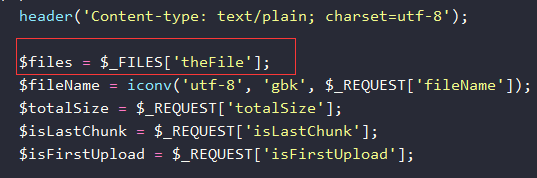
要注意的是,通過 FormData 對象上傳的文件,在 PHP 中同樣是通過 $_FILES 全局對象獲取的;另外,為避免上傳後文件名中文亂碼,用了一下 iconv。
由於斷點續傳要支持覆蓋,所以如果已存在完整文件,就先將其刪除:
// 如果第一次上傳的時候,該文件已經存在,則刪除文件重新上傳 if ($isFirstUpload == '1' && file_exists('upload/'. $fileName) && filesize('upload/'. $fileName) == $totalSize) { unlink('upload/'. $fileName); }
再用上述兩個方法追加文件數據,別忘了加上 FILE_APPEND 參數:
// 繼續追加文件數據 if (!file_put_contents('upload/'. $fileName, file_get_contents($_FILES['theFile']['tmp_name']), FILE_APPEND)) { $status = 501; } else { // 在上傳的最後片段時,檢測文件是否完整(大小是否一致) if ($isLastChunk === '1') { if (filesize('upload/'. $fileName) == $totalSize) { $status = 200; } else { $status = 502; } } else { $status = 200; } }
一般傳完後都需要校驗文件,這裡簡單校驗了文件大小是否一致。根據實際需求不同,錯誤處理方式也各異,就不過多展開了。完整的 PHP 部分如下:
<?php header('Content-type: text/plain; charset=utf-8'); $files = $_FILES['theFile']; $fileName = iconv('utf-8', 'gbk', $_REQUEST['fileName']); $totalSize = $_REQUEST['totalSize']; $isLastChunk = $_REQUEST['isLastChunk']; $isFirstUpload = $_REQUEST['isFirstUpload']; if ($_FILES['theFile']['error'] > 0) { $status = 500; } else { // 此處為一般的文件上傳操作 // if (!move_uploaded_file($_FILES['theFile']['tmp_name'], 'upload/'. $_FILES['theFile']['name'])) { // $status = 501; // } else { // $status = 200; // } // 以下部分為文件斷點續傳操作 // 如果第一次上傳的時候,該文件已經存在,則刪除文件重新上傳 if ($isFirstUpload == '1' && file_exists('upload/'. $fileName) && filesize('upload/'. $fileName) == $totalSize) { unlink('upload/'. $fileName); } // 否則繼續追加文件數據 if (!file_put_contents('upload/'. $fileName, file_get_contents($_FILES['theFile']['tmp_name']), FILE_APPEND)) { $status = 501; } else { // 在上傳的最後片段時,檢測文件是否完整(大小是否一致) if ($isLastChunk === '1') { if (filesize('upload/'. $fileName) == $totalSize) { $status = 200; } else { $status = 502; } } else { $status = 200; } } } echo json_encode(array( 'status' => $status, 'totalSize' => filesize('upload/'. $fileName), 'isLastChunk' => $isLastChunk )); ?>
以上就是關於基於 JavaScript 實現前端文件斷點續傳的分享,希望對大家有所幫助。如有疑問歡迎留言交流。