帶鬧鈴功能的 JavaScript 倒計時代碼
編輯:關於JavaScript
這是一個帶鬧鈴功能的 JavaScript 倒計時代碼,可以自訂鬧鐘時間。點擊開始按鈕後即會倒數,邏輯並不複雜,新手應該也能看懂,分享給大家參考。
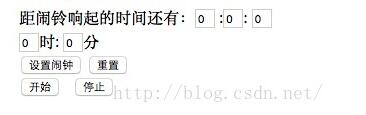
效果圖:
原始碼:
<html> <head> <title>Js倒計時,鬧鈴功能</title> <script language="javascript"> function $(id){ return document.getElementById(id); } function down(){ $("second").value-=1; if($("second").value==0&&$("minutes").value==0&&$("hours").value==0) { window.alert("干正事了!!!"); clearInterval(timeout); } if($("second").value==-1) { $("second").value=59; $("minutes").value-=1; } if($("minutes").value==-1) { $("minutes").value=59; $("hours").value-=1; } } var timeout; function begin(){ timeout=setInterval("down()",1000); } function stop(){ clearInterval(timeout); } var dt=new Date(); function setclock() { var hours=$("clock_hours").value-dt.getHours(); var minutes=$("clock_minutes").value-dt.getMinutes(); if(minutes<0) { if(hours<0) { $("minutes").value=60-Math.abs(minutes); $("hours").value=24-Math.abs(hours); } else if(hours==0) { $("minutes").value=60-Math.abs(minutes); $("hours").value=Math.abs(hours); } else { $("minutes").value=60-Math.abs(minutes); $("hours").value=Math.abs(hours)-1; } } else if(minutes==0) { if(hours<0) { $("minutes").value=Math.abs(minutes); $("hours").value=24-Math.abs(hours); } else if(hours==0) { $("minutes").value=Math.abs(minutes); $("hours").value=Math.abs(hours)+24; } else { $("minutes").value=Math.abs(minutes); $("hours").value=Math.abs(hours); } } else { if(hours<0) { $("minutes").value=60-Math.abs(minutes); $("hours").value=24-Math.abs(hours); } else if(hours==0) { $("minutes").value=Math.abs(minutes); $("hours").value=Math.abs(hours); } else { $("minutes").value=Math.abs(minutes); $("hours").value=Math.abs(hours); } } } function reset() { var time=document.getElementsByName("time"); for(i=0;i<time.length;i++) { time[i].value=0; } } </script> </head> <body> 距鬧鈴響起的時間還有:<input type="text" id="hours" style="width:20px" value="0" name="time" /> :<input type="text" id="minutes" value="0" style="width:20px" name="time"/>: <input type="text" id="second" value="0" style="width:20px" name="time"/><br/> <input type="text" id="clock_hours" value="0" style="width:20px" name="time"/>時: <input type="text" id="clock_minutes" value="0" style="width:20px" name="time"/>分<br/> <input type="button" value="設置鬧鐘" onclick="setclock()" /> <input type="button" value="重置" onclick="reset()" /><br/> <input type="button" value="開始" onclick="begin()"> <input type="button" value="停止" onclick="stop()"> </body> </html> 整個實作拆成幾個部分:setclock 負責把使用者設定的時、分換算成距離現在的剩餘時間;begin 透過 setInterval 每秒觸發 down,讓秒數遞減,並在秒、分歸零時跳出提醒;stop 則清除計時器。這裡有個小細節值得注意——當秒數遞減到 -1 時要借位、分鐘遞減到 -1 時也要向小時借位,處理好這些進位邊界,倒數才不會出現負數或錯亂。若要用在正式專案,建議再把 setclock 的時間差判斷整理得更精簡一些。