用純 JavaScript 打造 Flappy Bird 小遊戲的完整實作
編輯:關於JavaScript
前言:
《Flappy Bird》是一款由越南獨立遊戲開發者 Dong Nguyen 創作的作品,2013 年 5 月 24 日上線,並在 2014 年 2 月意外爆紅。同年 2 月,作者一度將它從 App Store 與 Google Play 下架;8 月又正式回歸,並加入了玩家期待已久的多人對戰模式。遊戲玩法是操控一隻小鳥,穿越由高低不一的水管組成的障礙。
接下來,我們就用純 JavaScript 一步步把它做出來。
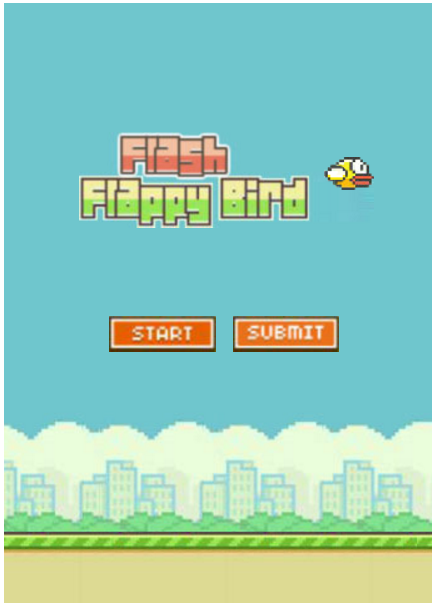
步驟 1:頁面佈局
這部分相對簡單,頁面結構如下:
步驟 2:讓小鳥下落與起跳
鳥下落:給小鳥一個 speed,初始值為 0,透過計時器讓 speed 每 30ms 加 1,當 speed 超過最大值 speedMax(即 speed > 8)時就保持最大值。
//獲取鳥div var bird = document.getElementById("flybird"); //鳥下降 function down() { speed += 1; bird.id = 'flybird_down'; up_bgm.pause();//關閉小鳥上升音樂; //當鳥下落速度達到最大值speedMax時,保持不變 if(speed >= speedMax) { speed = speedMax; } bird.style.top = bird.offsetTop + speed + 'px'; floorText(); //落地檢測 }
鳥上升:也就是讓小鳥的 top 值減小的過程,只要讓 speed 遞減即可。同時在上升時要關閉下降計時器與上一次起跳的上升計時器,再重新啟動上升計時器。這裡有個 isGameOver 作為遊戲開關,預設為 true,當它為 false 時遊戲未開始,小鳥無法起跳。
//小鳥上升 function up() { speed -= 0.8; bird.id = 'flybird_up'//該id下的樣式為小鳥下降的背景圖片,並增加動畫不斷替換小鳥的背景圖像,讓小鳥翅膀動起來~ up_bgm.play() if(speed <= 0) { speed = 0; clearInterval(upTimer); DownTimer = setInterval(down, 30); } bird.style.top = bird.offsetTop - speed + 'px'; } //鳥跳動的方法; function birdJump() { speed = speedMax; if(isGameOver) { //每次向上跳時,先將向上、向下計時器清楚,防止疊加 clearInterval(upTimer); clearInterval(DownTimer); //清除向下的定時器; upTimer = setInterval(up, 30); } } //判斷小鳥落地或者小鳥跳出上邊界,此時游戲結束 function floorText() { var t1 = bird.offsetTop; if(t1 > 396) { //游戲結束; gameover(); } if(t1 < 0) { gameover(); } }
步驟 3:建立水管
玩過 Flappy Bird 的人都知道,水管高度是隨機的,但上下兩根水管之間的間距固定。我們用 Math.random() 來產生隨機高度。
//隨機函數,用來隨機產生鋼管的高度 function rand(min, max) { return parseInt(Math.random() * (max - min) + min); } //創建管道。在點擊開始按鈕後,通過計時器來創建 function create_pipe() { var conduit_group = document.querySelector(".conduit_group"); var conduitItem = document.createElement("div"); //給創建的管道一個樣式 conduitItem.className = 'conduitItem'; //將創建的管道放入外層div conduit_group.appendChild(conduitItem); var topHeight = rand(60, 223);//管道裡面 上管道的高度值 var bottomHeight = 373 - 100 - topHeight;//管道裡面 下管道的高度值 //創建上下管道 conduitItem.innerHTML = '<div class="top_conduit"><div style="height:' + topHeight + 'px"></div></div><div class="bottom_conduit"><div style="height:' + bottomHeight + 'px"></div></div>' //獲取最外層div的寬度,即為管道可以移動的最大值 var maxWidth = canvas.offsetWidth; //讓管道剛開始在canvas外面,一開始看不到 conduitItem.style.left = maxWidth + 'px'; //加分開關,每通過一個管道分數才能加1 conduitItem.AddToscore = true; //管道移動方法,通過計時器不斷使其的left值遞減來實現管道移動。 conduitItem.movetimer = setInterval(function() { maxWidth -= 3;//每30ms向左移動3個像素 conduitItem.style.left = maxWidth + 'px' //在管道跑出去之後,清除使該管道移動的計時器,並將其移除。 if(maxWidth <= -70) { clearInterval(conduitItem.movetimer); conduit_group.removeChild(conduitItem); } //當管道的offsetLeft小於30時,即小鳥成功通過管道之後,分數加1 if(conduitItem.offsetLeft <= 30 && conduitItem.AddToscore == true) { score++; conduitItem.AddToscore = false; scoreFn(score); } }, 30) }
步驟 4:碰撞檢測
水管會動、小鳥會跳之後,接下來要判斷小鳥是否碰到水管。
//鳥和管道碰撞檢測,obj1為小鳥,obj2為上下管道的父集 //直接獲取上下管道,offsetLeft為0,因此要獲取其父集; function crashTest(obj1, obj2) { //小鳥的相關量 var l1 = bird.offsetLeft; console.log(l1) var r1 = l1 + bird.offsetWidth; var t1 = bird.offsetTop; var b1 = t1 + bird.offsetHeight //管道的相關量 var l2 = obj2.offsetLeft; var r2 = l2 + obj2.offsetWidth; var t2 = obj1.offsetTop; var b2 = t2 + obj1.offsetHeight; //判斷條件 if(r1 > l2 && l1 < r2 && b1 > t2 && t1 < b2) { gameover(); } } function judge() { //獲取創造的在當前頁面顯示的所有管道,為一個數組 var conduitItem = document.querySelector('.conduit_group').querySelectorAll('.conduitItem'); //遍歷顯示的管道,為crashTest方法傳遞參數來進行判斷。 for(var i = 0; i < conduitItem.length; i++) { var top_conduit = conduitItem[i].querySelector('.top_conduit'); var bottom_conduit = conduitItem[i].querySelector('.bottom_conduit'); crashTest(top_conduit, conduitItem[i]); crashTest(bottom_conduit, conduitItem[i]); } }
步驟 5:遊戲結束
當碰到水管、撞到上邊界或落地時,遊戲結束,顯示本局分數與歷史最高紀錄。
//游戲結束 function gameover() { //游戲結束背景音樂打開 gameover_bgm.play(); isGameOver = false; //結束音樂 bgm.pause(); clearTimer(); //小鳥換回原來的樣式 bird.id = 'flybird' bird.className = 'birddown' bird.style.top = '392px'; //存儲最高紀錄 var historyscore = localStorage.getItem('maxScore'); //當歷史記錄不存在或者歷史記錄小於當前記錄時,創建masScore. if(historyscore == null || historyscore < score) { localStorage.setItem('maxScore', score); //刷新記錄 historyscore = score; } //歷史最高紀錄 historyScore.innerHTML = historyscore; //當前分數 thisScore.innerHTML = score; //顯示游戲結束畫面 document.querySelector('.gameover').style.display = 'block'; }
步驟 6:遊戲開始
//游戲初始化 function init() { //為start_btn,即頁面剛開始顯示的start創建點擊事件,即開始按鈕 start_btn.onclick = function() { //點擊之後,開始界面隱藏 gameStartDiv.style.display = 'none'; //小鳥顯示出來 bird.style.display = 'block'; //使小鳥在中間顯示 bird.style.top = '200px'; bgm.play(); //通過點擊,來調用birdJump方法,來使小鳥上升 //開始創造管道 conduitTimer = setInterval(create_pipe, 2000) document.addEventListener('click', birdJump, false) crashTestTimer = setInterval(judge, 1000 / 60); } } init();
步驟 7:重新開始
//重新開始 var game_restart = document.querySelector(".game_restart") game_restart.onclick = restart; var conduit_group = document.querySelector(".conduit_group") //回到剛開始的界面 function restart() { bird.className = 'bird' clearTimer(); scoreDiv.innerHTML = null; isGameOver = true; speed = 0; score=0; speedMax = 8; document.querySelector('.gameover').style.display = 'none'; gameStartDiv.style.display = 'block'; bird.style.display = 'none'; conduit_group.innerHTML = ''; }
這裡用到的 clearTimer 方法用來清除所有計時器,程式碼如下:
function clearTimer() { var timer = setInterval(function() {}, 30); for(i = 0; i < timer; i++) { clearInterval(i); } }
這樣一來,遊戲大致就完成了。
效果圖如下:
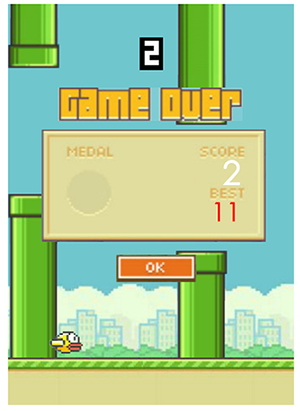
建議在 Chrome 瀏覽器上運行測試。
熱門推薦
JavaScript 的「反射」怎麼用?走訪物件的所有屬性
JavaScript 面試常見陷阱題解析:型別、this 與函式作用域
動態建立 link 標籤插入 head 的三種寫法(jQuery / 原生 / IE)
JavaScript 伸展收縮型菜單:懸停時背景自動伸長
用 JavaScript 模擬 DOS 視窗的趣味實作
JavaScript 手機震動 Vibration API 完整用法教學
用 Object.getPrototypeOf 打造方法 resend
動態改變 IFrame 高度實現自適應自伸展
Qatrix:4.7KB的超輕量級JavaScript框架,主打硬件加速動畫