父子頁面互相操作 DOM 是傳統多頁應用裡很常見的需求——父頁要改子頁的樣式,子頁要讀父頁的狀態。以下用一組最小範例把兩個方向都跑一次。
父頁面(demo.html):改子頁 div 的背景色
目標是把子頁中原本紅色的方塊改成灰色。
<!DOCTYPE html PUBLIC "-//W3C//DTD XHTML 1.0 Transitional//EN" "https://www.w3.org/TR/xhtml1/DTD/xhtml1-transitional.dtd"> <html xmlns="https://www.w3.org/1999/xhtml"> <head> <meta http-equiv="Content-Type" content="text/html; charset=utf-8" /> <title>demo主頁面</title> <script type="text/javascript"> window.onload = function(){ var _iframe = document.getElementById('iframeId').contentWindow; var _div =_iframe.document.getElementById('objId'); _div.style.backgroundColor = '#ccc'; } </script> </head> <body> <div id='parDiv'>父頁面</div> <iframe src="demo-iframe.html" id="iframeId" height="150" width="150"></iframe> </body> </html>
關鍵是 contentWindow:iframe 元素本身只是一個佔位盒子,真正的子頁視窗要透過這個屬性取得,之後才能用它的 document 往下找元素。
子頁面(demo-iframe.html):改父頁 div 的字色
反方向更簡單,把原本黑色的文字改成紅色。
<!DOCTYPE html PUBLIC "-//W3C//DTD XHTML 1.0 Transitional//EN" "https://www.w3.org/TR/xhtml1/DTD/xhtml1-transitional.dtd"> <html xmlns="https://www.w3.org/1999/xhtml"> <head> <meta http-equiv="Content-Type" content="text/html; charset=utf-8" /> <title>子頁面demo13-iframe.html</title> <script type="text/javascript"> window.onload = function(){ var _iframe = window.parent; var _div =_iframe.document.getElementById('parDiv'); _div.style.color = 'red'; } </script> </head> <body> <div id='objId' style='width:100px;height:100px;background-color:red;'>子頁面</div> </body> </html>
子頁用 window.parent 拿到父視窗,再直接呼叫父頁的 document。若有多層嵌套,window.top 可以一路取到最外層。
效果對照
(1)未加入 JS 時:
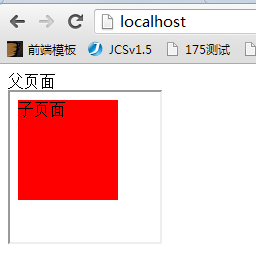
(2)加入 JS 後:
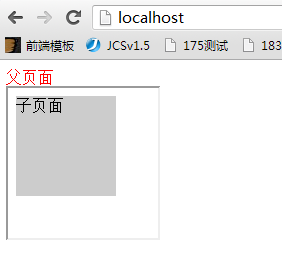
實務上一定要處理的三件事
同源政策。上述程式碼能運作的前提是父子頁同來源(同 protocol、同 host、同 port)。一旦 iframe 載入的是外部網域,存取 contentWindow.document 會直接拋出 SecurityError。跨來源溝通只能改用 postMessage,且接收端務必檢查 event.origin,否則任何網站都能對你的頁面發指令。
時序問題。window.onload 觸發的順序是子頁先、父頁後,但這只是同源的情況。若 iframe 的 src 尚未載完就存取其 document,會拿到錯誤的內容。稳妥的做法是監聽 iframe 的 load 事件,或讓子頁在就緒後主動通知父頁。
不要假設 iframe 一定存在。iframe 可能被 sandbox 限制、被瀏覽器擴充攔截,或因 Content-Security-Policy 而無法載入。跨頁操作前加上型別檢查,比事後追查 null 錯誤輕鬆得多。
最後一點架構上的建議:iframe 的跨頁耦合會讓除錯變得困難——錯誤堆疊跨越兩個文件,狀態散落在兩邊。若專案允許,改用單頁應用的元件化溝通(狀態管理或事件匯流排)通常比 iframe 更容易維護。
- 上一篇文章: 使用 HTML5 + Bootstrap 打造簡單的音樂播放器
- 下一篇文章: JS 從外部獲取圖片的實現方法
相關文章
-
解決 iframe 內 Bootstrap 模態框無法覆蓋整個頁面的問題 用 window.parent 判斷頁面是否被嵌入 iframe 讓 iframe 內的頁面呼叫父視窗的 JS 函式 JavaScript 在框架(Frame)環境下的頁面跳轉技巧 iframe 父子頁面互相呼叫的寫法與瀏覽器限制 JavaScript 操作 iframe 的六大常用技巧 搞懂 contentWindow 與 contentDocument:iframe 高度自適應的關鍵 用 JavaScript 跨 iframe 操作 DOM 的完整指南 使用 iframe window 的 scroll 方法控制 iframe 頁面滾動 用 JS 判斷 iframe 內網頁是否捲到底部並觸發事件