專案裡需要一個環形進度條,載入時從 0 動畫到 100%,跑完之後停在 100% 不動。以下用 radialIndicator 這個 jQuery 插件實作。
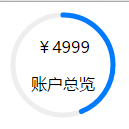
demo.html
<!doctype html> <html lang="zh"> <head> <meta charset="UTF-8"> <meta http-equiv="X-UA-Compatible" content="IE=edge,chrome=1"> <meta name="viewport" content="width=device-width, initial-scale=1.0"> <title>demo</title> <style> .rad-prg{ position: relative; } .rad-con{ position: absolute; z-index: 1; top:0; left: 0; text-align: center; width:90px; height: 90px; padding: 10px; font-family: "microsoft yahei"; } </style> </head> <body> <div class="prg-cont rad-prg" id="indicatorContainer"> <div class="rad-con"> <p>¥4999</p> <p>賬戶總覽</p> </div> </div> <script type="text/javascript" src="js/jquery.min.js"></script> <script src="js/radialIndicator.js"></script> <script> $('#indicatorContainer').radialIndicator({ barColor: '#007aff', barWidth: 5, initValue: 0, roundCorner : true, percentage: true, displayNumber: false, radius: 50 }); setTimeout(function(){ var radObj = $('#indicatorContainer2').data('radialIndicator'); radObj.animate(100); },300); </script> </body> </html>
這裡有個必須修的錯誤:初始化的選擇器是 #indicatorContainer,但 setTimeout 裡取物件用的卻是 #indicatorContainer2——這個 id 在 HTML 中不存在。因此 $('#indicatorContainer2').data('radialIndicator') 會回傳 undefined,接著呼叫 radObj.animate(100) 就會拋出「 Cannot read property 'animate' of undefined 」。把兩處 id 改成一致即可。
radialIndicator.js(jQuery 插件)
/* radialIndicator.js v 1.0.0 Author: Sudhanshu Yadav Copyright (c) 2015 Sudhanshu Yadav - ignitersworld.com , released under the MIT license. Demo on: ignitersworld.com/lab/radialIndicator.html */ ;(function ($, window, document) { "use strict"; //circumfence and quart value to start bar from top var circ = Math.PI * 2, quart = Math.PI / 2; //function to convert hex to rgb function hexToRgb(hex) { // Expand shorthand form (e.g. "03F") to full form (e.g. "0033FF") var shorthandRegex = /^#?([a-f\d])([a-f\d])([a-f\d])$/i; hex = hex.replace(shorthandRegex, function (m, r, g, b) { return r + r + g + g + b + b; }); var result = /^#?([a-f\d]{2})([a-f\d]{2})([a-f\d]{2})$/i.exec(hex); return result ? [parseInt(result[1], 16), parseInt(result[2], 16), parseInt(result[3], 16)] : null; } function getPropVal(curShift, perShift, bottomRange, topRange) { return Math.round(bottomRange + ((topRange - bottomRange) * curShift / perShift)); } //function to get current color in case of function getCurrentColor(curPer, bottomVal, topVal, bottomColor, topColor) { var rgbAryTop = topColor.indexOf('#') != -1 ? hexToRgb(topColor) : topColor.match(/\d+/g), rgbAryBottom = bottomColor.indexOf('#') != -1 ? hexToRgb(bottomColor) : bottomColor.match(/\d+/g), perShift = topVal - bottomVal, curShift = curPer - bottomVal; if (!rgbAryTop || !rgbAryBottom) return null; return 'rgb(' + getPropVal(curShift, perShift, rgbAryBottom[0], rgbAryTop[0]) + ',' + getPropVal(curShift, perShift, rgbAryBottom[1], rgbAryTop[1]) + ',' + getPropVal(curShift, perShift, rgbAryBottom[2], rgbAryTop[2]) + ')'; } //to merge object function merge() { var arg = arguments, target = arg[0]; for (var i = 1, ln = arg.length; i < ln; i++) { var obj = arg[i]; for (var k in obj) { if (obj.hasOwnProperty(k)) { target[k] = obj[k]; } } } return target; } //function to apply formatting on number depending on parameter function formatter(pattern) { return function (num) { if(!pattern) return num.toString(); num = num || 0 var numRev = num.toString().split('').reverse(), output = pattern.split("").reverse(), i = 0, lastHashReplaced = 0; //changes hash with numbers for (var ln = output.length; i < ln; i++) { if (!numRev.length) break; if (output[i] == "#") { lastHashReplaced = i; output[i] = numRev.shift(); } } //add overflowing numbers before prefix output.splice(lastHashReplaced+1, output.lastIndexOf('#') - lastHashReplaced, numRev.reverse().join("")); return output.reverse().join(''); } } //circle bar class function Indicator(container, indOption) { indOption = indOption || {}; indOption = merge({}, radialIndicator.defaults, indOption); this.indOption = indOption; //create a queryselector if a selector string is passed in container if (typeof container == "string") container = document.querySelector(container); //get the first element if container is a node list if (container.length) container = container[0]; this.container = container; //create a canvas element var canElm = document.createElement("canvas"); container.appendChild(canElm); this.canElm = canElm; // dom object where drawing will happen this.ctx = canElm.getContext('2d'); //get 2d canvas context //add intial value this.current_value = indOption.initValue || indOption.minValue || 0; } Indicator.prototype = { constructor: radialIndicator, init: function () { var indOption = this.indOption, canElm = this.canElm, ctx = this.ctx, dim = (indOption.radius + indOption.barWidth) * 2, //elm width and height center = dim / 2; //center point in both x and y axis //create a formatter function this.formatter = typeof indOption.format == "function" ? indOption.format : formatter(indOption.format); //maximum text length; this.maxLength = indOption.percentage ? 4 : this.formatter(indOption.maxValue).length; canElm.width = dim; canElm.height = dim; //draw a grey circle ctx.strokeStyle = indOption.barBgColor; //background circle color ctx.lineWidth = indOption.barWidth; ctx.beginPath(); ctx.arc(center, center, indOption.radius, 0, 2 * Math.PI); ctx.stroke(); //store the image data after grey circle draw this.imgData = ctx.getImageData(0, 0, dim, dim); //put the initial value if defined this.value(this.current_value); return this; }, //update the value of indicator without animation value: function (val) { //return the val if val is not provided if (val === undefined || isNaN(val)) { return this.current_value; } val = parseInt(val); var ctx = this.ctx, indOption = this.indOption, curColor = indOption.barColor, dim = (indOption.radius + indOption.barWidth) * 2, minVal = indOption.minValue, maxVal = indOption.maxValue, center = dim / 2; //limit the val in range of 0 to 100 val = val < minVal ? minVal : val > maxVal ? maxVal : val; var perVal = Math.round(((val - minVal) * 100 / (maxVal - minVal)) * 100) / 100, //percentage value tp two decimal precision dispVal = indOption.percentage ? perVal + '%' : this.formatter(val); //formatted value //save val on object this.current_value = val; //draw the bg circle ctx.putImageData(this.imgData, 0, 0); //get current color if color range is set if (typeof curColor == "object") { var range = Object.keys(curColor); for (var i = 1, ln = range.length; i < ln; i++) { var bottomVal = range[i - 1], topVal = range[i], bottomColor = curColor[bottomVal], topColor = curColor[topVal], newColor = val == bottomVal ? bottomColor : val == topVal ? topColor : val > bottomVal && val < topVal ? indOption.interpolate ? getCurrentColor(val, bottomVal, topVal, bottomColor, topColor) : topColor : false; if (newColor != false) { curColor = newColor; break; } } } //draw th circle value ctx.strokeStyle = curColor; //add linecap if value setted on options if (indOption.roundCorner) ctx.lineCap = "round"; ctx.beginPath(); ctx.arc(center, center, indOption.radius, -(quart), ((circ) * perVal / 100) - quart, false); ctx.stroke(); //add percentage text if (indOption.displayNumber) { var cFont = ctx.font.split(' '), weight = indOption.fontWeight, fontSize = indOption.fontSize || (dim / (this.maxLength - (Math.floor(this.maxLength*1.4/4)-1))); cFont = indOption.fontFamily || cFont[cFont.length - 1]; ctx.fillStyle = indOption.fontColor || curColor; ctx.font = weight +" "+ fontSize + "px " + cFont; ctx.textAlign = "center"; ctx.textBaseline = 'middle'; ctx.fillText(dispVal, center, center); } return this; }, //animate progressbar to the value animate: function (val) { var indOption = this.indOption, counter = this.current_value || indOption.minValue, self = this, incBy = Math.ceil((indOption.maxValue - indOption.minValue) / (indOption.frameNum || (indOption.percentage ? 100 : 500))), //increment by .2% on every tick and 1% if showing as percentage back = val < counter; //clear interval function if already started if (this.intvFunc) clearInterval(this.intvFunc); this.intvFunc = setInterval(function () { if ((!back && counter >= val) || (back && counter <= val)) { if (self.current_value == counter) { clearInterval(self.intvFunc); return; } else { counter = val; } } self.value(counter); //dispaly the value if (counter != val) { counter = counter + (back ? -incBy : incBy) }; //increment or decrement till counter does not reach to value }, indOption.frameTime); return this; }, //method to update options option: function (key, val) { if (val === undefined) return this.option[key]; if (['radius', 'barWidth', 'barBgColor', 'format', 'maxValue', 'percentage'].indexOf(key) != -1) { this.indOption[key] = val; this.init().value(this.current_value); } this.indOption[key] = val; } }; /** Initializer function **/ function radialIndicator(container, options) { var progObj = new Indicator(container, options); progObj.init(); return progObj; } //radial indicator defaults radialIndicator.defaults = { radius: 50, //inner radius of indicator barWidth: 5, //bar width barBgColor: '#eeeeee', //unfilled bar color barColor: '#99CC33', //filled bar color , can be a range also having different colors on different value like {0 : "#ccc", 50 : '#333', 100: '#000'} format: null, //format indicator numbers, can be a # formator ex (##,###.##) or a function frameTime: 10, //miliseconds to move from one frame to another frameNum: null, //Defines numbers of frame in indicator, defaults to 100 when showing percentage and 500 for other values fontColor: null, //font color fontFamily: null, //defines font family fontWeight: 'bold', //defines font weight fontSize : null, //define the font size of indicator number interpolate: true, //interpolate color between ranges percentage: false, //show percentage of value displayNumber: true, //display indicator number roundCorner: false, //have round corner in filled bar minValue: 0, //minimum value maxValue: 100, //maximum value initValue: 0 //define initial value of indicator }; window.radialIndicator = radialIndicator; //add as a jquery plugin if ($) { $.fn.radialIndicator = function (options) { return this.each(function () { var newPCObj = radialIndicator(this, options); $.data(this, 'radialIndicator', newPCObj); }); }; } }(window.jQuery, window, document, void 0));
這個插件的設計取捨
用 Canvas 而非 SVG。畫法是先描一個灰色底圓,再用 getImageData 把這個底圖存起來;每次更新數值時用 putImageData 還原底圖,然後只畫一段弧線。這種「存底圖再重畫」的策略比每幀重畫兩個圓省事。
從 12 點方向起算。ctx.arc(..., -quart, circ * perVal / 100 - quart, false) 裡的 -quart 就是 -π/2,把 0 度從 3 點鐘位置轉到 12 點鐘位置。少了這個偏移,進度會從右邊開始繞。
支援漸層配色。barColor 除了單色,還能傳物件如 {0: "#ccc", 50: "#333", 100: "#000"},配合 interpolate 會在區間之間做 RGB 線性插值。這讓「進度愈高顏色愈深」的效果不必手動分段。
同時提供 jQuery 與原生介面。有 jQuery 時掛成 $.fn.radialIndicator 並用 $.data 存參照,否則也能直接 radialIndicator(el, opts) 呼叫。
幾個使用上的提醒
displayNumber 設為 false 時,中心文字要自己排。示範中把 displayNumber: false,改由 .rad-con 這個絕對定位的 div 顯示「¥4999 賬戶總覽」。這裡要注意 .rad-con 的定位父層是 .rad-prg(設了 position: relative),而 canvas 是被 append 進容器的,兩者的 z-index 關係需要留意,否則文字會被畫布蓋住。
animate 內部用 setInterval 而非 rAF。frameTime 預設 10 毫秒,但瀏覽器對定時器有最小間隔限制(約 4ms,且背景分頁會降到 1 秒以上),所以實際 fps 會低於設定值。若在意動畫順暢度,改用 requestAnimationFrame 會更平穩。
option 方法有個 bug。if (val === undefined) return this.option[key]; 這行試圖讀取目前設定,但 this.option 是方法本身而非設定物件,應該是 this.indOption[key]。因此這個 getter 用法實際上取不到值。
純呈現元件應考慮無障礙。Canvas 內容對螢幕閱讀器完全不可見。若進度具有資訊意義,容器上應該加上 role="progressbar" 與 aria-valuenow、aria-valuemin、aria-valuemax,並在數值更新時同步 aria-valuenow。示範中這個進度條顯示的是金額而非完成比例,那麼它其實不是進度條,用一般文字標示即可,不該借用 progressbar 的語意。