用 zepto.js 實作相簿圖片放大彈窗
編輯:關於JavaScript
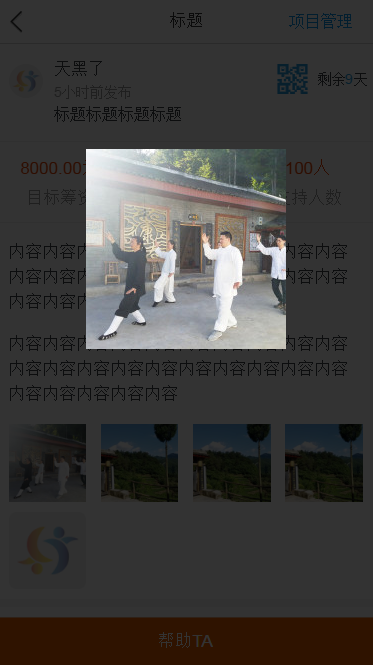
行動端點擊縮圖後弹出大圖、點擊空白處關閉,是相簿功能的標準互動。以下用 zepto.js 實作這個彈窗。
先看效果:
//放大圖片 $(page).on('click','.popupImage img',function () { var that = $(this); that.popupImage({ this:that, width:"200px" }) }); //相冊彈窗 $.fn.popupImage = function (obj) { var $this = obj.this; var sj_w = $this[0].naturalHeight; var src = $this.attr('src'); var h = $('body').height(); var w = $('body').width(); var padding = 10; var shadeW = w - padding*2; var img = '',shade = ''; img = '<div class="popup-image" style="position:absolute; top:0; left:0; z-index: 999999; padding:10px '+padding+'px; width: '+w+'px; height:'+h+'px; line-height: '+h+'px; text-align: center;" >' + '<img src="'+src+'" style="max-width: '+shadeW+'px"/></div>'; shade = '<div class="shade" style="position:absolute; top:0; left:0; width: '+w+'px; height:'+h+'px;background: #000; z-index: 999990; opacity: .8;"></div>'; $('body').append(shade); $('body').append(img); $('.popup-image').on('click',function () { $('.popup-image').remove(); $('.shade').remove(); }) };
運作拆解
事件委派觸發:以 $(page).on('click', '.popupImage img', ...) 綁定,動態加入的縮圖也能生效。
尺寸計算:讀取 body 的寬高作為覆蓋層尺寸,扣掉兩側各 10px 的 padding 後得到圖片可用的最大寬度 shadeW。
雙層結構:先 append 一層半透明黑色遮罩(z-index 999990),再 append 內容層(z-index 999999)。兩者層級差 9,確保圖片永遠在遮罩之上。內容層用 line-height 等於容器高度搭配 text-align:center 實現垂直與水平雙向居中,這是純 CSS 居中的經典技巧。
點擊關閉:在內容層上監聽 click,同時 remove 遮罩與內容。由於遮罩在上、內容在下且兩者重疊,點任何位置都會命中內容層,因此不必分別綁定。
可以更好的地方
程式裡讀了 $this[0].naturalHeight 存進 sj_w 但沒用到,是可以刪掉的殘留程式碼。
另外幾點實務建議:圖片應改用 max-width:100%; max-height:100% 搭配 width/height auto,只限制 max-width 會讓長圖超出視窗;彈窗期間最好鎖住背景捲動(為 body 加上 overflow:hidden),否則使用者在遮罩上滑動會帶動底層頁面;z-index 用 999999 這類魔法數字容易與其他元件衝突,建議統一在 CSS 中以變數管理;最後,長按圖片可另存或直接關閉,是行動端相簿必備的細節。
- 上一篇文章: Bootstrap 系列(一):初識 Bootstrap
- 下一篇文章: 基於 zepto.js 的省市聯動下拉選單實作
熱門推薦
百度地圖為 map 加上右鍵菜單:如何分辨是否點在 marker 上
逐行解析 John Resig 的 Simple JavaScript Inheritance
純 JavaScript 實現圖片點擊彈窗預覽大圖
用 JS 為 select 下拉選單動態添加 option 的三種做法
JavaScript 必知必會(四):型別轉換的規則與陷阱
《JavaScript 框架設計》讀書筆記:種子模塊的五大基礎能力
部落格目錄自動生成實作詳解:從抓取標題到滾輪同步高亮
用 JS 呼叫 WebService:手刻 SOAP 封包做身分驗證
JavaScript 物件導向入門:搞懂 Object 與 Function 的關係