$ionicModal 是 Ionic 提供的一個模態框服務,它能夠在主界面之上覆蓋一層內容框,常用於新增表單、確認提示等場景。下面從模板嵌入、控制器初始化到常用方法,做一次系統梳理。
嵌入模態框模板
你可以在 index 文件或其他頁面中嵌入以下模板代碼,其中的結構可按自身業務需要調整:
<script id="my-modal.html" type="text/ng-template"> <ion-modal-view> <ion-header-bar> <h1 class="title">My Modal title</h1> </ion-header-bar> <ion-content> Hello! </ion-content> </ion-modal-view> </script>
接著在 Controller 中注入 $ionicModal,調用剛才寫好的模板進行初始化:
angular.module('testApp', ['ionic']) .controller('MyController', function($scope, $ionicModal) { $ionicModal.fromTemplateUrl('my-modal.html', { scope: $scope, animation: 'slide-in-up' }).then(function(modal) { $scope.modal = modal; }); $scope.openModal = function() { $scope.modal.show(); }; $scope.closeModal = function() { $scope.modal.hide(); }; //清理模態框,避免內存洩漏 $scope.$on('$destroy', function() { $scope.modal.remove(); }); //模態框隱藏後執行 $scope.$on('modal.hidden', function() { }); //模態框移除後執行 $scope.$on('modal.removed', function() { }); });
創建方法
fromTemplate(templateString, options)
templateString(字符串):作為模態框內容的模板字符串。options(對象):會傳遞到 ionicModal#initialize 方法中。返回值為一個 ionicModal 控制器實例。
fromTemplateUrl(templateUrl, options)
templateUrl(字符串):載入模板的 URL。options(對象):同樣傳遞給 ionicModal#initialize。返回值是 promise 對象——Promise 是 CommonJS 工作組提出的一種規範,為異步編程提供統一接口。
ionicModal 實例方法
由 $ionicModal 服務實例化而來。特別提醒:每個模塊用完後,請務必調用 remove() 方法進行清理,以防止內存洩漏。此外,模態框會在其初始作用域上廣播 'modal.shown' 與 'modal.hidden',並把自己作為參數傳出。
initialize(options):創建一個新的模態框控制器實例,options 常用屬性包括:
- scope:子作用域,默認創建一個 $rootScope 的子類。
- animation:顯示或隱藏時的動畫,默認為 'slide-in-up'。
- focusFirstInput:顯示時是否讓第一個輸入框自動獲焦,默認 false。
- backdropClickToClose:點擊背景時是否關閉模態框,默認 true。
show():顯示模態框,返回在動畫結束後解析的 promise。
hide():隱藏模態框,返回在動畫結束後解析的 promise。
remove():從 DOM 中移除模態框並清理,返回在動畫結束後解析的 promise。
isShown():返回布爾值,用於判斷模態框是否處於顯示狀態。
完整實例
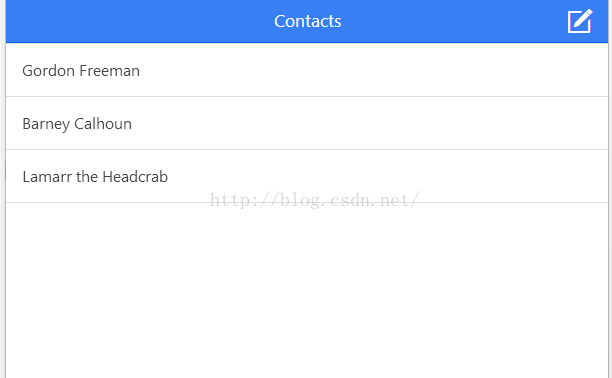
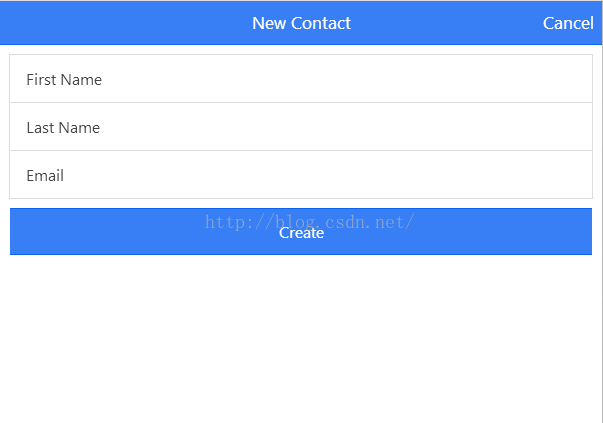
下面是一個「新增聯繫人」的實例,展示如何通過模態框收集輸入並追加到列表。
HTML 代碼
<html ng-app="ionicApp"> <head> <meta charset="utf-8"> <meta name="viewport" content="initial-scale=1, maximum-scale=1, user-scalable=no, width=device-width"> <title>菜鳥教程(runoob.com)</title> <link href="https://www.runoob.com/static/ionic/css/ionic.min.css" rel="stylesheet"> <script src="https://www.runoob.com/static/ionic/js/ionic.bundle.min.js"></script> </head> <body ng-controller="AppCtrl"> <ion-header-bar class="bar-positive"> <h1 class="title">Contacts</h1> <div class="buttons"> <button class="button button-icon ion-compose" ng-click="modal.show()"> </button> </div> </ion-header-bar> <ion-content> <ion-list> <ion-item ng-repeat="contact in contacts"> {{contact.name}} </ion-item> </ion-list> </ion-content> <script id="templates/modal.html" type="text/ng-template"> <ion-modal-view> <ion-header-bar class="bar bar-header bar-positive"> <h1 class="title">New Contact</h1> <button class="button button-clear button-primary" ng-click="modal.hide()">Cancel</button> </ion-header-bar> <ion-content class="padding"> <div class="list"> <label class="item item-input"> <span class="input-label">First Name</span> <input ng-model="newUser.firstName" type="text"> </label> <label class="item item-input"> <span class="input-label">Last Name</span> <input ng-model="newUser.lastName" type="text"> </label> <label class="item item-input"> <span class="input-label">Email</span> <input ng-model="newUser.email" type="text"> </label> <button class="button button-full button-positive" ng-click="createContact(newUser)">Create</button> </div> </ion-content> </ion-modal-view> </script> </body> </html>
CSS 代碼
body { cursor: url('https://www.runoob.com/try/demo_source/finger.png'), auto; }
JavaScript 代碼
angular.module('ionicApp', ['ionic']) .controller('AppCtrl', function($scope, $ionicModal) { $scope.contacts = [ { name: 'Gordon Freeman' }, { name: 'Barney Calhoun' }, { name: 'Lamarr the Headcrab' }, ]; $ionicModal.fromTemplateUrl('templates/modal.html', { scope: $scope }).then(function(modal) { $scope.modal = modal; }); $scope.createContact = function(u) { $scope.contacts.push({ name: u.firstName + ' ' + u.lastName }); $scope.modal.hide(); }; });
完整源碼
<html ng-app="ionicApp"> <head> <meta charset="utf-8"> <meta name="viewport" content="initial-scale=1, maximum-scale=1, user-scalable=no, width=device-width"> <title></title> <link href="https://cdn.bootcss.com/ionic/1.0.1/css/ionic.min.css" rel="stylesheet"> <script src="https://cdn.bootcss.com/ionic/1.0.1/js/ionic.bundle.min.js"></script> <style> body { cursor: url('https://ionicframework.com/img/finger.png'), auto; } </style> <script> angular.module('ionicApp', ['ionic'] .controller('AppCtrl', function($scope, $ionicModal) { $scope.contacts = [ { name: 'Gordon Freeman' }, { name: 'Barney Calhoun' }, { name: 'Lamarr the Headcrab' }, ]; $ionicModal.fromTemplateUrl('templates/modal.html', { scope: $scope }).then(function(modal) { $scope.modal = modal; }); $scope.createContact = function(u) { $scope.contacts.push({ name: u.firstName + ' ' + u.lastName }); $scope.modal.hide(); }; }); </script> </head> <body ng-controller="AppCtrl"> <ion-header-bar class="bar-positive"> <h1 class="title">Contacts</h1> <div class="buttons"> <button class="button button-icon ion-compose" ng-click="modal.show()"> </button> </div> </ion-header-bar> <ion-content> <ion-list> <ion-item ng-repeat="contact in contacts"> {{contact.name}} </ion-item> </ion-list> </ion-content> <script id="templates/modal.html" type="text/ng-template"> <ion-modal-view> <ion-header-bar class="bar bar-header bar-positive"> <h1 class="title">New Contact</h1> <button class="button button-clear button-primary" ng-click="modal.hide()">Cancel</button> </ion-header-bar> <ion-content class="padding"> <div class="list"> <label class="item item-input"> <span class="input-label">First Name</span> <input ng-model="newUser.firstName" type="text"> </label> <label class="item item-input"> <span class="input-label">Last Name</span> <input ng-model="newUser.lastName" type="text"> </label> <label class="item item-input"> <span class="input-label">Email</span> <input ng-model="newUser.email" type="text"> </label> <button class="button button-full button-positive" ng-click="createContact(newUser)">Create</button> </div> </ion-content> </ion-modal-view> </script> </body> </html>
相關文章
-
Angular + ui-grid 實戰:讓模態框裡的表格正確撐開寬度 HTML5 手機 App 開發入門(1):Ionic、Angular 2 與 Android 開發環境建置 HTML5 手機 App 開發入門(2):Ionic v2 與 Angular 2 聯絡人清單實作 用事件阻止冒泡實現點擊空白處關閉模態框 jQuery 彈出框組件 jDialog 的使用說明 兼容主流瀏覽器的 jQuery + CSS 遮罩層實作範例 私藏五款常用 jQuery 外掛分享 AngularJS 彈出模態框 $modal 用法 用 JavaScript 打造自訂的檔案選擇對話框 Ionic 實現下拉刷新與上拉加載更多的完整方案