用 JavaScript 打造自訂的檔案選擇對話框
編輯:關於JavaScript
瀏覽器原生 <input type="file"> 樣式難以定制,專案裡常有「換成自家風格的彈窗、裡面再放檔案選擇」的需求。做法是自己寫一個模態層,內容用 innerHTML 動態組裝。
CSS 樣式
DIV.neat-dialog-cont {
    Z-INDEX: 98;
    BACKGROUND: none transparent scroll repeat 0% 0%;
    LEFT: 0px;
    WIDTH: 100%;
    POSITION: absolute;
    TOP: 0px;
    HEIGHT: 100%;
}
DIV.neat-dialog-bg {
    Z-INDEX: -1;
    FILTER: alpha(opacity=70);
    LEFT: 0px;
    WIDTH: 100%;
    POSITION: absolute;
    TOP: 0px;
    HEIGHT: 100%;
    BACKGROUND-COLOR: #eee;
    opacity: 0.7;
}
DIV.neat-dialog {
    BORDER-RIGHT: #555 1px solid;
    BORDER-TOP: #555 1px solid;
    Z-INDEX: 99;
    MARGIN-LEFT: 35%;
    BORDER-LEFT: #555 1px solid;
    WIDTH: 300px;
    MARGIN-RIGHT: auto;
    BORDER-BOTTOM: #555 1px solid;
    POSITION: relative;
    TOP: 25%;
    BACKGROUND-COLOR: #fff;
}
DIV.neat-dialog-title {
    PADDING: 0.1em 0.3em;
    FONT-SIZE: 1em;
    MARGIN: 0px;
    LINE-HEIGHT: 1.2em;
    BORDER-BOTTOM: #444 1px solid;
    POSITION: relative;
    background: #36C;
    color: White;
}
DIV.neat-dialog P {
    PADDING: 0.2em;
    TEXT-ALIGN: center;
}
JavaScript
// 打開彈窗
function f_OpenDialog() {
    var sHTML = '<p><input id="txtFile" type="file" /></p>' +
        '<p><input id="btnYes" type="button" onclick="f_ReadExcel();" value="確定">' +
        '<button id="btnNo" onclick="window.neatDialog.close();">取消</button></p>';
    new NeatDialog(sHTML, "請選擇 Excel 文檔!");
}

// 關閉並移除彈窗
NeatDialog.prototype.close = function() {
    if (this.elt) {
        this.elt.style.display = "none";
        this.elt.parentNode.removeChild(this.elt);
    }
    window.neatDialog = null;
};

// 建立彈窗
function NeatDialog(sHTML, sTitle) {
    window.neatDialog = null;
    this.elt = null;
    if (document.createElement && document.getElementById) {
        var dg = document.createElement("div");
        dg.className = "neat-dialog";
        if (sTitle)
            sHTML = '<div class="neat-dialog-title">' + sTitle + '</div>\n' + sHTML;
        dg.innerHTML = sHTML;

        // 遮罩層
        var dbg = document.createElement("div");
        dbg.id = "nd-bdg";
        dbg.className = "neat-dialog-bg";

        // 容器
        var dgc = document.createElement("div");
        dgc.className = "neat-dialog-cont";
        dgc.appendChild(dbg);
        dgc.appendChild(dg);

        if (document.body.offsetLeft > 0) {
            dgc.style.marginLeft = document.body.offsetLeft + "px";
        }
        document.body.appendChild(dgc);
        this.elt = dgc;
        window.neatDialog = this;
    }
}
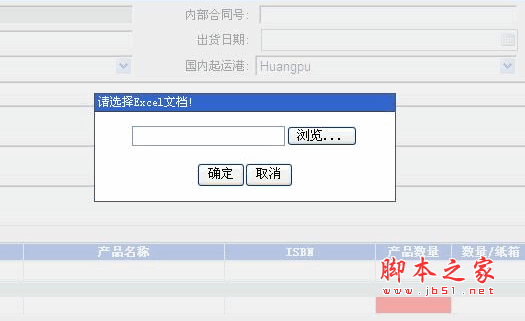
效果如下:
幾個可以改進的地方
這個實現把 neatDialog 掛在 window 上作為單例,好處是任何地方都能通過 window.neatDialog.close() 關掉它,缺點是同一頁面只能存在一個實例。另外點擊遮罩層關閉、ESC 鍵關閉、開啟時鎖定背景滾動這幾個常見互動,都需要額外補上。若要放到正式專案,建議改用 <dialog> 元素,它原生提供 showModal()、焦點陷阱與 backdrop,能省掉大量手寫邏輯。
- 上一篇文章: JavaScript 作用域最容易被記錯的兩個地方
- 下一篇文章: 用 JavaScript 把表格資料匯出到 Excel 的實作