用 HTML5 加 iScroll 實作下拉刷新與上拉載入更多
編輯:關於JavaScript
前言
前陣子接到一個手機版專案,需要下拉刷新與上拉載入更多的效果,腦中第一個浮現的就是微博那種互動。一開始我還理解錯了,以為下拉和上拉都是「追加資料」,請教同事後才搞清楚:下拉是重新抓取最新資料,上拉才是往後累加。這個區別很關鍵,直接影響資料層的設計。
實作要點
- 引入 iScroll.js,初始化時註冊
touchmove與DOMContentLoaded兩個事件。 - 在 iScroll 的
onScrollEnd中判斷方向,呼叫你自己的 Ajax 方法完成刷新或追加。 - 上拉載入等同分頁請求,Ajax 時要帶
pageIndex;初始載入時後端需回傳pageCount供前端判斷是否到底。 - 最關鍵的是實作
pullDownAction()與pullUpAction()這兩個方法。
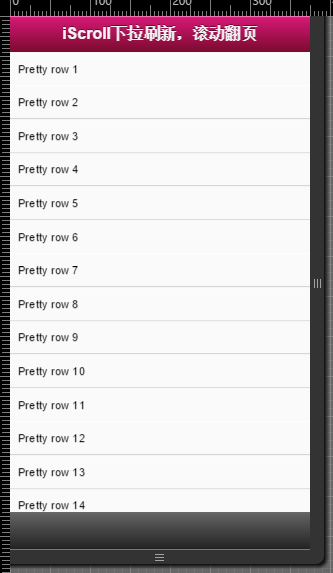
完整程式碼
var myScroll, pullDownEl, pullDownOffset, pullUpEl, pullUpOffset, generatedCount = 0;

/**
 * 下拉刷新(此處為自訂方法,實際專案請替換成 Ajax 請求)
 * 資料載入完成後,記得呼叫 myScroll.refresh() 更新介面
 */
function pullDownAction () {
  setTimeout(function () {
    var el, li, i;
    el = document.getElementById('thelist');
    for (i = 0; i < 3; i++) {
      li = document.createElement('li');
      li.innerText = 'Generated row ' + (++generatedCount);
      el.insertBefore(li, el.childNodes[0]);   // 新資料插到最前面
    }
    myScroll.refresh();
  }, 1000);
}

/**
 * 上拉載入更多(同樣為自訂方法)
 */
function pullUpAction () {
  setTimeout(function () {
    // 這裡的 setTimeout 只是模擬網路延遲,正式環境請移除
    var el, li, i;
    el = document.getElementById('thelist');
    for (i = 0; i < 3; i++) {
      li = document.createElement('li');
      li.innerText = 'Generated row ' + (++generatedCount);
      el.appendChild(li);                      // 舊資料往後疊
    }
    myScroll.refresh();
  }, 1000);
}

/** 初始化 iScroll */
function loaded() {
  pullDownEl = document.getElementById('pullDown');
  pullDownOffset = pullDownEl.offsetHeight;
  pullUpEl = document.getElementById('pullUp');
  pullUpOffset = pullUpEl.offsetHeight;

  myScroll = new iScroll('wrapper', {
    scrollbarClass: 'myScrollbar',
    useTransition: false,
    topOffset: pullDownOffset,
    onRefresh: function () {
      // 資料處理完畢後把提示文字復原
      if (pullDownEl.className.match('loading')) {
        pullDownEl.className = '';
        pullDownEl.querySelector('.pullDownLabel').innerHTML = '下拉刷新...';
      } else if (pullUpEl.className.match('loading')) {
        pullUpEl.className = '';
        pullUpEl.querySelector('.pullUpLabel').innerHTML = '上拉加載更多...';
      }
    },
    onScrollMove: function () {
      if (this.y > 5 && !pullDownEl.className.match('flip')) {
        pullDownEl.className = 'flip';
        pullDownEl.querySelector('.pullDownLabel').innerHTML = '松手開始更新...';
        this.minScrollY = 0;
      } else if (this.y < 5 && pullDownEl.className.match('flip')) {
        pullDownEl.className = '';
        pullDownEl.querySelector('.pullDownLabel').innerHTML = '下拉刷新...';
        this.minScrollY = -pullDownOffset;
      } else if (this.y < (this.maxScrollY - 5) && !pullUpEl.className.match('flip')) {
        pullUpEl.className = 'flip';
        pullUpEl.querySelector('.pullUpLabel').innerHTML = '松手開始更新...';
        this.maxScrollY = this.maxScrollY;
      } else if (this.y > (this.maxScrollY + 5) && pullUpEl.className.match('flip')) {
        pullUpEl.className = '';
        pullUpEl.querySelector('.pullUpLabel').innerHTML = '上拉加載更多...';
        this.maxScrollY = pullUpOffset;
      }
    },
    onScrollEnd: function () {
      if (pullDownEl.className.match('flip')) {
        pullDownEl.className = 'loading';
        pullDownEl.querySelector('.pullDownLabel').innerHTML = '加載中...';
        pullDownAction();     // 此處換成你的 Ajax
      } else if (pullUpEl.className.match('flip')) {
        pullUpEl.className = 'loading';
        pullUpEl.querySelector('.pullUpLabel').innerHTML = '加載中...';
        pullUpAction();       // 此處換成你的 Ajax
      }
    }
  });

  setTimeout(function () {
    document.getElementById('wrapper').style.left = '0';
  }, 800);
}

// 綁定初始化
document.addEventListener('touchmove', function (e) { e.preventDefault(); }, false);
document.addEventListener('DOMContentLoaded', loaded, false);
小結
整份機制的重點在於 iScroll 的三個回呼:onScrollMove 負責依位移距離切換提示文案與 class、onScrollEnd 決定要觸發哪一個動作、onRefresh 負責復原狀態。只要把 pullDownAction 與 pullUpAction 換成真正的 Ajax 請求,並在請求結束後呼叫 refresh(),功能就完整了。另外提醒:每次刷新後若 maxScrollY 被改動,記得讓它回到正確值,否則第二次上拉會失效。
- 上一篇文章: iScroll5 中文 API 參數與使用方法整理
- 下一篇文章: iScroll 裡的 Select 無法點選?兩步驟解決