上一篇概覽了框架的整體結構與菜單處理,這篇往下鑽,談兩個每個列表頁都會用到的東西:資料分頁,以及 JSTree 樹狀控件。
表格展示與分頁是所有後台系統的共同語言。搭配 Bootstrap 的樣式與 jQuery 的 Ajax,動態載入與翻頁都能寫得很乾淨。
1、列表展示與分頁
1)列表展示
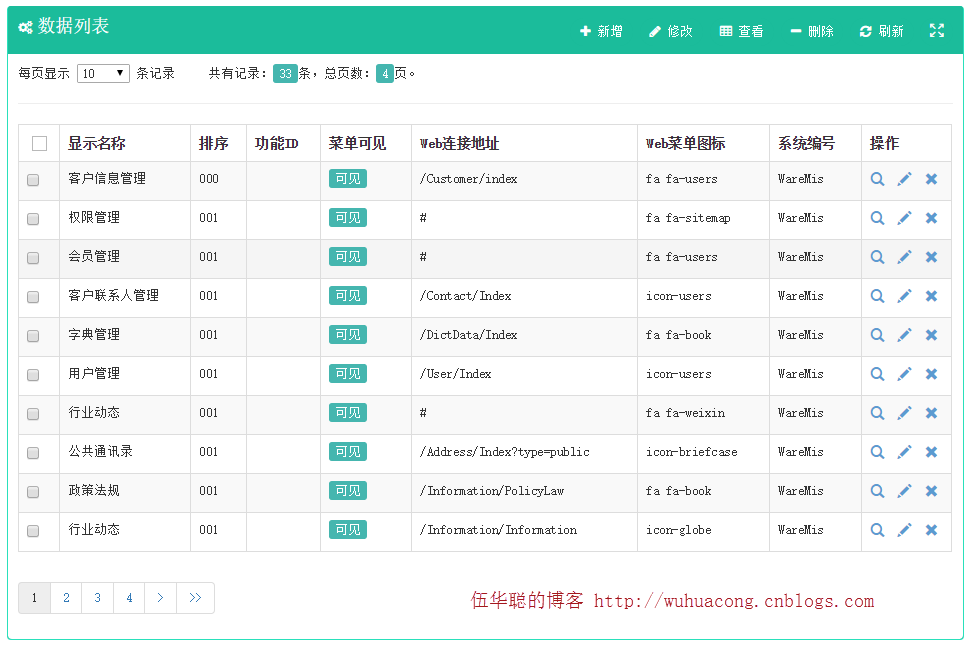
幾乎每個頁面都需要把資料庫紀錄列出來並分頁:
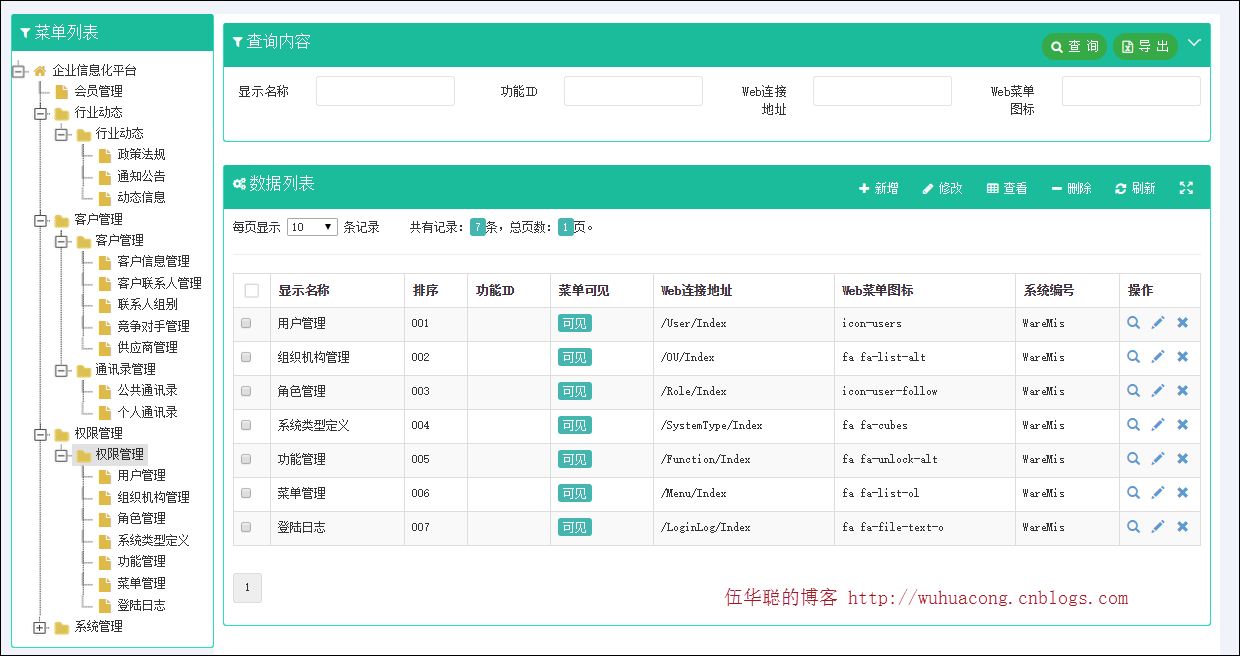
左側是樹列表(下節再說),右側是典型的查詢區:上方條件表單,下方資料列表。使用者觸發查詢時,前端把條件送到 MVC 控制器取回資料,再動態綁定並分頁。
菜單頁的查詢表單:
<form class="form-horizontal" id="ffSearch"> <div class="col-md-3 col-sm-3 col-xs-6"> <div class="form-group"> <label class="control-label col-md-4">顯示名稱</label> <div class="col-md-8"> <input name="WHC_Name" type="text" class="form-control"> </div> </div> </div> <div class="col-md-3 col-sm-3 col-xs-6"> <div class="form-group"> <label class="control-label col-md-4">功能ID</label> <div class="col-md-8"> <input name="WHC_FunctionId" type="text" class="form-control"> </div> </div> </div> <div class="col-md-3 col-sm-3 col-xs-6"> <div class="form-group"> <label class="control-label col-md-4">Web連接地址</label> <div class="col-md-8"> <input name="WHC_Url" type="text" class="form-control"> </div> </div> </div> <div class="col-md-3 col-sm-3 col-xs-6"> <div class="form-group"> <label class="control-label col-md-4">Web菜單圖標</label> <div class="col-md-8"> <input name="WHC_WebIcon" type="text" class="form-control"> </div> </div> </div> </form>
頁面初始化時依序做四件事:初始化樹、綁定事件、查第一頁資料、載入字典:
//頁面初始化 $(function () { initJsTree(); //初始化樹 BindEvent(); //綁定事件處理 Search(currentPage);//初始化第一頁數據 InitDictItem(); //初始化字典信息 });
表格本體只寫表頭,tbody 由腳本動態填充:
<table id="grid" class="table table-striped table-bordered table-hover" cellpadding="0" cellspacing="0" border="0" class="display" width="100%"> <thead id="grid_head"> <tr> <th class="table-checkbox" style="width:40px"><input class="group-checkable" type="checkbox" onclick="selectAll(this)"></th> <th>顯示名稱</th> <th>排序</th> <th>功能ID</th> <th>菜單可見</th> <th>Web連接地址</th> <th>Web菜單圖標</th> <th>系統編號</th> <th style="width:90px">操作</th> </tr> </thead> <tbody id="grid_body"></tbody> </table> <div class="paging-toolbar"> <ul id='grid_paging'></ul> </div>
Search 函式負責序列化表單條件與分頁參數,向控制器索取列表資料後動態綁定:
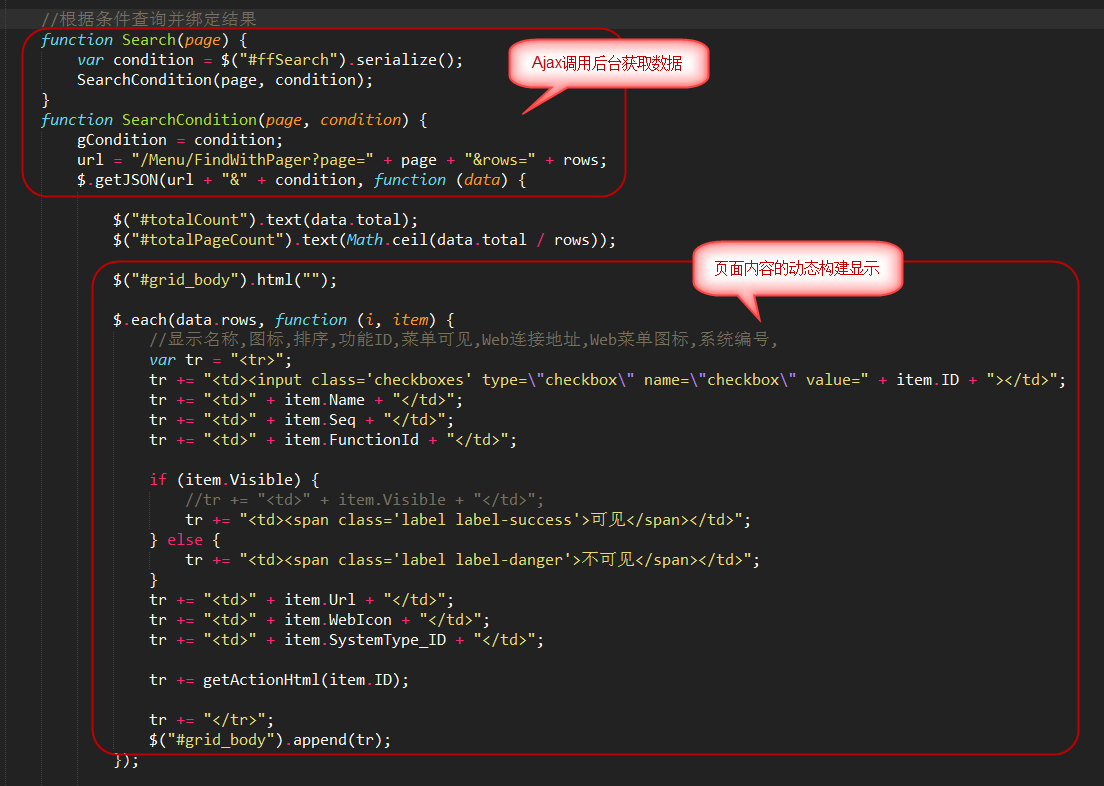
其中這一行是按鈕的來源:
tr += getActionHtml(item.ID);
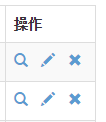
產出的操作按鈕如下:
2)分頁處理
資料量不會固定,分頁既是效能考量也是體驗考量。這裡用 Bootstrap Paginator 這個成熟的外掛。
GitHub:https://github.com/lyonlai/bootstrap-paginator
示範頁:https://lyonlai.github.io/bootstrap-paginator/
引入 jQuery 與 Bootstrap 後,只要一行:
<script src="/js/bootstrap-paginator.min.js"></script>
翻頁行為透過 page-clicked 與 page-changed 兩個事件處理。先在 HTML 準備一個 UL 當容器:
<div class="paging-toolbar"> <ul id='grid_paging'></ul> </div>
JS 端的處理:
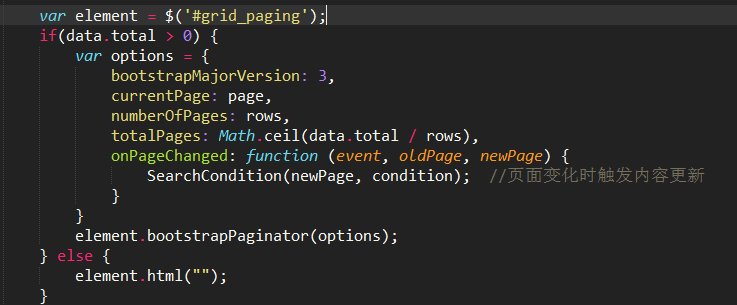
後端要同時接收表單條件與分頁條件。由於這套邏輯非常通用,我把它放在基底控制器;特殊頁面再在子類覆寫 FindWithPager 即可。
/// <summary> /// 根據條件查詢數據庫,並返回對象集合(用於分頁數據顯示) /// </summary> /// <returns>指定對象的集合</returns> public virtual ActionResult FindWithPager() { //檢查用戶是否有權限,否則拋出MyDenyAccessException異常 base.CheckAuthorized(AuthorizeKey.ListKey); string where = GetPagerCondition(); PagerInfo pagerInfo = GetPagerInfo(); List<T> list = baseBLL.FindWithPager(where, pagerInfo); //Json格式的要求{total:22,rows:{}} //構造成Json的格式傳遞 var result = new { total = pagerInfo.RecordCount, rows = list }; return ToJsonContentDate(result); }
GetPagerInfo 讀取前端傳來的分頁參數,對應的就是前面那個 URL:
url = "/Menu/FindWithPager?page=" + page + "&rows=" + rows;
/// <summary> /// 根據Request參數獲取分頁對象數據 /// </summary> /// <returns></returns> protected virtual PagerInfo GetPagerInfo() { int pageIndex = Request["page"] == null ? 1 : int.Parse(Request["page"]); int pageSize = Request["rows"] == null ? 10 : int.Parse(Request["rows"]); PagerInfo pagerInfo = new PagerInfo(); pagerInfo.CurrenetPageIndex = pageIndex; pagerInfo.PageSize = pageSize; return pagerInfo; }
兩個條件都備齊後,交給業務邏輯層處理即可,那已經是框架底層的範圍:
List<T> list = baseBLL.FindWithPager(where, pagerInfo);
最終畫面:
2、JSTree 外掛
前面提到的左側樹列表就是 JSTree。當資料本身有層級結構時,樹狀呈現比平面列表直觀得多。
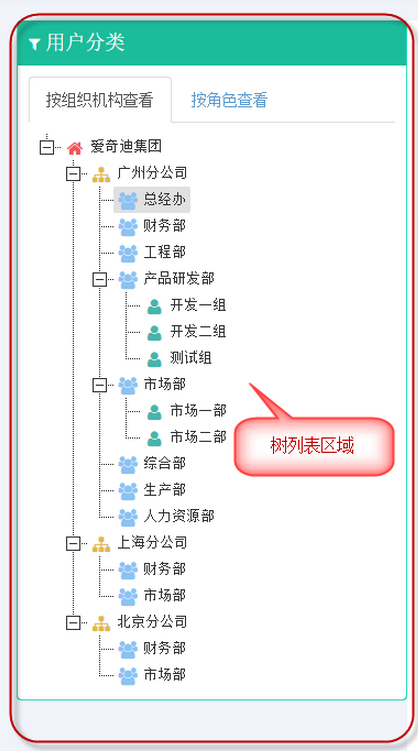
以使用者資料為例,可以按組織機構或角色分類,兩者用樹呈現都很合適,找特定類型的使用者也快得多:
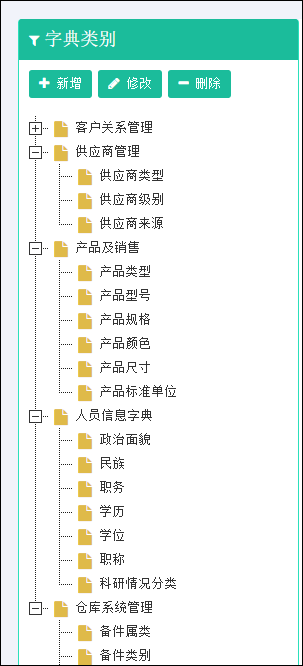
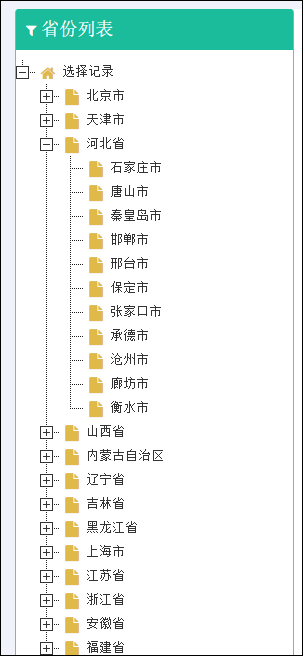
字典資料或省市資料同樣適用:
官網:https://www.jstree.com/ —— 文件與範例都很完整,通常照著例子改就能用。
最精簡的初始化:
$(function () { $('#jstree_demo_div').jstree(); });
事件綁定:
$('#jstree_demo_div').on("changed.jstree", function (e, data) { console.log(data.selected); });
實務上資料多半來自後端 JSON,其結構定義如下:
{ id : "string" // required parent : "string" // required text : "string" // node text icon : "string" // string for custom state : { opened : boolean // is the node open disabled : boolean // is the node disabled selected : boolean // is the node selected }, li_attr : {} // attributes for the generated LI node a_attr : {} // attributes for the generated A node }
清空並重新綁定的標準寫法:
$('#jstree_demo_div').data('jstree', false);//清空數據,必須 //異步進行JSON數據的綁定 $.getJSON(url, function (data) { $('#jstree_demo_div').jstree({ 'core': { 'data': data, "themes": { "responsive": false } } }).bind('loaded.jstree', loadedfunction); });
需要每個節點帶核取方塊時,加掛 checkbox 外掛即可:
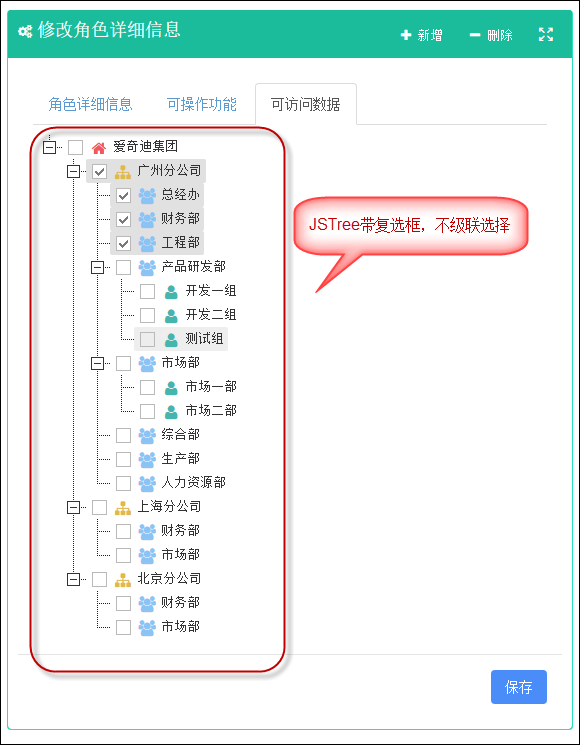
//帶復選框的JSTree的初始化代碼 $.getJSON(url, function (data) { control.jstree({ 'plugins' : [ "checkbox" ], //出現選擇框 'checkbox': { cascade: "", three_state: false }, //不級聯 'core': { 'data': data, "themes": { "responsive": false } } }).bind('loaded.jstree', loadedfunction); });
把兩種情況合併,就得到一個好用的公用函式:
//以指定的Json數據,初始化JStree控件 //treeName為樹div名稱,url為數據源地址,checkbox為是否顯示復選框,loadedfunction為加載完畢的回調函數 function bindJsTree(treeName, url, checkbox, loadedfunction) { var control = $('#' + treeName) control.data('jstree', false);//清空數據,必須 var isCheck = arguments[2] || false; //設置checkbox默認值為false if(isCheck) { //復選框樹的初始化 $.getJSON(url, function (data) { control.jstree({ 'plugins' : [ "checkbox" ], //出現選擇框 'checkbox': { cascade: "", three_state: false }, //不級聯 'core': { 'data': data, "themes": { "responsive": false } } }).bind('loaded.jstree', loadedfunction); }); } else { //普通樹列表的初始化 $.getJSON(url, function (data) { control.jstree({ 'core': { 'data': data, "themes": { "responsive": false } } }).bind('loaded.jstree', loadedfunction); }); } }
呼叫端因此精簡很多:
//初始化組織機構列表 function initDeptTreeview() { var treeUrl = '/User/GetMyDeptJsTreeJson?userId=@Session["UserId"]'; bindJsTree("jstree_div", treeUrl); //樹控件的變化事件處理 $('#jstree_div').on("changed.jstree", function (e, data) { var icon = data.node.icon; loadDataByOu(data.selected); }); }
核取方塊型的樹:
//初始化所有該用戶的所有功能集合 var treeUrl = '/Function/GetRoleFunctionJsTreeByUser?userId=@Session["UserId"]'; bindJsTree("tree_function", treeUrl, true); //角色數據權限,先初始化所有部門 treeUrl = '/User/GetMyDeptJsTreeJson?userId=@Session["UserId"]'; bindJsTree("tree_roledata", treeUrl, true);
核取方塊的樹不建議每次變更都重新初始化——先載入一次,之後只調整勾選狀態,效能與反應速度都更好。因此做法是「取消全部勾選,再逐一勾上需要的節點」:
//初始化角色數據權限集合(組織機構) function initRoleData(id) { if (id != "") { var treeMenu = "tree_roledata"; $('#' + treeMenu).jstree("uncheck_all");//取消所有選中 //勾選指定內容 $.getJSON("/RoleData/GetRoleDataList?r=" + Math.random() + "&roleId=" + id, function (json) { $.each(json, function (i, item) { $('#' + treeMenu).jstree('check_node', item);//將節點選中 }); }); } }
保存時取出勾選的節點列表送出即可:
//保存角色數據權限 function saveRoleData(roleid) { var ouList = $('#tree_roledata').jstree('get_selected'); var url = '/RoleData/UpdateData?r=' + Math.random(); var postData = { roleId: roleid, ouList: ouList.join(',')}; $.post(url, postData, function (json) { initRoleData(roleid); }).error(function () { showTips("您未被授權使用該功能,請聯系管理員進行處理。"); }); }
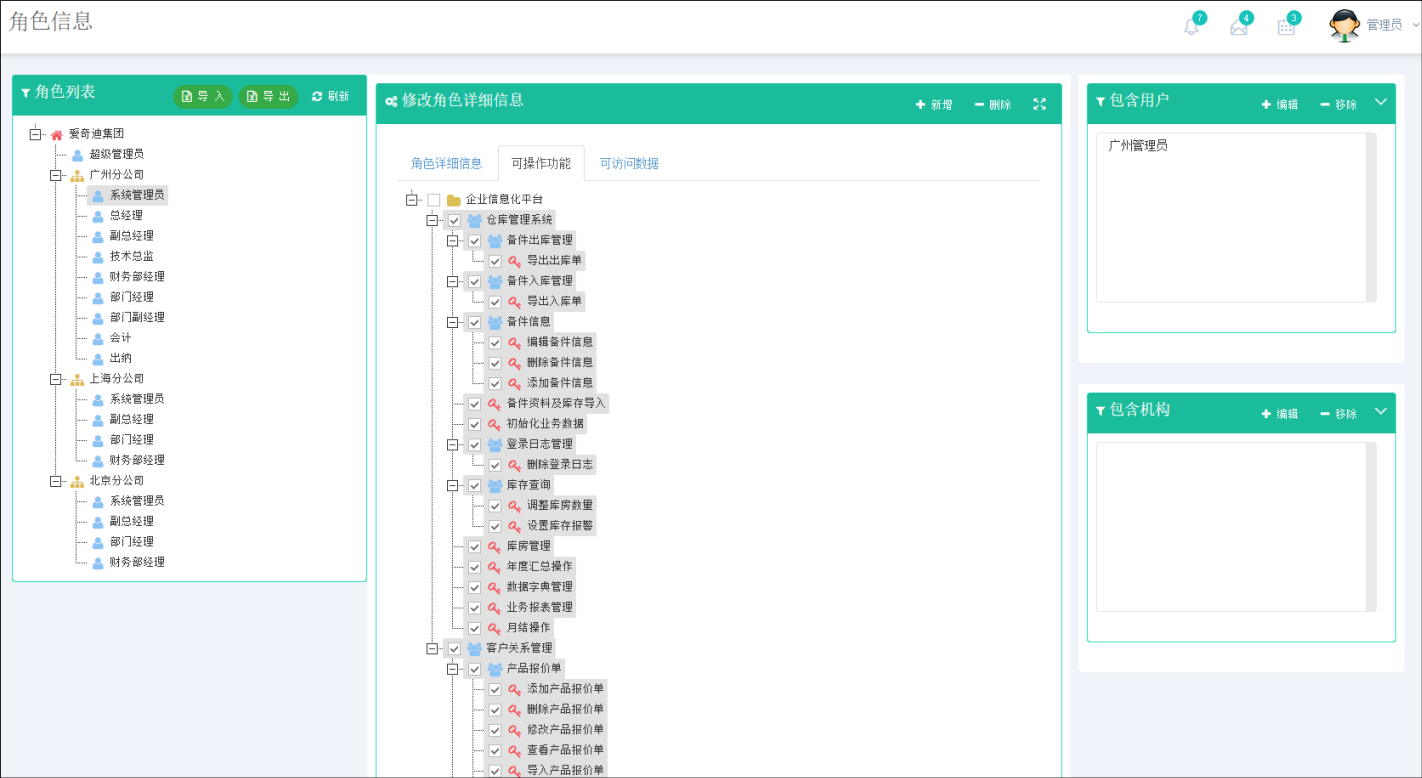
到這裡,資料展示、分頁、JSTree 的綁定與事件、勾選狀態還原與保存,基本就走完一輪了。後續我會繼續把 Bootstrap 開發中涉及的各個要點與外掛逐一寫清楚,讓這系列更貼近實務。
以上就是這篇的內容,希望對大家有幫助。
- 上一篇文章: 20 分鐘寫完 Bootstrap 響應式頁面,真的這麼簡單
- 下一篇文章: 去除字串左右兩側空白字元的實作教學