用 JavaScript 打造簡易月曆:從閏年判斷到表格輸出
編輯:關於JavaScript
月曆看起來簡單,寫起來卻處處是細節。本文拆成三步來做:先算表格需要幾行、再把日期填進格子、最後處理閏年與當天高亮。
一、表格行數怎麼算
欄數是固定的——週日到週六共七欄。難的是列數,而列數取決於「這個月 1 號是星期幾」。
為什麼?因為 1 號不一定落在第一格。若 1 號是星期五,它左邊就得留 5 個空格。這裡要用 getDay(),它回傳 0 到 6 的數字,0 是週日、1 是週一,依此類推。所以 1 號是星期五時,左邊剛好需要 5 個空格。
接著,若該月有 31 天,列數就是:
var tr_nums = Math.ceil((5 + 31) / 7); // => 6
顯然不是每個月都 31 天,所以得準備一個代表各月天數的陣列。而二月最麻煩:閏年 29 天,平年 28 天。因此先寫一個閏年判斷函式:
// 能被 4 整除但不能被 100 整除,或能被 400 整除,即為閏年
// 回傳 1 代表閏年,0 代表平年
function isLeap(year) {
  return year % 4 == 0 ? (year % 100 != 0 ? 1 : (year % 400 == 0 ? 1 : 0)) : 0;
}
而後建立月份陣列:
var days_per_month = new Array(31, 28 + isLeap(year), 31, 30, 31, 30, 31, 31, 30, 31, 30, 31);
這樣不論平年閏年都能取到正確天數。接著取得今天的所有相關資訊:
var today = new Date(),          // 當前日期
    y = today.getFullYear(),     // 年份
    m = today.getMonth(),        // 月份(從 0 起算,比一般月份少 1)
    d = today.getDate(),         // 日(用於高亮當天)
    firstday = new Date(y, m, 1),// 當月第一天
    dayOfWeek = firstday.getDay(),// 第一天是星期幾(0-6)
    days_per_month = new Array(31, 28 + isLeap(y), 31, 30, 31, 30, 31, 31, 30, 31, 30, 31),
    str_nums = Math.ceil((dayOfWeek + days_per_month[m]) / 7); // 所需列數
二、把月曆印出來
表格本質上是二維結構,兩層迴圈就能搞定:
for (i = 0; i < str_nums; i += 1) {          // 第一層迴圈建立 tr
  document.write('<tr>');
  for (k = 0; k < 7; k++) {                  // 第二層迴圈建立 td
    var idx  = 7 * i + k;                    // 為每個格子建立索引,從 0 開始
    var date = idx - dayOfWeek + 1;          // 讓當月 1 號對上星期
    // 這裡決定要顯示日期還是空格
  }
  document.write('</tr>');
}
三、完整程式碼
<script>
// 判斷當前年份是否為閏年(閏年 2 月 29 天,平年 28 天)
function isLeap(year) {
return year % 4 == 0 ? (year % 100 != 0 ? 1 : (year % 400 == 0 ? 1 : 0)) : 0;
}
var i, k,
today = new Date(),
y = today.getFullYear(),
m = today.getMonth(),
d = today.getDate(),
firstday = new Date(y, m, 1),
dayOfWeek = firstday.getDay(),
days_per_month = new Array(31, 28 + isLeap(y), 31, 30, 31, 30, 31, 31, 30, 31, 30, 31),
str_nums = Math.ceil((dayOfWeek + days_per_month[m]) / 7);
document.write("<table cellspacing='0'><tr>"
+ "<th>日</th><th>一</th><th>二</th><th>三</th>"
+ "<th>四</th><th>五</th><th>六</th></tr>");
for (i = 0; i < str_nums; i += 1) {
document.write('<tr>');
for (k = 0; k < 7; k++) {
var idx = 7 * i + k;
var date = idx - dayOfWeek + 1;
// 索引小於等於 0 或大於當月天數,就用空格佔位
(date <= 0 || date > days_per_month[m]) ? date = ' ' : date = idx - dayOfWeek + 1;
// 當天加上 today 這個 class 以便高亮
date == d
? document.write('<td class="today">' + date + '</td>')
: document.write('<td>' + date + '</td>');
}
document.write('</tr>');
}
document.write('</table>');
</script>
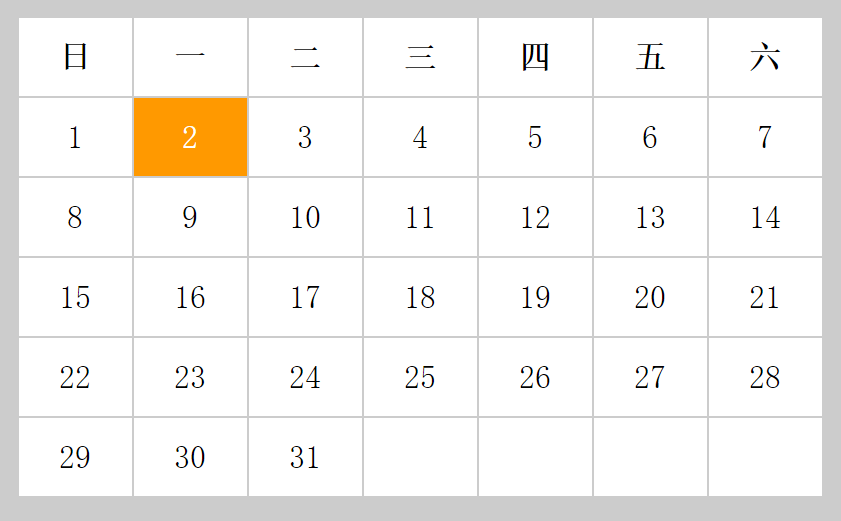
CSS 部分就自由發揮了。以 2016 年 5 月 2 日為例,效果如下:
兩個值得改進的地方
別用 document.write。它會在文件載入完成後清空整個頁面,而且難以除錯。改用 DOM 建立元素、組字串後一次寫入 innerHTML,會安全得多也更快。
閏年判斷可以更簡潔。巢狀三元運算式不易閱讀,寫成布林運算反而清楚:
function isLeap(year) {
  return (year % 4 === 0 && year % 100 !== 0) || year % 400 === 0;
}
另外,月份陣列其實不必手寫——new Date(y, m + 1, 0).getDate() 就能取得 m 月的天數(第 0 天是上個月的最後一天),閏年問題交給 Date 物件自己處理即可,程式碼立刻少一半。這個技巧在處理日期時非常實用,值得記起來。
相關文章
-
用 jQuery 與 Bootstrap 模態框自製日期選擇器 用 JavaScript 計算本月剩餘天數:閏年判斷不可少的天數計算器 JS 實現出生日期的「年-月-日」三級聯動菜單 日期小工具:輸入年月日,告訴你那天是星期幾、是過去還是未來 能記事的萬年曆:用 JavaScript 手刻一個月曆 JS 日期時間選擇控件升級版:加上時與分,還能避開遮擋 年/月/日三層連動下拉選單:閏年判斷與 ASP.NET 取值 原生 JavaScript 實作年/月/日三級聯動下拉選單 JavaScript getDay() 方法詳解:取得星期幾 用 jQuery 實作即時日期時鐘:日期、星期、閏年判斷與元素追加
熱門推薦
JavaScript 常見編碼與雜湊:Base64、MD5、SHA1 實作解析
Bootstrap 表單控件全解:從輸入框到驗證狀態
45 個 JavaScript 實戰技巧:變量、陣列、循環與性能的最佳實踐大全
Vuex 2.0 知識更新:Modules、Plugins 與嚴格模式一次整理
純前端實作 Excel 匯入匯出:從踩坑到定案
10 個值得一看的 JavaScript 特效類庫
JavaScript 處理 JSON、字串比較與選單操作的綜合範例
用JavaScript實作圖片模糊切換顯示特效的教學
原生 JS 封裝 Ajax 外掛:同域 GET/POST 與 JSONP 跨域一次講透