橫向伸展的二級導航菜單實現代碼
編輯:關於JavaScript
側邊欄菜單遇到層級較深的內容時,二級菜單往往靠右側滑出更合適。本文實現的就是這樣一款菜單:一級菜單豎向排列,鼠標懸停到帶子菜單的項(示例中是第四項),二級菜單便向右橫向展開。
菜單本身只做了基礎修飾,沒有過多美化,接入項目時建議按自己網站的視覺風格重新配色。
運行效果截圖如下:
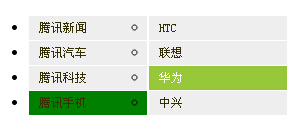
在線演示地址:https://demo.jb51.net/js/2015/js-r-show-menu-style-codes/
實現思路
JS 部分做兩件事:遍歷所有二級 ul,給其父節點內的第一個鏈接加上 subfolderstyle 類(用來顯示右箭頭圖示);同時為父節點綁定 onmouseover / onmouseout,控制子菜單的 display 與當前項的背景色。定位則完全交給 CSS:二級菜單 position:absolute,left 設為一級菜單寬度減 1px,層級更深時再遞增偏移量。
具體代碼
<!DOCTYPE html PUBLIC "-//W3C//DTD XHTML 1.0 Transitional//EN" "https://www.w3.org/TR/xhtml1/DTD/xhtml1-transitional.dtd">
<html xmlns="https://www.w3.org/1999/xhtml">
<head>
<meta http-equiv="Content-Type" content="text/html; charset=utf-8" />
<title>橫向伸展開來的二級導航菜單</title>
<style type="text/css">
.suckerdiv ul { width: 120px; position: relative; }
.suckerdiv ul li ul { left: 120px; position: absolute; width: 140px; top: 0; display: none; }
.suckerdiv ul li ul li ul { left: 159px; }
.suckerdiv ul li a { display: block; color: #353302; text-decoration: none; font:12px 宋體; background: #eee; line-height:24px; padding: 0px 10px; border: 1px solid #fff; border-bottom: 0; }
.suckerdiv ul li a:visited { color: black; }
.suckerdiv ul li a:hover{ color: white; background-color: #97c839; }
.suckerdiv a.subfolderstyle:hover { background: #97c839 url() no-repeat center right; }
</style>
</head>
<body>
<script type="text/javascript">
var menuids = ["suckertree1"]
function buildsubmenus() {
    for (var i = 0; i < menuids.length; i++) {
        var ultags = document.getElementById(menuids[i]).getElementsByTagName("ul")
        for (var t = 0; t < ultags.length; t++) {
            ultags[t].parentNode.getElementsByTagName("a")[0].className = "subfolderstyle"
            ultags[t].parentNode.onmouseover = function () {
                this.getElementsByTagName("ul")[0].style.display = "block";
                this.firstChild.style.backgroundColor = 'green';
            }
            ultags[t].parentNode.onmouseout = function () {
                this.getElementsByTagName("ul")[0].style.display = "none"
                this.firstChild.style.backgroundColor = '';
            }
        }
    }
}
if (window.addEventListener)
    window.addEventListener("load", buildsubmenus, false)
else if (window.attachEvent)
    window.attachEvent("onload", buildsubmenus)
</script>
<div class="suckerdiv">
<ul id="suckertree1">
<li><a href="#">騰訊新聞</a></li>
<li><a href="#">騰訊汽車</a></li>
<li><a href="#">騰訊科技</a></li>
<li><a href="#">騰訊手機</a>
<ul>
<li><a href="#">HTC</a></li>
<li><a href="#">聯想</a></li>
<li><a href="#">華為</a></li>
<li><a href="#">中興</a></li>
</ul>
</li>
</ul>
</div>
</body>
</html>
這種寫法的好處是 HTML 保持乾淨的嵌套列表結構,JS 只負責綁定行為,样式與結構分離得比較徹底。若菜單項較多,可以把 menuids 換成 class 選擇器批量處理,擴展性更好。
- 上一篇文章: 純 JS 打造仿蘋果 Dock 底部任務欄效果
- 下一篇文章: 重新理解 JavaScript 中 function 的多重身份