JavaScript 打造簡單計算機:HTML、CSS 與 % 運算的 bug 排查
編輯:關於JavaScript
做一個網頁版計算機是練習 DOM 操作與事件處理的好題目。以下是一份完整可執行的實作,並附上原作者的 % 運算 bug 記錄與修正思路。
已知的問題
這個版本整體運作正常,唯獨有一處瑕疵:整數後按 % 結果正確,但小數後按 % 就會出錯。原因在於 input 的 value 本質上是字串,直接丟給 Math.round 處理時,行為與預期不同。
圖一(bug 所在處)

圖二(最終效果)
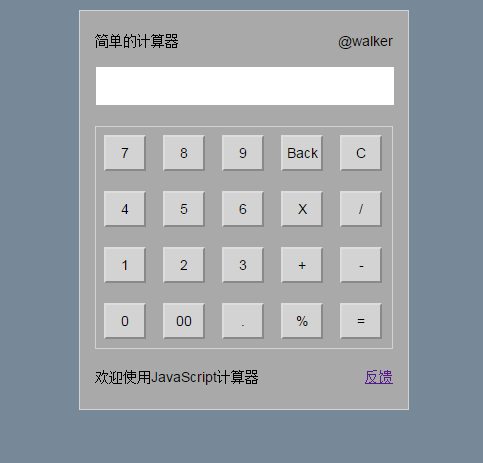
HTML 結構
<body>
<div id="calculator">
    <div class="LOGO">
        <span class="name">簡單的計算器</span>
        <span class="verson">@walker</span>
    </div>
    <div id="shuRu">
        <!-- 螢幕輸入欄 -->
        <div class="screen">
            <input type="text" id="screenName" name="screenName" class="screen">
        </div>
    </div>
    <div id="keys">
        <!-- 第一排 -->
        <input type="button" id="7" onclick="jsq(this.id)" value="7" class="buttons">
        <input type="button" id="8" onclick="jsq(this.id)" value="8" class="buttons">
        <input type="button" id="9" onclick="jsq(this.id)" value="9" class="buttons">
        <input type="button" id="Back" onclick="tuiGe()" value="Back" class="buttons">
        <input type="button" id="C" onclick="clearNum()" value="C" class="buttons" style="margin-right:0px">
        <!-- 第二排 -->
        <input type="button" id="4" onclick="jsq(this.id)" value="4" class="buttons">
        <input type="button" id="5" onclick="jsq(this.id)" value="5" class="buttons">
        <input type="button" id="6" onclick="jsq(this.id)" value="6" class="buttons">
        <input type="button" id="*" onclick="jsq(this.id)" value="X" class="buttons">
        <input type="button" id="/" onclick="jsq(this.id)" value="/" class="buttons" style="margin-right:0px">
        <!-- 第三排 -->
        <input type="button" id="1" onclick="jsq(this.id)" value="1" class="buttons">
        <input type="button" id="2" onclick="jsq(this.id)" value="2" class="buttons">
        <input type="button" id="3" onclick="jsq(this.id)" value="3" class="buttons">
        <input type="button" id="+" onclick="jsq(this.id)" value="+" class="buttons">
        <input type="button" id="-" onclick="jsq(this.id)" value="-" class="buttons" style="margin-right:0px">
        <!-- 第四排 -->
        <input type="button" id="0" onclick="jsq(this.id)" value="0" class="buttons">
        <input type="button" id="00" onclick="jsq(this.id)" value="00" class="buttons">
        <input type="button" id="." onclick="jsq(this.id)" value="." class="buttons">
        <input type="button" id="%" onclick="jsq(this.id)" value="%" class="buttons">
        <input type="button" id="eva" onclick="eva()" value="=" class="buttons" style="margin-right:0px">
    </div>
    <div class="footer">
        <span class="aside">歡迎使用JavaScript計算器</span>
        <span class="link"><a href="#" title="聲明" target="_blank">反饋</a></span>
    </div>
</div>
</body>
CSS 樣式
<style>
/* 基本重置 */
* { margin: 0; padding: 0; box-sizing: border-box; font: 14px Arial, sans-serif; }
html { height: 100%; background-color: lightslategrey; }
#calculator {
    margin: 15px auto;
    width: 330px;
    height: 400px;
    border: 1px solid lightgray;
    background-color: darkgrey;
    padding: 15px;
}
/* LOGO */
.LOGO { height: 20px; }
.LOGO .name { float: left; line-height: 30px; }
.LOGO .verson { float: right; line-height: 30px; }
/* 螢幕 */
#shuRu { margin-top: 15px; }
.screen {
    margin-top: 5px;
    width: 300px;
    height: 40px;
    text-align: right;
    padding-right: 10px;
    font-size: 20px;
}
#keys {
    border: 1px solid lightgray;
    height: 223px;
    margin-top: 25px;
    padding: 8px;
}
#keys .last { margin-right: 0px; }
.footer { margin-top: 20px; height: 20px; }
.footer .link { float: right; }
#keys .buttons {
    float: left;
    width: 42px;
    height: 36px;
    text-align: center;
    background-color: lightgray;
    margin: 0 17px 20px 0;
}
</style>
JavaScript 邏輯
<script>
var num = 0; // 定義第一個輸入的資料

function jsq(num) {
    if (num == "%") {
        document.getElementById('screenName').value =
            Math.round(document.getElementById('screenName').value) / 100;
    } else {
        document.getElementById('screenName').value += document.getElementById(num).value;
    }
}

function eva() {
    document.getElementById("screenName").value = eval(document.getElementById("screenName").value);
}

function clearNum() {
    document.getElementById("screenName").value = null;
    document.getElementById("screenName").focus();
}

function tuiGe() {
    var arr = document.getElementById("screenName");
    arr.value = arr.value.substring(0, arr.value.length - 1);
}
</script>
那個 % bug 怎麼修
問題出在 Math.round 會把數值取整為整數。因此「12.5%」會先被算成 13 再除以 100,得到 0.13,而非期望的 0.125。這正是「整數正確、小數出錯」的原因。
修正方式很直接:把取整拿掉,改用 parseFloat 明確轉型後再除以 100:
if (num == "%") {
    var current = document.getElementById('screenName').value;
    document.getElementById('screenName').value = parseFloat(current) / 100;
}
另外提醒一個更根本的問題:用 eval 計算使用者輸入的運算式,等於把任意程式碼的執行權交給輸入框。在計算機這種案例中風險雖低,但養成習慣很危險。若要嚴肅處理,建議自行實作一個簡單的運算式解析器,或引入專門的數學運算套件,避免直接使用 eval。
可以再加強的地方
除了 bug 修正,這個計算機還有幾個實務上的缺口:一是未處理除以零,會顯示 Infinity;二是浮點運算精度問題,例如 0.1 + 0.2 會得到 0.30000000000000004,可搭配 toFixed 或改用分數運算處理;三是未支援鍵盤輸入,加上 keydown 監聽會大幅改善可用性。
小結
這個範例的價值在於它示範了一個完整的除錯思路:先觀察「哪種情況正常、哪種不正常」,從差異反推原因。整數對、小數錯,指向的就是取整函式;而 input 的 value 是字串這件事,則提醒我們在數值運算前務必明確轉型。
相關文章
-
用 alert 搞懂 parseFloat 與 parseInt:30.12 加 60.56 為什麼不只一個答案 JavaScript 中 parseInt 與 parseFloat 的差異 JavaScript 自動加總的實作與三個常見錯誤 購物車即時計算總價:勾選商品自動加總示範 JavaScript 取小數點後 N 位:toFixed() 用法解析 jQuery 放大縮小字體:parseFloat 與 slice 的組合技 用 jQuery 計算表格的動態行合計與列合計 用 jQuery 選擇器計算表格某行或某列的合計 JavaScript 數字判斷與處理:isNaN、parseFloat 的應用 JavaScript parseFloat 與 parseInt 轉換函數