做過的專案中曾經需要抽獎轉盤的功能,專案上線一段時間後未出現嚴重問題,因此整理出來與大家分享。這個實作的特色是把「中獎結果由後端決定、前端只負責演出」這個責任界線切得很清楚。
功能需求
1、轉盤視覺要美觀,轉動效果流暢
2、轉盤上需顯示獎品圖片,且獎品內容由後端讀取,包含圖片與名稱
3、轉動動畫結束後要有對應的提示
4、中獎演算法在資料庫端處理,前端只負責最後的效果呈現
知識要點
1、引入 awardRotate 這個 jQuery 外掛來實現轉動動畫
2、使用 canvas 標籤與對應的 HTML5 API 進行繪製
轉盤樣式
.lunck_draw_wrap { display: block; width: 95%; margin-right: auto; }
.lunck_draw_wrap .turnplate { display: block; width: 106%; position: relative; }
.lunck_draw_wrap .turnplate canvas.item { left: 1px; position: relative; top: 9px; width: 100%; }
.lunck_draw_wrap .turnplate img.pointer { height: 37.5%; left: 34.6%; position: absolute; top: 30%; width: 31.5%; }
外掛所需參數
var turnplate = {
    restaraunts: [],   // 大轉盤獎品名稱
    lucky: [],         // 獎品內容
    colors: [],        // 各區塊對應的背景顏色
    goodsimgArr: [],   // 獎品圖片標籤
    outsideRadius: 175, // 外圓半徑
    textRadius: 140,    // 獎品文字距圓心的距離
    insideRadius: 65,   // 內圓半徑
    startAngle: 0,      // 起始角度
    bRotate: false      // false 停止;true 旋轉
};
由參數可知,需要從伺服器取得獎品名稱、獎品內容與獎品圖片,再據此渲染轉盤。因此第一步就是發請求取資料並填入上述陣列:
$.each(data.list, function (key, value) {
    turnplate.restaraunts.push(value.data0);
    turnplate.lucky.push(value.data1);
    turnplate.goodsimgArr.push(getLuckyImg + value.data4);
    if (key % 2 == 0) turnplate.colors.push("#fff");
    else turnplate.colors.push("#5fcbd4");
});
data.list 是取得的獎品 JSON 資料:
[
    {
        "data0": "一等獎",
        "data1": "iphone6s",
        "data2": "0",
        "data3": "0",
        "data4": "201510161406303384.png",
        "data5": "XXXX網絡科技",
        "data6": "浙江省衢州市柯城區XXXXX",
        "data7": "0570-XXXXXX"
    },
    ......
]
由於客戶要求不能有「謝謝參與」,最低獎項也設為「優勝獎」,因此在遍歷後補上這一段渲染描述:
turnplate.goodsimgArr.push('../images/hongbao.png');
turnplate.restaraunts.push("優勝獎");
turnplate.colors.push("#5fcbd4");

// 頁面所有元素載入完畢後執行渲染
preloadimages(turnplate.goodsimgArr).done(function (images) {
    drawRouletteWheel();
});
為什麼需要預載圖片
canvas 的 drawImage 要求圖片必須已載入完成才能繪製,否則會畫不出來。因此這裡用 preloadimages 等到所有獎品圖都就位後才開始繪製轉盤:
// 對獎品圖片做預載
function preloadimages(arr) {
    var newimages = [], loadedimages = 0;
    var postaction = function () {};
    var arr = (typeof arr != "object") ? [arr] : arr;

    function imageloadpost() {
        loadedimages++;
        if (loadedimages == arr.length) {
            postaction(newimages); // 全部載入完成後呼叫
        }
    }

    for (var i = 0; i < arr.length; i++) {
        newimages[i] = new Image();
        newimages[i].src = arr[i];
        newimages[i].onload = function () { imageloadpost(); };
        newimages[i].onerror = function () { imageloadpost(); };
    }

    return {
        done: function (f) { postaction = f || postaction; }
    };
}
注意 onerror 也計入完成數,這樣單張圖片失效時不會讓整個流程卡死——這是實務上很重要的防禦。
繪製轉盤
function drawRouletteWheel() {
    var canvas = document.getElementById("wheelcanvas");
    if (canvas.getContext) {
        // 依獎品個數計算每個扇形的弧度
        var arc = Math.PI / (turnplate.restaraunts.length / 2);
        var ctx = canvas.getContext("2d");

        ctx.clearRect(0, 0, 422, 422);           // 清空矩形區域
        ctx.strokeStyle = "rgba(0,0,0,0)";       // 筆觸顏色
        ctx.font = 'bold 18px Microsoft YaHei';  // 畫布文字字體

        for (var i = 0; i < turnplate.restaraunts.length; i++) {
            var angle = turnplate.startAngle + i * arc; // 該扇形的起始弧度
            ctx.fillStyle = turnplate.colors[i];

            ctx.beginPath();
            // arc(x, y, r, 起始角, 結束角, 繪製方向)
            ctx.arc(212, 212, turnplate.outsideRadius, angle, angle + arc, false); // 外圓
            ctx.arc(212, 212, turnplate.insideRadius, angle + arc, angle, true);   // 內圓(反向)
            ctx.stroke();
            ctx.fill();

            ctx.save(); // 鎖存畫布狀態

            ctx.fillStyle = "#fff";
            var text = turnplate.restaraunts[i];
            var lukyname = turnplate.lucky[i];
            var line_height = 17;

            // translate 重新映射畫布的 (0,0) 位置
            ctx.translate(212 + Math.cos(angle + arc / 2) * turnplate.textRadius,
                          212 + Math.sin(angle + arc / 2) * turnplate.textRadius);
            // rotate 旋轉繪圖座標系
            ctx.rotate(angle + arc / 2 + Math.PI / 2);

            // 繪製獎品圖片
            var img = new Image();
            img.src = turnplate.goodsimgArr[i];
            ctx.drawImage(img, -17, 35);

            // 因色塊交錯,相鄰區域文字顏色可不同
            if (i % 2 == 0) {
                ctx.fillStyle = "#f7452f";
            }

            ctx.fillText(text, -ctx.measureText(text).width / 2, 0);
            ctx.font = ' 14px Microsoft YaHei';

            if (text != "優勝獎") {
                ctx.fillText(lukyname, -ctx.measureText(lukyname).width / 2, 25);
            } else {
                ctx.fillText("優麥幣", -ctx.measureText("優麥幣").width / 2, 25);
            }

            ctx.restore(); // 還原到上一個 save() 的狀態
            ctx.save();
        }
    }
}
這段程式碼有幾個 canvas 技巧值得留意。用兩段不同方向的 arc 就能畫出環形(甜甜圈)而非完整的圓餅,這是內外圓半徑不同的關鍵。而 translate 搭配 rotate 則把座標原点搬到每個扇形的中央、再旋轉對應角度,如此一來文字與圖片就能沿著半徑方向自然排列,不必逐一計算每個元素的絕對座標。save() 與 restore() 成對出現,確保每個扇形的變換不會污染下一個。
HTML 結構
<div class="lunck_draw_wrap">
    <div class="turnplate" style="background-size: 100% 100%;">
        <canvas class="item" id="wheelcanvas" width="422px" height="422px"></canvas>
        <img class="pointer" style="top:0px; left:0px; width:100%; height:100%;" src="../images/chouzhang12.png"/>
        <img class="pointer" src="../images/hianji .png"/>
    </div>
</div>
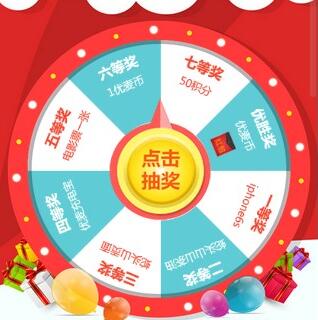
效果圖:
點擊抽獎的請求邏輯
$('.lunck_draw_wrap').delegate("img.pointer", "click", function () {
    if (turnplate.bRotate) return;   // 正在轉動則忽略點擊
    turnplate.bRotate = !turnplate.bRotate;

    $.getJSON("../AJAX/lottery.ashx", "", function (data) {
        hideInput("code", data.code);
        if (data.code.toString() == "1090") {
            iosalert("系統配置錯誤");
        } else if (data.code.toString() == "1091") {
            iosalert("用戶未登陸或用戶數據異常");
        } else if (data.code.toString() == "1092") {
            iosalert("用戶剩余積分不足");
        } else if (data.code.toString() == "1094") {
            iosalert("超過每日抽獎次數");
        } else {
            var upoint = 0;
            upoint = parseInt($("#uPoint").html()) - parseInt($("#sPoint").html());
            $("#uPoint").html(upoint);

            if (data.isWin == 'true') {
                item = getArrayIndex(turnplate.restaraunts, data.name);
                rotateFn(item + 1, "恭喜獲得," + turnplate.restaraunts[item]);
            } else {
                rotateFn(0, "恭喜獲得優勝獎!");
            }
        }
    });
});
這裡的設計值得學習:bRotate 這個旗標充當了鎖,避免使用者在轉動期間連續點擊而重複發出請求。所有錯誤碼都在前端攔下並提示,只有真正中獎或落空才進入轉動流程。
依結果計算旋轉角度
// item:獎品位置;txt:提示語
var rotateFn = function (item, txt) {
    // 依傳入的獎品序號計算對應弧度
    var angles = item * (360 / turnplate.restaraunts.length) - (360 / (turnplate.restaraunts.length * 2));
    if (angles < 270) {
        angles = 270 - angles;
    } else {
        angles = 360 - angles + 270;
    }

    $('#wheelcanvas').stopRotate(); // 強制停止目前的轉動

    $('#wheelcanvas').rotate({
        angle: 0,
        animateTo: angles + 1800, // 加 1800 度是為了多轉幾圈
        duration: 8000,
        callback: function () {
            iosSuccess(txt);
            turnplate.bRotate = !turnplate.bRotate;
            if ($("#code").val() != "1093") {
                delayLoad(getHttpPrefix + "graphicdetails.html?lukyid=" + $("#code").val());
            }
        }
    });
};
角度計算的關鍵在於「指針固定在圓頂(也就是 270 度方向)」。因此要讓第 item 個扇形停在指針下,就得把該扇形的中心角度對齊到 270 度,程式碼中的 - (360 / length / 2) 就是在減去半個扇形的寬度以取得中心位置。再加上 1800 度(五圈)是為了讓轉動有足夠的戲劇張力,單純的 90 度旋轉看起來會像在倒退。
總結
canvas 是 HTML5 中相當強大的一張王牌,能實現許多絢麗的效果。這個轉盤範例最關鍵的設計觀念是:前端不決定結果,只負責把結果演出來。中獎與否由伺服器端裁定並回傳,前端收到後反推角度、播放動畫。這樣的架構不僅安全(無法透過竄改前端程式碼作弊),也讓獎項機率可以隨時在後台調整而不必改動前端。
需要留意的是,範例中的 delegate 已在 jQuery 3 之後標記為 deprecated,新專案建議改用 on 搭配事件委派寫法:$('.lunck_draw_wrap').on('click', 'img.pointer', handler)。
- 上一篇文章: JavaScript 瀏覽器相容性實戰對策:能力偵測與常見 API 的降級封裝
- 下一篇文章: 深入淺析 JavaScript 的 constructor:為什麼改了 prototype 它就變了