JavaScript 結合 HTML5 Canvas 實現圓盤抽獎功能
編輯:關於JavaScript
我們經常參加各類電商促銷活動,比如購物達到一定金額就能抽獎,還有微信抽獎、淘寶抽獎、迅雷賺錢寶圓盤抽獎等等。這些抽獎活動中,有相当一部分就是用 HTML5 的 Canvas 製作的。今天就來分享一下如何用 Canvas 做一個圓盤抽獎。老規矩,先看效果圖:
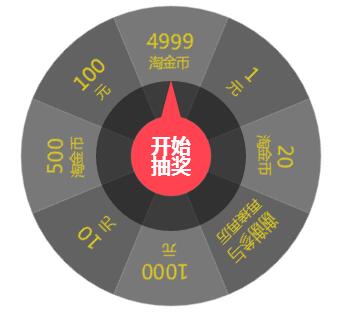
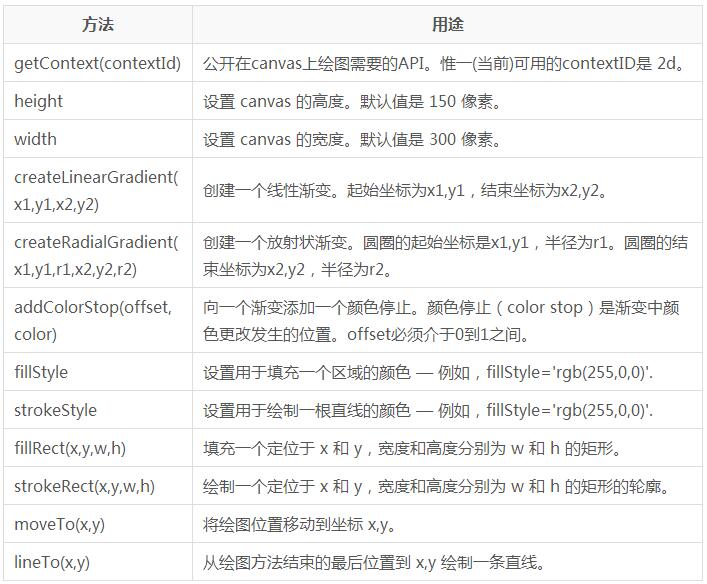
再來看看 Canvas 的幾個主要 API:
完整源代碼如下:
<!DOCTYPE html>
<html lang="zh-cn">
<head>
<meta charset="UTF-8">
<title>HTML5 Canvas 圓盤抽獎 DEMO</title>
<style>
*{padding:0;margin:0;font-size:16px;font-family:"Microsoft YaHei";}
.xttblog_box{width:300px;height:300px;margin:100px auto;position:relative;}
.xttblog_box canvas{position:absolute;}
#xttblog{background-color:white;border-radius:100%;transition:transform 6s;transform-origin:50% 50%;}
#xttblog01,#xttblog03{left:50px;top:50px;z-index:30;}
#xttblog02{left:75px;top:75px;z-index:20;}
.taoge_btn{width:60px;height:60px;left:120px;top:120px;border-radius:100%;position:absolute;cursor:pointer;border:none;background:transparent;outline:none;z-index:40;}
</style>
<script src="https://cdn.bootcss.com/jquery/1.11.3/jquery.min.js"></script>
<script>
$(document).ready(function(){
  var angles, clickNum = 5, rotNum = 0, notice = null;
  var color = ["#626262","#787878","rgba(0,0,0,0.5)","#DCC722","white","#FF4350"];
  var info = ["謝謝參與"," 1000"," 10"," 500"," 100"," 4999"," 1"," 20"];
  var info1 = ['再接再厲',' 元',' 元',' 淘金幣',' 元',' 淘金幣',' 元',' 淘金幣'];
  canvasRun();
  $('#tupBtn').bind('click', function(){
    if (clickNum >= 1) {
      clickNum--;
      runCup();
      $('#tupBtn').attr("disabled", true);
      rotNum++;
      setTimeout(function(){ alert(notice); $('#tupBtn').removeAttr("disabled", true); }, 6000);
    } else { alert("親,抽獎次數已用光!"); }
  });
  //轉盤旋轉
  function runCup(){
    probability();
    var degValue = 'rotate(' + angles + 'deg)';
    $('#xttblog').css('transform', degValue);
  }
  //各獎項對應的旋轉角度與公告
  function probability(){
    var num = parseInt(Math.random() * 8);
    var base = [1800,1845,1890,1935,1980,2025,2070,2115];
    var idx = [0,7,6,5,4,3,2,1];
    angles = 2160 * rotNum + base[num];
    notice = info[idx[num]] + info1[idx[num]];
  }
  //繪製轉盤
  function canvasRun(){
    var ctx = document.getElementById('xttblog').getContext('2d');
    var ctx1 = document.getElementById('xttblog01').getContext('2d');
    var ctx2 = document.getElementById('xttblog02').getContext('2d');
    var ctx3 = document.getElementById('xttblog03').getContext('2d');
    createCircle(); createCirText(); initPoint();
    //外圓:8 等份扇形
    function createCircle(){
      var startAngle, endAngle;
      for (var i = 0; i < 8; i++){
        startAngle = Math.PI * (i/4 - 1/8);
        endAngle = startAngle + Math.PI * (1/4);
        ctx.save(); ctx.beginPath();
        ctx.arc(150,150,100, startAngle, endAngle, false);
        ctx.lineWidth = 120;
        ctx.strokeStyle = (i%2==0) ? color[0] : color[1];
        ctx.stroke(); ctx.restore();
      }
    }
    //各獎項文字
    function createCirText(){
      ctx.textAlign='start'; ctx.textBaseline='middle';
      var step = 2*Math.PI/8;
      for (var i = 0; i < 8; i++){
        ctx.save(); ctx.beginPath();
        ctx.translate(150,150); ctx.rotate(i*step);
        ctx.font = "20px Microsoft YaHei"; ctx.fillStyle = color[3];
        ctx.fillText(info[i], -30, -115, 60);
        ctx.font = "14px Microsoft YaHei";
        ctx.fillText(info1[i], -30, -95, 60);
        ctx.closePath(); ctx.restore();
      }
    }
    //指針與中心按鈕
    function initPoint(){
      ctx1.beginPath(); ctx1.moveTo(100,24); ctx1.lineTo(90,62); ctx1.lineTo(110,62); ctx1.fillStyle = color[5]; ctx1.fill();
      ctx3.beginPath(); ctx3.arc(100,100,40,0,Math.PI*2,false); ctx3.fillStyle = color[5]; ctx3.fill();
      ctx3.font = "Bold 20px Microsoft YaHei"; ctx3.fillStyle = color[4];
      ctx3.fillText('開始',80,90,40); ctx3.fillText('抽獎',80,110,40);
      ctx2.beginPath(); ctx2.arc(75,75,75,0,Math.PI*2,false); ctx2.fillStyle = color[2]; ctx2.fill();
    }
  }
});
</script>
</head>
<body>
<div class="xttblog_box">
  <canvas id="xttblog" width="300" height="300">抱歉!瀏覽器不支援。</canvas>
  <canvas id="xttblog01" width="200" height="200"></canvas>
  <canvas id="xttblog03" width="200" height="200"></canvas>
  <canvas id="xttblog02" width="150" height="150"></canvas>
  <button id="tupBtn" class="taoge_btn"></button>
</div>
</body>
</html>
這個抽獎的核心思路是:用多層 canvas 分別繪製轉盤扇形、獎項文字、指針和中心按鈕,點擊後透過 CSS transform 的 rotate 配合 transition 實現旋轉動畫,並依隨機數計算最終停留的角度與中獎結果。以上就是完整實現,希望對大家的學習有所幫助。
- 上一篇文章: zTree 插件下拉樹使用入門教程
- 下一篇文章: 詳解 JavaScript 的幾種「另類」寫法